Type: Shareware
Cost: $14.95
Size: 1.00 MB
Release date: Sep 19 2016
Platform: Win2000,WinXP,Win7 x32,Win7 x64,Windows 8,Windows 10,WinServer,WinOther,WinVista,WinVista x64
Publisher’s Site: http://www.molliesoft.com
Publisher’s Product Page: http://www.molliesoft.com/winsleep
Country: United States of America
Cost: $14.95
Size: 1.00 MB
Release date: Sep 19 2016
Platform: Win2000,WinXP,Win7 x32,Win7 x64,Windows 8,Windows 10,WinServer,WinOther,WinVista,WinVista x64
Publisher’s Site: http://www.molliesoft.com
Publisher’s Product Page: http://www.molliesoft.com/winsleep
Country: United States of America
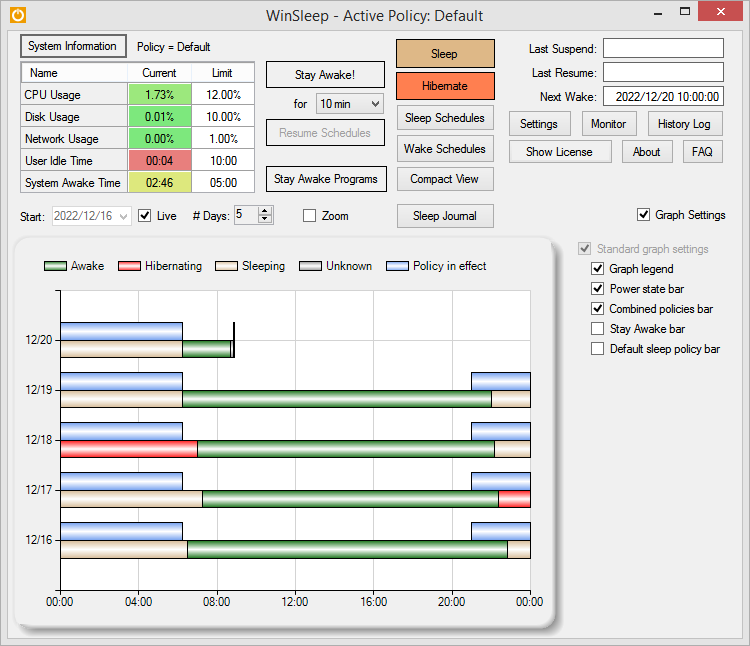

WINSLEEP by MollieSoft keeps your computer asleep (while not too busy) as much as possible during periods you specify.
** Runs on Windows 7, Windows 8.1 or Windows 10.
** Provides a detailed time-line graph showing when your computer was awake, asleep, or hibernating.
** Provides convenient Sleep and Hibernate buttons for manual use when desired.
** Shows the current CPU/Disk/Network usage percentages for your computer.
** Define multiple sleep schedules (daily, weekly, or monthly time slot), each with a designated sleep policy with its own CPU/Disk/Network usage limits.
** Set wake schedules and an optional task (program) to be run at each wake.
** Helps prolong the life of your desktop computer. Your disk drive is not spinning, motherboard is not powered, fan is not running (and accumulating dust inside the computer casing), and your monitors are in standby mode.
** Saves money! A typical desktop uses 250 watts of electricity when awake, but only a few watts while asleep. Power companies (in the US) may bill at say 10 cents per kWH. This is .25 kWH @ 10 cents = 2.5 cents/hr you are saving while asleep. Say WinSleep sleeps your computer for half the day; this is $.30/day = $109.50 per year. The more you sleep, the more you save. (We didn’t even count the power consumption of the computer monitor here.)
** Runs on Windows 7, Windows 8.1 or Windows 10.
** Provides a detailed time-line graph showing when your computer was awake, asleep, or hibernating.
** Provides convenient Sleep and Hibernate buttons for manual use when desired.
** Shows the current CPU/Disk/Network usage percentages for your computer.
** Define multiple sleep schedules (daily, weekly, or monthly time slot), each with a designated sleep policy with its own CPU/Disk/Network usage limits.
** Set wake schedules and an optional task (program) to be run at each wake.
** Helps prolong the life of your desktop computer. Your disk drive is not spinning, motherboard is not powered, fan is not running (and accumulating dust inside the computer casing), and your monitors are in standby mode.
** Saves money! A typical desktop uses 250 watts of electricity when awake, but only a few watts while asleep. Power companies (in the US) may bill at say 10 cents per kWH. This is .25 kWH @ 10 cents = 2.5 cents/hr you are saving while asleep. Say WinSleep sleeps your computer for half the day; this is $.30/day = $109.50 per year. The more you sleep, the more you save. (We didn’t even count the power consumption of the computer monitor here.)
 <
<