
Category Archives: System Utilities

Automation Tools, Backup & Restore, Benchmarking, Clipboard Tools, File & Disk Management, File Compression, Launchers & Task Managers, Other, Printer, Registry Tools, Shell Tools, System Maintenance, Text/Document Editors

WinSleep by MollieSoft 1.1.19.0

Type: Shareware
Cost: $9.95
Size: 992.00 kB
Release date: Jul 15 2016
Platform: Win2000,WinXP,Win7 x32,Win7 x64,Windows 8,Windows 10,WinServer,WinOther,WinVista,WinVista x64
Publisher’s Site:  http://www.molliesoft.com
Publisher’s Product Page:  http://www.molliesoft.com/winsleep
Country: United States of America

WinSleep by MollieSoft

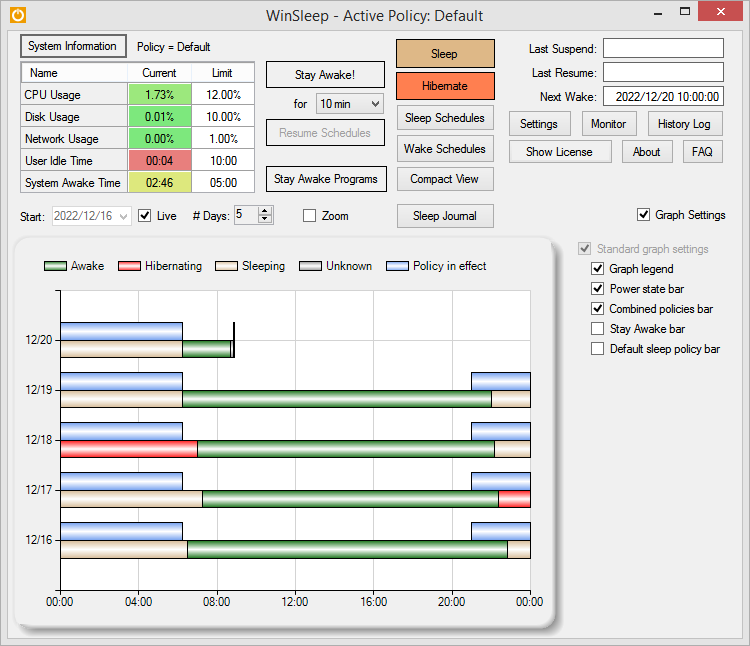
WinSleep keeps your computer asleep (while not too busy) as much as possible during periods you specify. Provides a detailed time-line graph showing when your computer was awake, asleep, or hibernating. Provides convenient Sleep and Hibernate buttons for manual use when desired. Shows the current CPU/Disk/Network usage percentages for your computer. Runs on Windows 8.1 or Windows 10. Saves money! A typical desktop uses 250 watts of electricity when awake, but only a few watts while asleep. Power companies (in the US) may bill at say 10 cents per kWH. This is .25 kWH @ 10 cents = 2.5 cents/hr you are saving while asleep. Say WinSleep sleeps your computer for half the day; this is $.30/day = $109.50 per year. The more you sleep, the more you save. (We didn’t even count the power consumption of the computer monitor here.) Helps prolong the life of your desktop computer. Your disk drive is not spinning, motherboard is not powered, fan is not running (and accumulating dust inside the computer casing), and your monitors are in standby mode.

Graphcat<

Advance Data Copy Tool 1.5.7

Type: Shareware
Cost: $34.95
Size: 1.58 MB
Release date: Jul 04 2014
Platform: Win2000,WinXP,Win7 x32,Win7 x64,Windows 8,Windows 10,WinServer,WinOther,WinVista,WinVista x64
Publisher’s Site:  http://www.technocomsolutions.com/
Publisher’s Product Page:  http://www.technocomsolutions.com/data-copy-tool.html
Country: United States of America


Advance Data Copy Tool

Advance Data Copy Tool, Copy and Move Data & Photographs from one PC to Another computer with Same or Current Date & Time. Advance Data Copy Tool capable of working in network environment also. User can choose date & time of the moving or copying data (folders and files). Advance Data Copy Tool is very useful tool for user who wish to shift there data (folders and Files) from one computer to another computer with same date & time Or set custom date & time of the moved data. Advance Data Copy Tool have Advance features of copy or move data from one HardDrive to Another HardDrive with Same or Custom date & time.


Key Features :

Keeps same Date-Time of folders, Photos and files when moving or copying data from one harddrive to another harddrive.
User can set Custom date & time of Copied or Moved Data;
Advance Data Copy Tool is a fast software to copy or move data.
Have Advance features of copying or Moving Data.
Can process multiple files, folders in one Click.
Advance Data Copy Tool can process Directory & Sub-Directories.
Preview result mode, detailed error reporting with error-cause.

Great TOOL to copy & clone data from one computer hard disk to another PC

Nero TuneItUp Free 2.6.4.177

Type: Freeware
Cost: $0
Size: 13.07 MB
Release date: Aug 03 2016
Platform: Win2000,WinXP,Win7 x32,Win7 x64,Windows 8,Windows 10,WinServer,WinOther,WinVista,WinVista x64
Publisher’s Site:  http://www.nero.com
Publisher’s Product Page:  http://www.nero.com/redir.php?id=12977
Country: Germany


Nero TuneItUp Free

Nero TuneItUp is an optimization, tuning and maintenance tool for Windows PCs which helps you analyze and fix common problems, and optimize system settings.

During startup Nero TuneItUp automatically analyzes all weak spots and problems in your system and lists them. The intuitive interface lets you fix problems while maintaining a clear overview.

The special High Speed Mode lets programs and games run much faster.

The free version lets you do the following:

(1) Delete Unnecessary Files
Temporary files created by programs are often not properly deleted. Completely deleting these files frees up disk space.
The affected folders are displayed in the Details section and can be cleaned separately.
(2) Delete Digital Footprints
Browsers save various types of files in the ‘Browser Cache’ to make surfing faster and easier. The problem is that these files are a threat to your PC security because they often contain personal data such as usernames and passwords. Deleting these digital footprints helps to protect your privacy while surfing the Internet.
This can also lead to increased browser performance and faster surfing when a large number of files is deleted during the cleaning process.
In the ‘Details’ section you can select the files that should be deleted.
(3) Clean Registry
The Windows registration database, a.k.a. the ‘Registry’, is the central configuration file for Windows. The cleaning function removes invalid entries and increases PC stability and performance.
(4) Uninstall Wizard
Unused programs take up space on your hard drive and can slow down your PC. This function removes these unused programs from your PC to help increase performance.
(5) Multimedia Data Manager
The largest multimedia files and folders are easily located and can be deleted to free storage space.