Category Archives: System Utilities

Automation Tools, Backup & Restore, Benchmarking, Clipboard Tools, File & Disk Management, File Compression, Launchers & Task Managers, Other, Printer, Registry Tools, Shell Tools, System Maintenance, Text/Document Editors

PropertyEditor 5.0

Type: Shareware
Cost: $19.95
Size: 3.41 MB
Release date: Jun 27 2016
Platform: Win2000,WinXP,Win7 x32,Win7 x64,Windows 8,Windows 10,WinServer,WinOther,WinVista,WinVista x64
Publisher’s Site:  http://usefulsoft.com
Publisher’s Product Page:  http://usefulsoft.com/propertyeditor
Country: United States of America

PropertyEditor

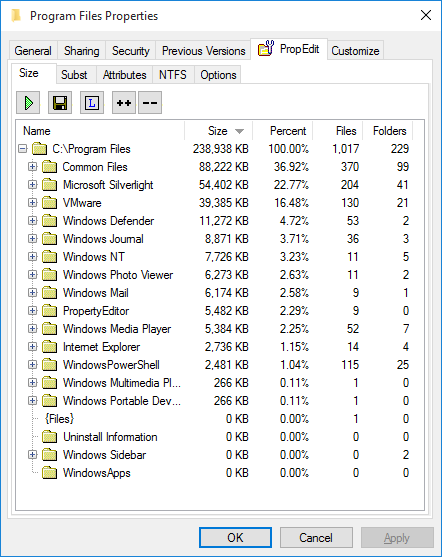
PropertyEditor is a context menu extension for Windows Explorer. Upon installation, it adds a host of new property editing capabilities. It lets you configure the context menu for the selected files, folders, or drives, change icons for the selected files and folders, create a report about the content of any selected drive or folder (the size of all subfolders and files is included). Also, you can now configure many NTFS parameters, including Streams, Junctions, Hard Links, and Mount Points. Plus, there’s an ability to learn who has access to encrypted files.


The benefits of PropertyEditor are numerous. With PropertyEditor in place, you can make your context menu more usable and less confusing by hiding or removing unwanted items. Its detailed reports about the usage of hard disk space can help you better organize your disk space for convenient computing. PropertyEditor gives you a refreshingly quick way to customize Windows icons, which, compared to standard Windows, is much faster and more convenient. You can also take advantage of the NTFS file system parameters. Unlike Windows, PropertyEditor gives you the tools for configuring such parameters.

PropertyEditor seamlessly integrates into the Windows shell and works totally transparently throughout the Operating System. It has a low memory footprint and does not cut down on system productivity, or slow down other applications. Added property editing options can be accessed via the context menu of a file, folder or a drive. All editing efforts are performed with just a few simple clicks. The program has a multilingual support.

Graphcat<

Smart Zipper Pro 3.60

Type: Shareware
Cost: $17.99
Size: 19.03 MB
Release date: Jun 21 2016
Platform: Mac OS X
Publisher’s Site:  http://www.effectmatrix.com/
Publisher’s Product Page:  http://www.totalrar.com/smart-zipper-pro.html
Country: Hong Kong


Smart Zipper Pro

Smart Zipper Pro for Mac is a professional archiving app, which can easily create, extract and preview major archive files like ZIP, RAR, 7z and more ( Over 20 popular formats ).
You can use Smart Zipper Pro Mac to compress your files, extract archivers with a password and preview files inside an archive without extracting. This wonderful archiving software also provides you with some functions to browse the detailed infomation of your files.

Main Features:
1 EXTRACT over 20 different archive formats ranging from RAR, 7z, ISO, CAB, Zip, StuffIt, Lzma, Tar, Gzip, Bzip2, EXE, PAX, MSI, Arj, Z and much more

2 CREATE archives easily. 7z, Zip, Gzip, Tar, Bzip2 could be compressed with 6 different compression levels: Fastest compression, fast compression, normal compression, high compression, maximum compression and no compression

3 REVISE existing archives. Add new or updated files to existing archives, Remove any file or folder from an archive. No need to archive and re-archive files any more

4 PROTECT your data: Smart Zipper Pro protects your data with a password

5 BROWSE images and PREVIEW files inside an archive without extracting

6 SPLIT large archives to several small ones.

7 FILTER out unnecessary files

8 DRAG and drop files directly to the Finder to decompress from the list view

9 Easy to Quick Look

10 Browse Compressed Archives in the Archiver

11 Extract Different Files with Different Password in the Same Archiver

12 Provide shortcuts in ‘Finder’s context menu’

13 Browse EXIF details of images

14 Get more detailed information of audios and videos

EXE Joiner 1.21.4.0

Type: Shareware
Cost: $34.99
Size: 580.00 kB
Release date: Jun 08 2016
Platform: Win2000,WinXP,Win7 x32,Win7 x64,Windows 8,Windows 10,WinServer,WinOther,WinVista,WinVista x64
Publisher’s Site:  http://www.exejoiner.com
Publisher’s Product Page:  http://www.exejoiner.com
Country: United States of America


EXE Joiner

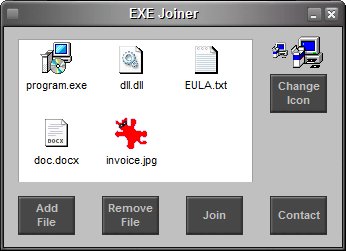
EXE Joiner is a small program that allows you to easily join (bind) two or more files (no matter their type) into one single executable. That executable (the one into which the files are included) is a simple compiled program that, when opened, will automatically launch the included files one by one.

See more at www.exejoiner.com

EXE Joiner is portable – no installation needed, no need for .NET or any other runtime library. Just unzip on your hard drive and run the program (and to uninstall simply delete it from your hard drive).

EXE Joiner is able to run any type of file from the joined file without affecting the file functionality. For instance, let’s assume you join an executable and a mp3 file. When the joined file is run, the included executable will run like before being joined while the mp3 file will be opened with the associated mp3 player (Winamp, MediaPlayer etc.).