
Category Archives: System Utilities

Automation Tools, Backup & Restore, Benchmarking, Clipboard Tools, File & Disk Management, File Compression, Launchers & Task Managers, Other, Printer, Registry Tools, Shell Tools, System Maintenance, Text/Document Editors

HoudahSpot 4.2.3

Type: Demo
Cost: $29
Size: 5.20 MB
Release date: Aug 05 2016
Platform: Mac OS X
Publisher’s Site:  https://www.houdah.com
Publisher’s Product Page:  https://www.houdah.com/houdahSpot/
Country: Luxembourg
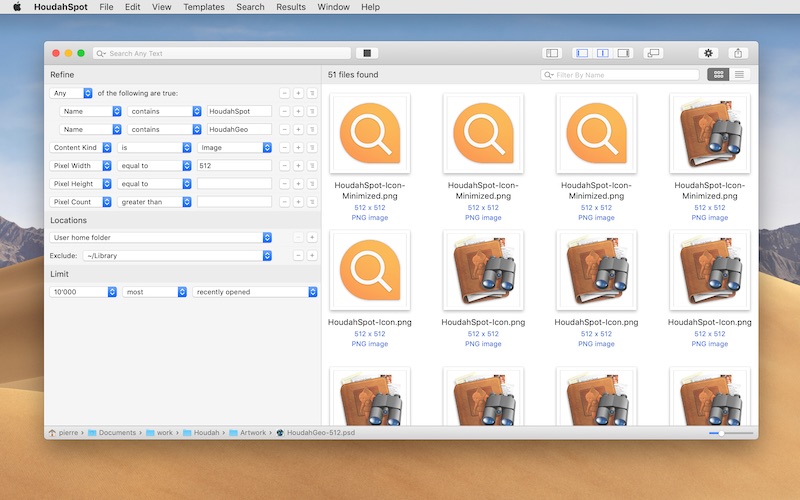

HoudahSpot

HoudahSpot is an advanced file search tool. It builds upon Spotlight, which comes preinstalled with OS X. It makes Spotlight both more powerful and easier to use.


HoudahSpot provides a clear and structured interface that focuses on file search. It gets you to your files as quickly as possible.

* Find files by name, text, content kind, author, recipient, pixel count, etc.

* Combine criteria to narrow down search results

* Specify which folders to search and which ones to exclude

* Add any of the hundreds of columns available

* Apply filters to reduce search results to only the relevant items

* Preview files and text matches

* Open files and, where the application supports it, continue searching for text matches by pressing command-G (Find Next)

HoudahSpot is indispensable to unearth hard-to-find files. It also works great as a replacement to the default Spotlight interface.

If you’ve ever had a hard time finding a file before, this is what you’ve been looking for.

Graphcat<

Nero TuneItUp Free 2.4.4.82

Type: Freeware
Cost: $0
Size: 12.65 MB
Release date: Apr 14 2016
Platform: Win2000,WinXP,Win7 x32,Win7 x64,Windows 8,Windows 10,WinServer,WinOther,WinVista,WinVista x64
Publisher’s Site:  http://www.nero.com
Publisher’s Product Page:  http://www.nero.com/redir.php?id=12977
Country: Germany


Nero TuneItUp Free

Nero TuneItUp is an optimization, tuning and maintenance tool for Windows PCs which helps you analyze and fix common problems, and optimize system settings.

During startup Nero TuneItUp automatically analyzes all weak spots and problems in your system and lists them. The intuitive interface lets you fix problems while maintaining a clear overview.

The special High Speed Mode lets programs and games run much faster.

The free version lets you do the following:

(1) Delete Unnecessary Files
Temporary files created by programs are often not properly deleted. Completely deleting these files frees up disk space.
The affected folders are displayed in the Details section and can be cleaned separately.
(2) Delete Digital Footprints
Browsers save various types of files in the ‘Browser Cache’ to make surfing faster and easier. The problem is that these files are a threat to your PC security because they often contain personal data such as usernames and passwords. Deleting these digital footprints helps to protect your privacy while surfing the Internet.
This can also lead to increased browser performance and faster surfing when a large number of files is deleted during the cleaning process.
In the ‘Details’ section you can select the files that should be deleted.
(3) Clean Registry
The Windows registration database, a.k.a. the ‘Registry’, is the central configuration file for Windows. The cleaning function removes invalid entries and increases PC stability and performance.
(4) Uninstall Wizard
Unused programs take up space on your hard drive and can slow down your PC. This function removes these unused programs from your PC to help increase performance.
(5) Multimedia Data Manager
The largest multimedia files and folders are easily located and can be deleted to free storage space.

Total Manager for Mac 3.7.0

Type: Shareware
Cost: $24.99
Size: 35.67 MB
Release date: Jun 21 2016
Platform: Mac OS X
Publisher’s Site:  http://www.effectmatrix.com/
Publisher’s Product Page:  http://www.totalrar.com/total-manager.html
Country: Hong Kong


Total Manager for Mac

Total Manager is Total Commander for Mac version – an all-in-one app to manage loads of files in an efficient way. Total Manager is a wonderful replacement for Finder. You can use Total Manager to view files info,play video/audio, extract archivers and rename files!

Main Features :
* Multi-tab Interface: Open multiple tabs and browse local directories separately at the same time.

* More convenient to use ‘Connect to Server’ and ‘ Go to Folder’ operation which is more simple than Finder.

* Compression and Decompression
1.EXTRACT over 30 different archive formats ranging from RAR, 7z, ISO, CAB, Zip, StuffIt, Lzma, Tar, Gzip , Bzip2, EXE, PAX, MSI, Arj, Z and much more.
2. 7z, Zip, Gzip, Tar, Bzip2 could be compressed with 6 different compression levels.
3. Add new files or remove any file from existing archive.
4. Protect your data with unbreakable AES-256 encryption. Extract Different Files with Different Password in the Same Archiver.
5. Support multi-tasks. Split large archives to several small ones. You are free to work on other files while you extract, copy or move very LARGE files.
6. Browse Compressed Archives in the Archiver. Support browsing images by slideshow.

* Get File Details,such as images thumbnails, file size, file type, creation time, etc.

* Powerful Batch Renamer.

* Easily connect to a remote using FTP, SFTP.

* View the Hash Value of files: MD4 Hash, MD5 Hash, MDC2 Hash, SHA Hash, SHA1 Hash, SHA256 Hash, SHA512 Hash, SHA224 Hash, SHA384 Hash, RMD 160 Hash

* Support Numerous File Formats:
JPG,JPEG,JPE,JFIF,JPS,PNG,GIF,JP2,JPF,TIF,DNG,CR2,MOS,FFF,3FR,NEF,NRW,PEF,SRW,SRF,SR2,ARW,ERF,DCR,TIFF,FAX,G3,JFX,JFAX,EFX,ICNS,CRW,RAF,RAW,RW2,RWL,MRW,ORF,PSD,ICO,BMP,XBM,CUR,TGA,SGI,RGB,PNTG,PNT,MAC,EXR,HDR,MPO,QTIF,QTI,FPX,FPIX,EPS,EPI,EPSF,EPSI,PS,PICT,PCT,PIC,TARGA

* Professionally play videos and audios:
rmvb, rm, m4v, m4a, wma, wav, wmv, mp2, mp3, mmf, mp4, mov, mpg, mpeg, m1v, mod, 3gp, 3gp2, 3g2, 3gpp, avi, asf…