Category Archives: System Utilities

Automation Tools, Backup & Restore, Benchmarking, Clipboard Tools, File & Disk Management, File Compression, Launchers & Task Managers, Other, Printer, Registry Tools, Shell Tools, System Maintenance, Text/Document Editors

ShareWatcher 5

Type: Shareware
Cost: $19.99
Size: 7.11 MB
Release date: Feb 22 2016
Platform: Win2000,WinXP,Win7 x32,Win7 x64,Windows 8,Windows 10,WinServer,WinOther,WinVista,WinVista x64
Publisher’s Site:  http://www.thecodeline.com
Publisher’s Product Page:  http://www.thecodeline.com/wp/products/sharewatcher
Country: Australia


ShareWatcher

ShareWatcher will monitor your local and remote computer Windows File Shares showing who and when they were accessed, notify you of new files added or deleted by whom via email, sounds, custom commands or Windows events and optionally move your new files by adding a QuickMove Action to any monitored folder. ShareWatcher also supports FTP folder monitoring for new files.
The New File Notification Plugin has two options: Polled or Live depending on which model suits your needs best.
QuickMove can also pair with ShareWatcher Pro to watch for new files and run a QuickMove rule-based action.

Graphcat<

PS Tray Factory 3.3

Type: Shareware
Cost: $24.95
Size: 1.33 MB
Release date: Feb 15 2016
Platform: Win2000,WinXP,Win7 x32,Win7 x64,Windows 8,Windows 10,WinServer,WinOther,WinVista,WinVista x64
Publisher’s Site:  http://www.pssoftlab.com
Publisher’s Product Page:  http://www.pssoftlab.com/pstf_info.phtml
Country: Ukraine


PS Tray Factory

PS Tray Factory is a powerful and handy tool meant to flexibly control ALL the other icons in the system tray of the taskbar. PS Tray Factory will help you to manage all the applications that place their icons in the taskbar tray. When you have installed PS Tray Factory, you will forget about the problem of lack of space in the system tray, and will also get an easy, fast and handy tool to handle those applications. In short, ALL Windows users will get this handy and powerful tool at their disposal, whereas only Windows XP users have an idea of it. For the latter, we have made a nice surprise, as the features of PS Tray Factory exceed the standard built-in ones of this OS. PS Tray Factory is a system tray icons manager that will allows you to: hide low-activity icons from a system tray into menu, get fast access to hidden icons, change the order of icons in the menu, change the order of icons in the system tray (sort system tray icons), hide from the menu seldom used icons, protect tray menu with password, minimize any application to tray, restore icons in system tray area at crash or restarting Explorer.exe, change original tray icons with your own icons.

Tao ExDOS 10.0.420

Type: Demo
Cost: $185
Size: 0.00 kB
Release date: Sep 01 2014
Platform: Win2000,WinXP,Win7 x32,Win7 x64,Windows 8,WinServer,Windows Server 2003,Windows Server 2008,Windows Server 2008r2,Windows Server 2012,WinVista,Windows Vista Starter,Windows Vista Home Basic,Windows Vista Home Premium,Windows Vista Business,Windows Vista Enterprise,Windows Vista Ultimate,MS-DOS
Publisher’s Site:  http://www.taosdc.com/
Publisher’s Product Page:  http://taosdc.com/exdos/product/
Country: Israel


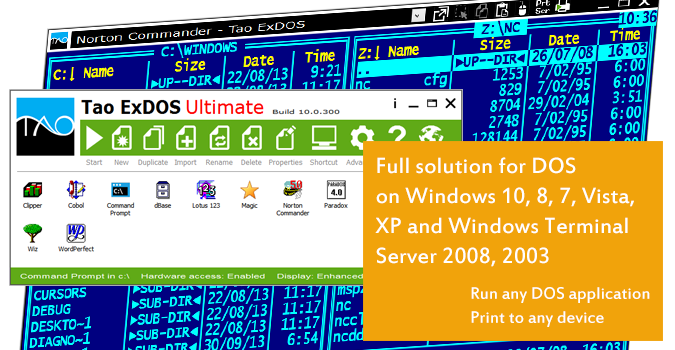
Tao ExDOS

Full support for DOS on Windows 8, 7, Vista, XP, 2000 and Windows Terminal Server 2008, 2003. Printing from DOS and parallel port (LPT) to any printer, including fax, PDF, image files and Word document files.
The Tao ExDOS line of products is a comprehensive and commercially proven solution for DOS and Win16bit based applications under Windows 8, 7, Vista, XP, 2000 and Windows Terminal Servers 2008 and 2003. The technology used in Tao ExDOS products is proprietary and is not available in any other products on the market.
The software engines used for Tao ExDOS have been developed and debugged for over 8 years and comprehensively tested for full support and flawless operation in any environment.
The Tao ExDOS line of products covers any number of issues encountered daily by DOS users under modern operating systems.


-Support for Windows 7 64-bit using the Microsoft Virtual PC Windows XP Mode!
-Running DOS applications in a simulated native environment.
-Allowing DOS applications to run in Full Screen mode, also under Windows 8, 7 and Vista with the Aero user interface enabled.
-Printing to any printer, including WinPrinters, Fax, PDF, image (GIF, TIFF, JPEG, BMP) and document (Word, RTF, HTML, Text) files.
-Enhancing printing from DOS applications with advanced features such as adding company logo images, header and footer text, as well as allowing changes to the margins and rotation of the printed documents.
-Running DOS applications under multi-user environments, such as Windows Terminal Server.
-Running DOS applications directly on Windows 7 32-bit versions. On Windows 7 64-bit versions it is possible to run DOS applications directly from the desktop by using the required Virtual XP Mode.
-Dongle support enabling the use of Parallel (LPT) and USB protection dongles, using the on-board parallel port as well as 3rd party PCI / PCMCIA / Express adaptors.
-Enhancing the performance of DOS application, a critical issue under multi-user environments.
-More