Category Archives: System Utilities

Automation Tools, Backup & Restore, Benchmarking, Clipboard Tools, File & Disk Management, File Compression, Launchers & Task Managers, Other, Printer, Registry Tools, Shell Tools, System Maintenance, Text/Document Editors

RPM Remote Print Manager Select 32 Bit 6.1.0.425

Type: Shareware
Cost: $324
Size: 36.71 MB
Release date: Mar 18 2016
Platform: Win2000,WinXP,Win7 x32,Win7 x64,Windows 8,Windows 10,WinServer,WinOther,WinVista,WinVista x64
Publisher’s Site:  http://www.brooksnet.com/
Publisher’s Product Page:  http://www.brooksnet.com/lpd/compare-rpm-6-elite-and-select.html
Country: United States of America
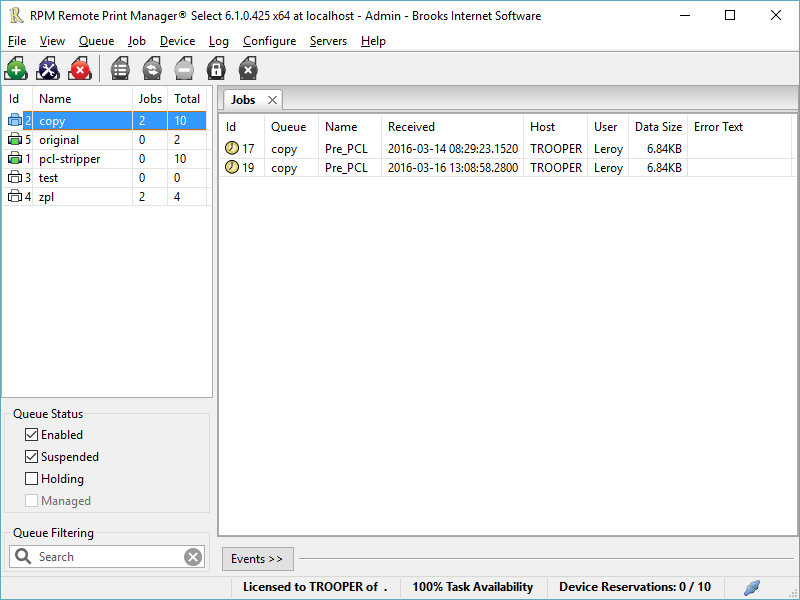

RPM Remote Print Manager Select 32 Bit

Printing should be one click away. but there are so many problems which make printing difficult if not impossible. RPM Remote Print Manager (RPM) has grown through the years from all the print problems our customers have brought to us. We are here to help you solve your printing problems.


RPM is our virtual printer product. Our customers have been using RPM for 20 years!
RPM as virtual printer

RPM does what you expect a virtual PDF printer to do, and more:

convert incoming print jobs to other formats, such as PDF, TIFF and PCL
save multiple documents into a single document
print the same job to multiple printers
in one pass, send to a printer and save to disk
print the same job multiple times, using separate paper trays

RPM as print server

RPM is implemented as a Windows print server. Its core capabilities include:

managing your print workflow
send print jobs to any Windows printer
send print jobs to any printer on your network using core Windows print protocols, or LPR, or direct with port 9100
archive print jobs to local folders, shared folders, or anywhere via FTP
run any local application on your print job
send your print job via email as an attachment or in the message body

RPM also provides extensive data editing, manipulation and translation.

Windows version support

RPM 6.0 supports these versions of Windows: Windows 2003, XP, Windows 7 and 2008, Windows 8, Windows Server 2012 and Server 2012 R2. We have used RPM on Windows 10 but have not stress tested it yet.

Graphcat<

HoudahSpot 4.1.3

Type: Demo
Cost: $29
Size: 5.01 MB
Release date: Jan 14 2016
Platform: Mac OS X
Publisher’s Site:  https://www.houdah.com
Publisher’s Product Page:  https://www.houdah.com/houdahSpot/
Country: Luxembourg


HoudahSpot

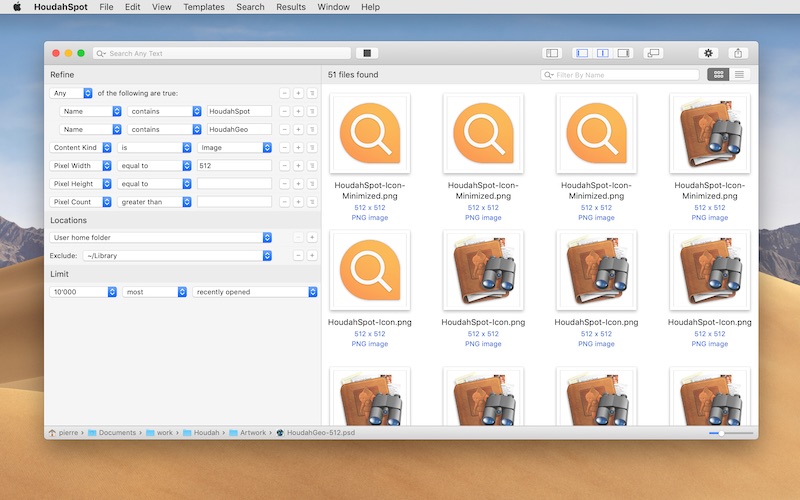
HoudahSpot is an advanced file search tool. It builds upon Spotlight, which comes preinstalled with OS X. It makes Spotlight both more powerful and easier to use. HoudahSpot is indispensable to unearth hard-to-find files. It also works great as a replacement to the default Spotlight interface.

In OS X Yosemite, the Spotlight menu is a great go-to place for all sorts of searches. It serves as an application launcher. It can find restaurants, show movie times, perform currency conversions, etc. File search however has taken a back seat. Spotlight lists a few seemingly random top matches. To find files, one frequently has to jump from the Spotlight window to the Finder. Here, search results expand to show an overwhelming number of items. The file one is looking for may still hide like a needle in the proverbial haystack.

HoudahSpot provides a clear and structured interface that focuses on file search. It gets you to your files as quickly as possible.

* Find files by name, text, content kind, author, recipient, pixel count, etc.

* Combine criteria to narrow down search results

* Specify which folders to search and which ones to exclude

* Add any of the hundreds of columns available

* Apply filters to reduce search results to only the relevant items

* Preview files and text matches

* Open files and, where the application supports it, continue searching for text matches by pressing command-G (Find Next)

If you’ve ever had a hard time finding a file before, this is what you’ve been looking for.

Acronis Backup Universal License 11.7.0.44184

Type: Shareware
Cost: $2199
Size: 12.85 MB
Release date: Mar 05 2016
Platform: Win2000,WinXP,Win7 x32,Win7 x64,Windows 8,Windows 10,WinServer,WinOther,WinVista,WinVista x64
Publisher’s Site:  http://www.acronis.com
Publisher’s Product Page:  http://www.acronis.com/en-us/business/backup-advanced/universal-license/
Country: United States of America


Acronis Backup Universal License

Future-proof your backup & meet evolving system requirements without any extra costs! Whether you are switching to a new OS, supporting multiple applications on a server, or virtualizing your data, Acronis Backup Advanced Universal License gives you the freedom to maintain coverage without having to buy additional backup licenses. This single flexible license unlocks all Acronis advanced backup capabilities for any system type: physical servers (Windows and Linux), application servers (Exchange, SQL, SharePoint, Active Directory), and all major hypervisors (VMware, Hyper-V, Citrix XenServer, RHEV/KVM, Oracle VM). Regardless of your requirements, Acronis Backup Advanced Universal License ensures reliable, uninterrupted data protection for all your business-critical systems:
– Multi-system backup managed with 1 easy-to-use console
– Recover to any destination, even different hardware/OS
– Automatic backup to the ultra-secure Acronis Cloud
– Unlimited P2V/V2V/V2P migrations
– And more!