
Category Archives: System Utilities

Automation Tools, Backup & Restore, Benchmarking, Clipboard Tools, File & Disk Management, File Compression, Launchers & Task Managers, Other, Printer, Registry Tools, Shell Tools, System Maintenance, Text/Document Editors

Cacheman 7.91

Type: Shareware
Cost: $28.95
Size: 4.42 MB
Release date: May 01 2015
Platform: WinXP,Win7 x32,Win7 x64,Windows 8,WinVista
Publisher’s Site:  http://www.outertech.com
Publisher’s Product Page:  http://www.outertech.com/en/how-to-speed-up-your-computer
Country: Germany

Cacheman

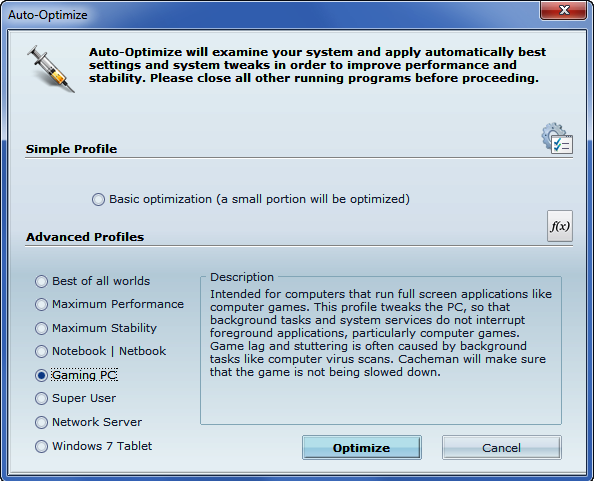
Cacheman allows the user to choose from ten computer auto optimization profiles. For example, one of the profiles is designed to speed up a gaming PC. With this profile Cacheman makes sure that your games will not be interrupted by background tasks like computer virus scans or Windows updates. Another profile called Digital Audio Workstation is designed for music editing and will minimize the latency of the PC. A ‘maximum stability’ profile will not optimize for more system performance, but instead increase system service wait times in order to prevent ‘non responding’ notifications making it suitable for PCs used for presentation or medical purposes. If the user is not sure which profile to choose Cacheman offers a ‘Best of all worlds’ profile that will try to optimize the computer in every area.


Cacheman aims to help to optimize computer caches, make the most efficient use of them, and control how big they are. A computer cache (pronounced ‘kash’) is a software or hardware component that stores user data so that future requests for that data can be served faster. It is faster to read and deliver data from the cache than to retrieve it from the original storage location. The more data can be served from the cache, the faster a computer speed up becomes. There is a multitude of caches, including the CPU cache, (write-through) disk cache, web cache, DNS cache, icon cache and thumbnail cache. Cacheman tweaks several cache components of a Windows PC.

Nice is a function of the linux/unix system kernel that monitors program behavior and decreases the resources for programs that behave badly. This ensures that the system will not start to stutter when background applications use a lot of processing (CPU) power. Cacheman’s Dynamic Priority feature brings the same functionality to a Windows PC. Cacheman will dynamically lower the priority of background applications that use a lot of processor time. The active front-running application will run faster this way.

Graphcat<

FunMouse 4.0.0.0

Type: Freeware
Cost: $0
Size: 12.50 MB
Release date: Apr 24 2015
Platform: Win7 x32,Win7 x64,Windows 8,WinOther,WinServer,WinVista,WinVista x64,Other
Publisher’s Site:  http://www.funmouse.org
Publisher’s Product Page:  http://www.funmouse.org
Country: South Africa


FunMouse

FunMouse. It’s the best software for your mouse. Period! Add instant productivity to any application with hot spot shortcuts, mouse gestures, extra button assignments, text selection tools, Paste2 search utility, clipboard extender and quick text manager.

Easily control the system volume and see how far you travel with your mouse every day. Throw in a quick launch toolbar and you’ll never need another program launcher again. FunMouse does it all!

FunMouse is designed as a natural mouse extender which means you can use as much or as little of its features as you like.

FunMouse comes installed with a minimal feature set enabled. As you become more familiar with what it can do, you will almost certainly end up enabling all of the features it has to offer as FunMouse will show you a completely new way to interact with windows while at the same time keeping all the standard mouse features you are already familiar with.

Not only will FunMouse make you more productive in a work environment, it is also the aim of the developer to make it more fun using your mouse.

This is what the default mouse support that is installed with Windows should have been all along!

RescuePRO for Windows PC 4.2.5.0

Type: Demo
Cost: $39.99
Size: 14.38 MB
Release date: Apr 13 2015
Platform: Win98,Win2000,WinXP,Win7 x32,Win7 x64,Windows 8,WinServer,WinVista,WinVista x64
Publisher’s Site:  http://www.LC-Tech.com
Publisher’s Product Page:  http://www.lc-tech.com/pc/sandisk-rescuepro-and-rescuepro-deluxe/
Country: United States of America


RescuePRO for Windows PC

RescuePRO is an easy-to-use application that recovers images, movies, sound files, documents, mail, videos, music and more. Recover data even if files were deleted, lost, corrupted or formatted. The wizard driven, user-friendly graphic interface makes it easy to recover your files with just a few mouse clicks.

This software is compatible with Memory Sticks, SmartMedia, CompactFlash, Floppy Disks, Palm Pilots, Windows CE devices, Digital Cameras and Camcorders, MP3 players, MMC, Microdrive, SD/SDHC, XD cards, PCMCIA, Video CD, DVD and most forms of digital media. The program works with any USB or FireWire Adaptor. Also features unique recovery algorithm for MPEG audio and MPEG video recovery (MPEG-1/2/3).

Simply insert your digital media into the reader, run the software and save the recovered files. There is no easier way to salvage those important files you thought were lost forever. The application then displays previews of the recoverable data.

Secure media wiping is also included for permanent deletion of data on your digital media. An imaging utility allows the creation of an image of your media for recovery at a later time. Advanced features include: now supports many high-end Digital Backs for SLR cameras, automatically saves the data as it is being scanned, supports media up to 64 GB and can run on Linux too.