Category Archives: System Utilities

Automation Tools, Backup & Restore, Benchmarking, Clipboard Tools, File & Disk Management, File Compression, Launchers & Task Managers, Other, Printer, Registry Tools, Shell Tools, System Maintenance, Text/Document Editors

Alternative Flash Player Auto-Updater 1.1.0.7

Type: Freeware
Cost: $0
Size: 813.00 kB
Release date: Apr 25 2015
Platform: WinXP,Win7 x32,Win7 x64,Windows 8,WinVista,WinVista x64
Publisher’s Site:  http://pXc-coding.com
Publisher’s Product Page:  http://pxc-coding.com/portfolio/alternative-flash-player-auto-updater/
Country: Germany

Alternative Flash Player Auto-Updater

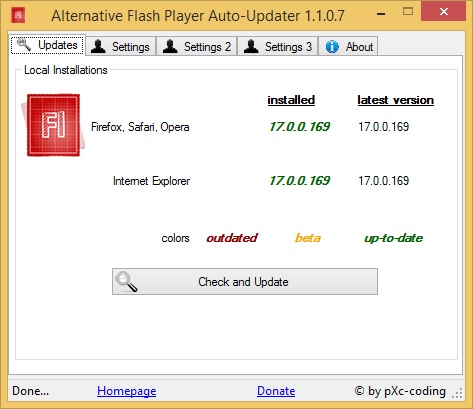
Adobe’s Flash Player is the key to the internet’s most used technology called Flash. Nowadays Flash can be considered one of the internet’s basics. Therefore it has always been targeted by hackers, malware authors and so on. Adobe tries to keep up with those by offering security updates – but although Flash offers update checks itself, many systems run outdated and insecure Flash Player versions. That is a huge security risk which must be eliminated. Alternative Flash Player Auto-Updater let’s you download and install the Flash Player without having to download Adobe’s download manager – it downloads the latest version and asks you whether it should be installed or not. You can choose to let it run at the start of Windows, this way you can be sure that your system will never run an outdated and extremely dangerous version of Flash Player.


Key Features:

-Even works if no Flash Player is installed on the system (offers download)
-Works on Windows x86 and x64 (32-bit, 64-bit)
-German, English and Spanish (automatically detecting system language)
-Can work completely hidden (except notifications when updates are available)
– User can choose to let it start with Windows automatically
-Works behind a proxy and with different administrator credentials (those are encrypted in the configuration file)
-Can use a global configuration file for network environments

Graphcat<

RescuePRO Deluxe for Windows PC 5.2.5.0

Type: Demo
Cost: $59.99
Size: 14.83 MB
Release date: Apr 13 2015
Platform: Win2000,WinXP,Win7 x32,Win7 x64,Windows 8,WinServer,WinOther,WinVista,WinVista x64
Publisher’s Site:  http://www.LC-Tech.com
Publisher’s Product Page:  http://www.lc-tech.com/pc/sandisk-rescuepro-and-rescuepro-deluxe/
Country: United States of America


RescuePRO Deluxe for Windows PC

RescuePRO Deluxe is an advanced application that recovers images, movies, documents, mail, videos, music and more. Recovers data even if files were deleted, lost, corrupted or formatted. The wizard driven, user-friendly graphic interface makes it easy to recover your files with just a few mouse clicks.

This software is compatible with Memory Sticks, SmartMedia, CompactFlash, Windows devices, Digital Cameras and Camcorders, MP3 players, MMC, Microdrive, SD/SDHC, XD cards, PCMCIA, Video CD, DVD and most forms of digital media. The program works with any USB or FireWire Adapter. Also features unique recovery algorithm for MPEG audio and MPEG video recovery (MPEG-1/2/3).

Simply insert your digital media into the reader, run the software and save the recovered files. There is no easier way to salvage those important files you thought were lost forever. The application then displays previews of the recoverable data.

Secure media wiping is also included for permanent deletion of data on your digital media. An imaging utility allows the creation of an image of your media for recovery at a later time. Advanced features include: now supports many high-end Digital Backs for SLR cameras, automatically saves the data as it is being scanned, supports media up to 256 GB.

MTPdrive 1.4

Type: Shareware
Cost: $39.95
Size: 2.19 MB
Release date: Apr 03 2015
Platform: Win7 x32,Win7 x64,Windows 8,WinServer,WinVista,WinVista x64
Publisher’s Site:  http://www.crankingpixels.com
Publisher’s Product Page:  http://www.mtpdrive.com/index.html
Country: Canada


MTPdrive

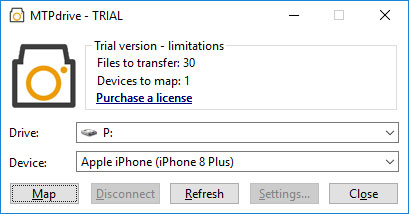
The MTPdrive allows mapping devices operating in MTP mode to a drive letter in the Microsoft Windows. It offers read access to the files on the device with ability to delete them (e.g. digital cameras or Apple devices). Write access is supported as well but it depends on device’s capabilities (typically Android based devices allow it). The MTPdrive can be configured to access original file/directory structure on the device (default) or use virtual file/directory names to simplify navigation through the device (useful for digital cameras). The MTPdrive is an evolution of the PTPdrive, it enhances its features (e.g. allows accessing movies in the Apple devices) and also improves usability/performance (accessing original file/directory structure on the device does not require waiting for collecting information about all the files before the mapping can be done).