Category Archives: System Utilities

Automation Tools, Backup & Restore, Benchmarking, Clipboard Tools, File & Disk Management, File Compression, Launchers & Task Managers, Other, Printer, Registry Tools, Shell Tools, System Maintenance, Text/Document Editors

Remote Backup Magic 4.2

Type: Shareware
Cost: $4.99
Size: 4.24 MB
Release date: Apr 23 2013
Platform: WinXP,Win2000,WinOther,WinVista,WinVista x64,Mac OS X,Mac Other,Other
Publisher’s Site:  http://www.rebrandsoftware.com
Publisher’s Product Page:  http://www.rebrandsoftware.com/app.asp?id=23
Country: United States of America


Remote Backup Magic


Backup your important files to an FTP server, email account or network drive.


Keeping a copy of your most important files in a remote location is the only way to be sure that you can retrieve them in the event of theft, fire or other unexpected event.

It’s easy! Simply drag your files or folders into the app, select a backup location, and you’re done. We support the most popular FTP backup services, free email providers, network locations and removable drives. We have suggestions and presets for popular services built in!

Backup types:

Full Backup: Copies all of your files
Incremental Backup: Copies only files that have changed
Full Incremental Backup: Copies all of your files if any of them have changed

Locations:

Backup to any local, network or removable drive
Backup to any SMTP email account, including popular free web services
Backup to any FTP server
Restore from local drives or FTP automatically

Compression and Encryption:

Compress your files with ZIP compression
Encrypt with up to 448 bit AES, Blowfish or Serpent encryption

Scheduling:

Schedule daily, weekly or monthly backups
Runs in the background to ensure scheduled backups are executed
Automatically runs any missed schedules when you turn on your computer

Other:

Detailed history
Import and export backups with restore information
Group backups and delete old backups
Queue multiple backups at once

Graphcat<

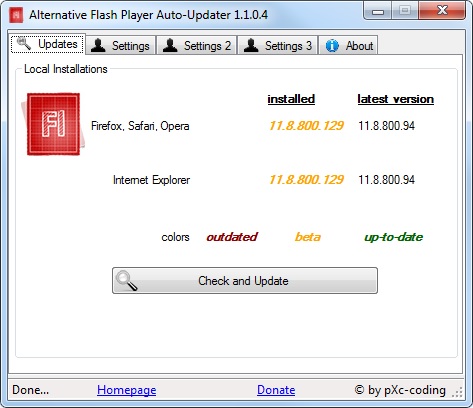
Alternative Flash Player Auto-Updater 1.1.0.5

Type: Freeware
Cost: $0
Size: 876.00 kB
Release date: Sep 30 2013
Platform: WinXP,Win7 x32,Win7 x64,Windows 8,WinVista,WinVista x64
Publisher’s Site:  http://pXc-coding.com
Publisher’s Product Page:  http://pxc-coding.com/portfolio/alternative-flash-player-auto-updater/
Country: Germany


Alternative Flash Player Auto-Updater


Adobe’s Flash Player is the key to the internet’s most used technology called Flash. Nowadays Flash can be considered one of the internet’s basics. Therefore it has always been targeted by hackers, malware authors and so on. Adobe tries to keep up with those by offering security updates – but although Flash offers update checks itself, many systems run outdated and insecure Flash Player versions. That is a huge security risk which must be eliminated. Alternative Flash Player Auto-Updater let’s you download and install the Flash Player without having to download Adobe’s download manager – it downloads the latest version and asks you whether it should be installed or not. You can choose to let it run at the start of Windows, this way you can be sure that your system will never run an outdated and extremely dangerous version of Flash Player.

Key Features:

-Even works if no Flash Player is installed on the system (offers download)
-Works on Windows x86 and x64 (32-bit, 64-bit)
-German, English and Spanish (automatically detecting system language)
-Can work completely hidden (except notifications when updates are available)
– User can choose to let it start with Windows automatically
-Works behind a proxy and with different administrator credentials (those are encrypted in the configuration file)
-Can use a global configuration file for network environments

Typing Stats 1.0.0.3

Type: Freeware
Cost: $0
Size: 1.01 MB
Release date: Sep 10 2013
Platform: Win2000,WinXP,Win7 x32,Win7 x64,Windows 8,WinServer,WinOther,WinVista,WinVista x64
Publisher’s Site:  http://www.duthersoft.com
Publisher’s Product Page:  http://www.duthersoft.com/typingstats
Country: Spain


Typing Stats


TypingStats is a state-of-the-art typing monitoring tool. Its main purpose is to run in the background, calculating your typing speed and providing useful statistics, such as your WPM (Words Per Minute) or CPM (Characters Per Minute). The way it works is different from other software. It tracks your typing during your normal computer usage. You can use your computer normally, and you do not need to type in within TypingStats itself, or in any specific way. This means that you can measure your typing stats continuously, without wasting time, and while doing real work, thus being totally accurate.

TypingStats is more convenient than traditional typing stats software because:

– You do not need to waste time on specific tests.
– Tracking can be done forever, thus being real-time and highly accurate.
– There is no predefined text. The stats you get are for the work you do, so the accuracy is much greater for your specific tasks.