Category Archives: System Utilities

Automation Tools, Backup & Restore, Benchmarking, Clipboard Tools, File & Disk Management, File Compression, Launchers & Task Managers, Other, Printer, Registry Tools, Shell Tools, System Maintenance, Text/Document Editors

PeaZip 5.4.1

Type: Freeware
Cost: $0
Size: 5.84 MB
Release date: Aug 13 2014
Platform: Win98,WinOther,Win2000,WinXP,Win7 x32,Win7 x64,Windows 8,WinServer,WinVista,WinVista x64
Publisher’s Site:  http://peazip.sourceforge.net/
Publisher’s Product Page:  http://peazip.sourceforge.net/
Country: Italy

PeaZip


PeaZip is a free ZIP files utility and free RAR extractor, a fast and elegant all-purpose file manager and archive manager tool for Windows, Linux, and BSD.
The program freatures a powerful unified GUI that, unlike most of other classic file archivers like i.e. WinZip and WinRar, is natively portable and cross-platform.
PeaZip is based on solid and proven Open Source technology of 7-Zip for handling mainstream archive formats, and other great Open Source tools (FreeARC, PAQ, UPX…) for supporting additional file formats and features, for a total of over 150 file formats supported.


Create 7Z, ARC, BZ2, GZ, *PAQ, PEA, QUAD/BALZ, SFX self extracting archives, TAR, UPX, WIM, XZ, ZIP files

Open and extract RAR, ACE, ARJ, CAB, DEB, DMG, ISO, LHA, RPM, UDF, ZIPX files and more…

PeaZip is localized in 30 languages and is capable of handling all most popular archive formats (150+ file types), supporting a wide array of advanced file and archive management features (search, bookmarks, thumbnail viewer, hashing, find duplicate files, convert archives…), especially focused on security (strong encryption, two factor authentication, encrypted password manager, secure deletion…).

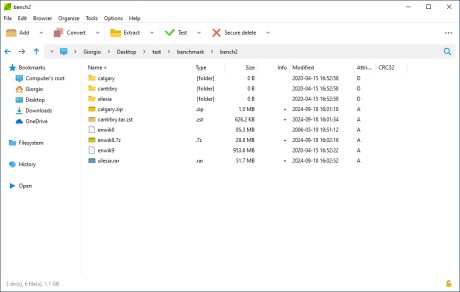
The distinctive trait of PeaZip is the innovative and easy to use compression/extraction interface, more similar to CD burners interfaces rather than to a classic file compressor: this design makes extremely simple to check/update items set for compression and extraction, integrating a full featured file manager component.

Also, tasks created in the GUI can be easily saved (and/or scheduled) as batch scripts, in order to help automate backup/restore operations, or for fine tuning, or for learning purpose, bridging the gap between the ease of use of GUI applications and power and flexibility of console.

Graphcat<

GiMeSpace QuickMenu 1.0.1.11

Type: Freeware
Cost: $0.00
Size: 610.00 kB
Release date: Sep 20 2014
Platform: WinXP,Win7 x32,Win7 x64,Windows 8,WinServer,WinOther,WinVista,WinVista x64
Publisher’s Site:  http://gimespace.com
Publisher’s Product Page:  http://gimespace.com
Country: Australia


GiMeSpace QuickMenu


While ms is annoying windows desktop users with metro/modernUI, and other companies are restoring things back to the old, GiMeSpace is offering desktop users something much better: the most simple and fastest task launcher&switcher possible! GiMeSpace QuickMenu!
Press a custom assigned mouse/keyboard key, the menu pops up at the place of the mouse cursor, move to the desired task, release the key, and that is all! Can not be quicker or easier!

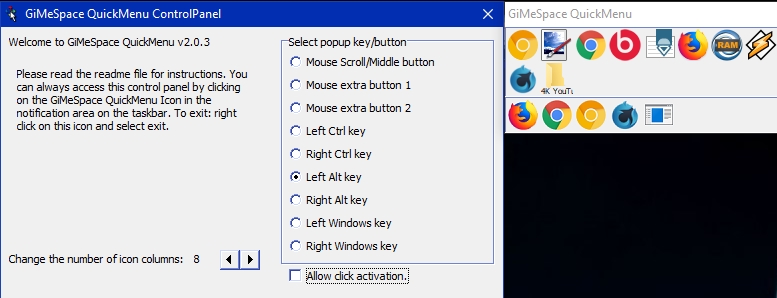
In the control panel you can select the "hotkey" that you like to use to make the QuickMenu show up. If you rather like one click to make the menu show up and then an other click to select the desired task then you can select "allow click activation". You can also adjust the number of icon columns that the menu will show.

The QuickMenu has two parts, the upper part shows the running tasks with the tasks you used last, first (like with alt-tab). In the bottom part you can add any item you want (programs, files, shortcuts, etc).
While the QuickMenu control panel is shown, you can drag items to the lower part of the QuickMenu and order them in your desired order. You can remove items by right clicking on them. When you add all your favourite programs, you will notice you will hardly ever use the normal startmenu again.

When you are done with the Control panel, click the close button and you are ready for a more easy and efficient desktop experience:
Simply press your chosen hotkey, the menu shows at the mouse cursor position, move the cursor to the task of your choice and release, the task will show or launch!
When the mouse cursor is not too close to the screen border the QuickMenu will show in the position so that the task you used last (before the current one) will show right under the cursor. This way, switching between 2 tasks becomes very easy, you just press the hotkey and release it again, and that is all that is needed to switch to the last task!

Recover My Files 5.2.1.1964

Type: Shareware
Cost: $69.95
Size: 31.11 MB
Release date: Mar 13 2013
Platform: WinXP,WinVista,WinVista x64,Win7 x32,Win7 x64,Win2000,WinServer,Win98
Publisher’s Site:  http://www.getdata.com
Publisher’s Product Page:  http://www.recovermyfiles.com
Country: Australia


Recover My Files


Recover My Files v5 is data recovery software by GetData Software company (www.recovermyfiles.com). First released in 2002 it is now the trusted recovery software of more than 400,000 users world wide.

Recover My Files will recover files in a wide range of situations, including;
* when files have been deleted and emptied from or bypassed the Windows Recycle Bin;
* when a drive has been formatted;
* when a drive has been formatted and Windows has been reinstalled;
* a Windows recovery or system restore has resulted in a fresh installation of Windows and user crated files are now missing;
* a drive is recognized by your PC as RAW and not files can be read;
* or some other problem has effected the entire contents of the drive.

Recover My Files works with all forms of digital media, including hard drives, USB media, camera cards etc. It will recover FAT, eXFAT, NTFS, HFS (MAC) and RAID systems. An activation key is valid for install on 2 separate computers (e.g. a desktop and a laptop) and there is no limit on the number of times you can use it.

Recover My Files should first be run in evaluation mode to preview the content of files that can be recovered. A license is purchased to save the files with the knowledge that they have been successfully located.

Recover My Files v5 has advanced interface features that make important data easy to identify and restore. These include; sort and multi-sort attribute columns; a gallery view to thumbnail pictures;a text filter tool to quickly locate files by name; and an auto validate function to test recovered file content.

Data recovery is simple; no technical skill is required. With its ability to recovery files by file signature, it can recover files that most undelete programs cannot find. Recover My Files is safe and secure. Data recovery results must be saved to another drive, such as an external USB or network drive.

Download and try Recover My Files in evaluation mode now to view your deleted files.