Active@ Boot Disk 22

Product Page: https://www.boot-disk.com/index.html

bootdisk1.png

Active@ Boot Disk provides an impressive range of utilities for your hard disk and other storage devices. Using this software, you can create a fully bootable operating environment allowing you to start up your computer from a CD, DVD or USB flash drive even if your operating system is damaged and completely refuses to start. The independent boot environment means that it does not rely on the contents or state of your hard disk. You will be able to access all of your data using the built-in tools. The main utilities provided in this convenient all-in-one package include a data recovery solution, a secure data erasure facility and a complete disk imaging program. It provides everything that you need for data recovery, privacy and backup. The program presents a much more affordable and practical solution than having separate programs for each type of task. It is easy to use as well, making it ideal for everyone from casual users to system administrators and experts.

New version includes the latest software versions:
Active@ Disk Image
Active@ File Recovery
Active@ Partition Recovery
Active@ KillDisk


Visit https://www.boot-disk.com/index.html for more.

Graphcat<

AppGini 22.14

Product Page: https://bigprof.com/appgini/

appgini-5.20-bootstrap-01.png

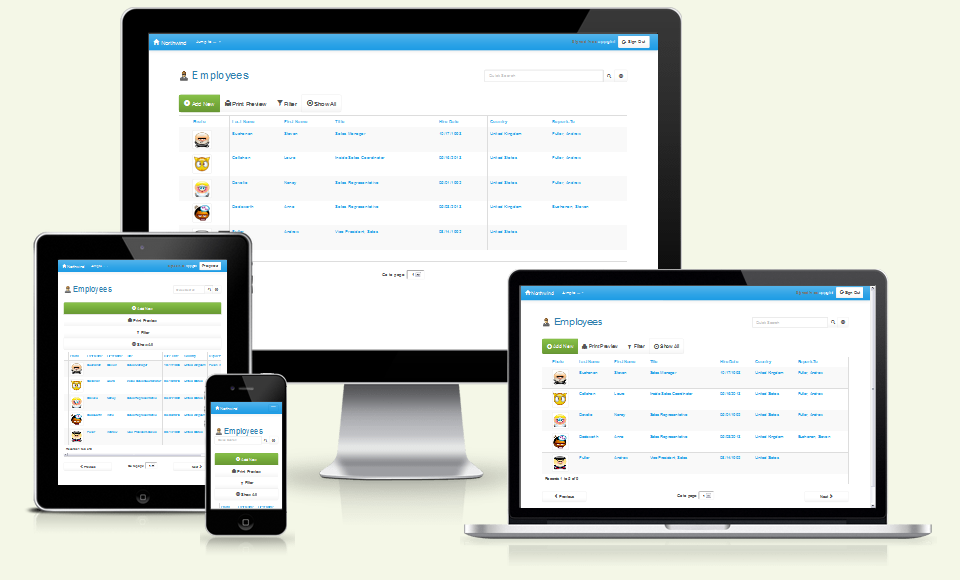
AppGini is a tool that accelerates web database applications development. Use AppGini to reduce your development cost and time, and rest assured that your code will be fully functional and bug-free. AppGini converts your database into a powerful multi-user PHP application that connects to MySQL database. It creates HTML forms for editing your data and all the PHP scripts behind them. It features enhanced foreign keys functionality and advanced Filters and sorting. You can create image fields that support image uploads, as well as file upload fields that allow uploading PDF, word, Excel, PPT, and any other file type, and provide download links for them. All this is done very easily through an intuitive graphical interface, without having to write any PHP scripts, HTML or SQL. You can customize the appearance of the generated scripts using CSS. Download free trial version now!

Vidmore Video Converter for Mac

Product Page: https://www.vidmore.com/video-converter/

mac-vcu.jpg

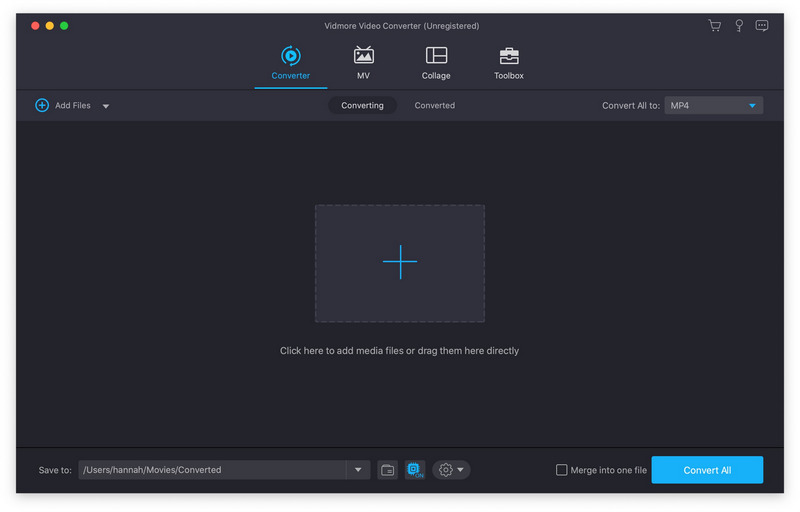
Vidmore Video Converter for Mac is powerful software which could help you convert your video and audio files to any other formats. You can easily choose an output format and convert your videos without hassle. In addition, you could also rotate, crop, clip your videos freely.

Key functions:

1. Convert video/audio files to any other formats
Vidmore Video Converter for Mac is powerful in converting your video/audio files to other formats such as AVI/MKV/MOV/MP4, etc. Moreover, it is able to convert 4K videos to other formats or convert videos to 1080p. In addition, it supports many kinds of devices, including iPhone/iPad/Samsung/Huawei/Sony and so on. Moreover, it could keep the original media metadata and quality of your videos.

2. Various video editing functions
If you want to edit your videos before conversion, with Vidmore Video Converter for Mac, you could trim/rotate/crop/merge your videos, add watermark to videos or change the brightness/contrast/saturation and hue of your files.

3. Make MV and collage
Vidmore Video Converter for Mac allows you to make your own customized MV with video clips and photos. You could also edit your MV as you like. The Collage function makes it easy to create video collage with various templates.

4. Compress large files, make GIFs and 3D files, enhance your videos
With the built-in Video Compressor function, you could compress your large files to a smaller size. In addition, you could make your own GIFs with the GIF Maker. And you could also convert common files to 3D format with the 3D Maker. With the Video Enhancer function, you could enhance your video quality simply.