Aiseesoft iPhone Cleaner 1.0.16

Type: Shareware
Cost: $23.96
Size: 47.53 MB
Release date: Aug 17 2021
Platform: Win2000,WinXP,Win7 x32,Win7 x64,Windows 8,Windows 10,WinServer,WinOther,WinVista,WinVista x64
Publisher’s Site:  https://www.aiseesoft.com
Publisher’s Product Page:  https://www.aiseesoft.com/iphone-cleaner/
Country: China


Aiseesoft iPhone Cleaner

Want to erase unnecessary data in your iPhone to free up more space but tired of deleting them one by one manually? Aiseesoft iPhone Cleaner can do you a good favor. Whether you want to wipe all the data on your iPhone permanently in case of privacy disclosure, or delete some specific files or file types selectively, Aiseesoft iPhone Cleaner can meet your demands.


Key features:

1. Clean up junk files easily
Aiseesoft iPhone Cleaner enables iOS users to remove temporary files, crash logs, system junk files, caches like iTunes Cache, camera roll, photo stream, photo library, etc. easily.

2. Delete large files
You can use iPhone Cleaner to scan out all the large files on your iOS devices and clean them up according to your need.

3. Uninstall unused apps
Aiseesoft iPhone Cleaner is able to detect and present all apps on your iDevice, along with the storage they occupy. You can select and uninstall those you no longer or seldom use.

4. Wipe all data permanently, erase private data
If you need to erase all the data on your iOS device, Aiseesoft iPhone Cleaner can help you wipe data permanently and completely in one click. There is no way to recover the deleted data after deleting it, so you do not need to worry about privacy disclosure. In addition, you could use the Erase Private Data function to wipe your private data and no one will know these data.

5. Preview data before cleaning
Aiseesoft iPhone Cleaner comes with a preview feature to let you preview the scanned results before erasing to avoid mistaken deletion.

Graphcat<

DataNumen RAR Repair 3.6

Type: Shareware
Cost: $49.95
Size: 7.80 MB
Release date: Jan 20 2022
Platform: Win2000,WinXP,Win7 x32,Win7 x64,Windows 8,Windows 10,WinServer,WinOther,WinVista,WinVista x64
Publisher’s Site:  https://www.datanumen.com
Publisher’s Product Page:  https://www.datanumen.com/rar-repair/
Country: Hong Kong


DataNumen RAR Repair

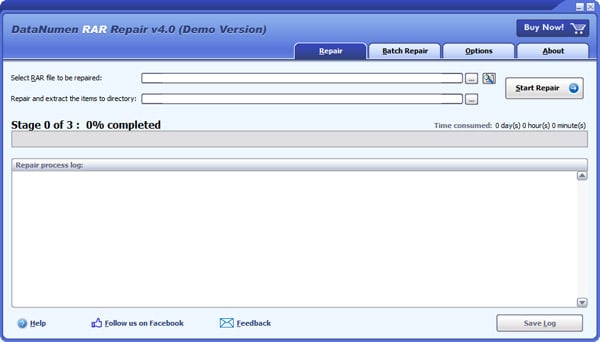
DataNumen RAR Repair (formerly Advanced RAR Repair) is a powerful tool to repair corrupt or damaged RAR and SFX archives. It uses advanced technologies to scan the corrupt or damaged archives and recover your files in them as much as possible, so to minimize the loss in file corruption.

Main Features:

1. Support to repair all versions of RAR and SFX archives.

2. Support to recover multi-volume and solid archives.

3. Support to recover encrypted RAR archives.

4. Support to find and select the RAR and SFX archives to be repaired on the local computer.

5. Support to upload corrupt RAR or SFX archives to our ftp server so that the qualified engineers in our file analysis center can help to analyze your archives efficiently.

6. Support to repair RAR and SFX archives on corrupted medias, such as floppy disks, Zip disks, CDROMs, etc.

7. Support to repair a batch of RAR and SFX archives.

8. Support to repair RAR archives as large as 16777216 TB (i.e. 17179869184 GB).

9. Support integration with Windows Explorer, so you can repair a RAR archive with the context menu of Windows Explorer easily.

10. Support drag & drop operation.

11. Support command line parameters.

ACDSee Ultimate 14.0.1-2451

Type: Shareware
Cost: $149.99
Size: 1.18 MB
Release date: Sep 23 2020
Platform: Win2000,WinXP,Win7 x32,Win7 x64,Windows 8,Windows 10,WinServer,WinOther,WinVista,WinVista x64
Publisher’s Site:  http://www.acdsee.com
Publisher’s Product Page:  https://www.acdsee.com/en/products/photo-studio-ultimate
Country: Canada


ACDSee Ultimate

The Creators Companion
ACDSee Photo Studio Ultimate 2021 is for photographers dedicated to their craft. With a focus on improved performance and precision editing, this year, choose ACDSee Photo Studio Ultimate 2021 as your sidekick.

Our Fastest Version Yet
We have made some huge performance enhancements this year to let you focus on the task in hand and perfect your images.

Introducing Color Wheels
Get enhanced control over color manipulation.
Lift precise colors to enhance your images, make your skies bluer and your reflections vivid.
Refine your color selection and saturation for edits with a new level of precision.

Text on a path and text in a frame
Customize your text, including its path. Write on a curve or follow a shape. Create digital photographic ads and inserts.

New Develop Mode UI and Panes
New panes enhance your editing process. Create and categorize a library of presets. Take snapshots and view your full edit history.

Improved Quick Search
New toggle options for Quick Search makes finding images in large databases much faster.

Improved Watermark
Add watermarks with more accuracy particularly beneficial for applying watermarks to a batch of images.

Refine Selection
You can now use Refine Selection to shift or soften edges which can maximize the effect of tools like Smart Erase.

New & Improved Batch Rename
An improved process for renaming multiple images in response to customer feedback. The options are almost endless.

New & Improved Batch Resize
Relaunched with a huge capability expansion, our Batch Resize tool lets you resize multiple images to any dimension, following pixels or percentages, along either edge, or as a print size.

GoPro Support
Work directly with GoPro RAW images, and perfect your adventures.

Improved Crop
Improved crop tool with relative positioning functionality allows you to crop multiple images in seconds.