
Gtraffic bot 2.0.8

Type: Shareware
Cost: $75
Size: 16.04 MB
Release date: Sep 07 2020
Platform: Win2000,WinXP,Win7 x32,Win7 x64,Windows 8,Windows 10,WinServer,WinOther,WinVista,WinVista x64
Publisher’s Site:  https://bestmacros.com
Publisher’s Product Page:  https://bestmacros.com/gtraffic-bot/
Country: Israel

Gtraffic bot

PC410, Computer Services in Carroll County Maryland
Auto generate Google organic traffic with Windows application bot

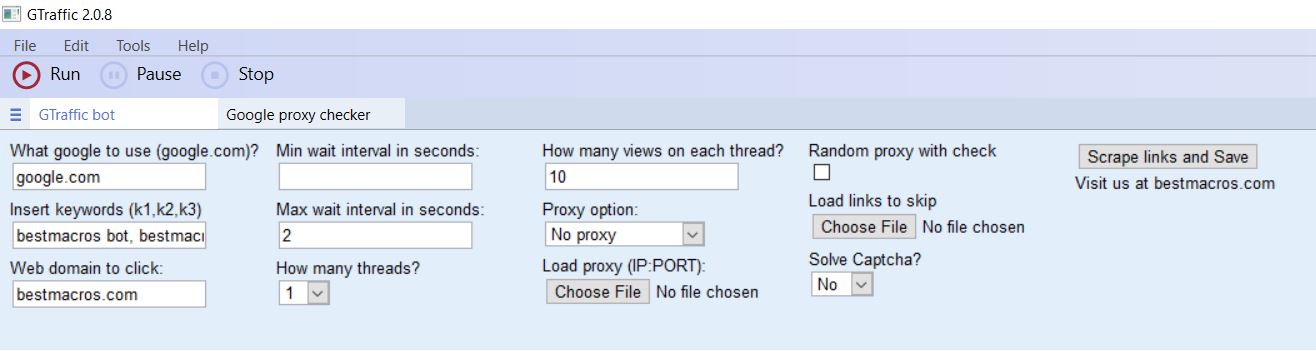
This Windows application bot will help you to auto generate Google organic traffic by searching your keyword in Google and clicking your website link.

With this bot you can easily generate Google organic traffic to any website or blog.

You can generate traffic with SINGLE CLICK!
Highly recommended!

Graphcat

This bot was made to help you with your Internet activity.

Forget about annoying manual traffic generation!

Automate it!

Main Features of the bot:

Select what local Google search to use.
Auto scrape target website links for skip list generation.
Multi threaded (emulates number of simultaneous users).
International Google pages supported.
Typewriter effect emulates real human typing.
Multiple keywords support (randomly selected each round).
Auto solves Google captcha with 2captcha.com
Auto request refund if captcha was not solved
Build-in Google proxy checker tool to test proxies with Google search.
Works on Win7/8/10
Works on any domain link.
Set your keyword to search in Google.
Clears cookies, cache, flash cookies, history after each round.
Searches your domain link on first 20 pages of search results.
Set Min/Max time interval to wait on your pages.
Set amount of visits per thread.
Supports socks5, socks4, public http proxies and private http proxies.
Auto clicks on random link on target website to prevent bounce rate count.
Ability to provide internal links to be skipped from clicking.
Build-in user agents random rotation.
Ability to edit useragents used by the bot.
Auto save last configuration.
Auto load last configuration on start.
Ability to schedule and auto run the bot using windows task scheduler.
New random proxy option.
Auto check proxy before each run.
Au

Coolcut 1.8.3

Type: Freeware
Cost: $0
Size: 592.00 kB
Release date: Mar 22 2022
Platform: Win2000,WinXP,Win7 x32,Win7 x64,Windows 8,Windows 10,WinServer,WinOther,WinVista,WinVista x64
Publisher’s Site:  https://www.coolcut.tv/index/advertise3.html?c=21
Publisher’s Product Page:  https://www.coolcut.tv/index/advertise3.html?c=21
Country: China


Coolcut

A combination of two powerful utilities, Coolcut is both an outstanding video editor and an excellent screen capture and live video recording tool. With Coolcut you can produce high-end tutorials, take screenshots of your desktop, and embellish your new videos with all kinds of transitions, effects, filters, multiple soundtracks, and audio effects, watermarks, etc., all in a convenient and intuitive timeline-based workspace and at no cost for you.
The desktop recording tool is extremely flexible, allowing you to take screenshots of your desktop and make high-quality recordings of anything taking place on your desktop. This flexibility allows you to produce tutorials and dynamic presentations, make online video and audio recordings, and save conferences, workshops, business meetings, etc., as convenient video files for later use. It comes with all the features you would expect from a professional screen recorder, with tools to add text and images to your presentations and a full set of settings to customize the quality of your recordings.
The video editor is in itself a professional tool with all the knots and bolts you find inexpensive video editing tools. Its timeline will let you place and move all kinds of media and related tracks (such as text), so you can combine and overlap them in the most convenient way just by dragging them with your mouse. The video player embedded in its interface will let you check, modify, and correct all of the changes you perform on your videos. Transitions, soundtracks, filters, text-to-speech capabilities, green screen, dubbing, speed change, and the most common editing features are all part of this impressive editor.

DataNumen PowerPoint Recovery 2.0

Type: Shareware
Cost: $89.95
Size: 8.53 MB
Release date: Dec 30 2021
Platform: Win2000,WinXP,Win7 x32,Win7 x64,Windows 8,Windows 10,WinServer,WinOther,WinVista,WinVista x64
Publisher’s Site:  https://www.datanumen.com
Publisher’s Product Page:  https://www.datanumen.com/powerpoint-recovery/
Country: Hong Kong


DataNumen PowerPoint Recovery

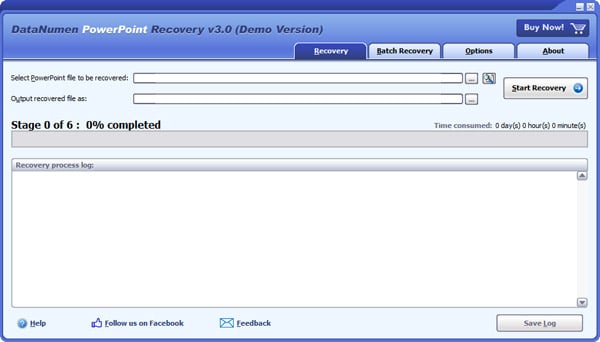
DataNumen PowerPoint Recovery is a powerful tool to repair and recover corrupt Microsoft PowerPoint PPTX files. It uses advanced technologies to scan the corrupt or damaged PowerPoint PPTX files and recover your data in them as much as possible, so to minimize the loss in file corruption. Currently DataNumen PowerPoint Recovery supports to recover Microsoft PowerPoint 2007 to 2019 and PowerPoint for Office 365 files. Moreover, it is integrated with Windows Explorer, supports drag & drop operations and command line parameters, which will make you repair files easily and quickly.

Main Features:

1. Support Microsoft PowerPoint 2007, 2010, 2013, 2016, 2019 and PowerPoint for Office 365 pptx files.
2. Support to recover slide masters, layouts, slides, notes masters, notes, handout masters and themes.
3. Support to recover all kinds of medias, including pictures, 3D models, videos and audios.
4. Support to repair PowerPoint files on corrupted media, such as floppy disks, Zip disks, CDROMs, etc.
5. Support to repair a batch of PowerPoint files.
6. Support to find and select the PowerPoint files to be repaired on the local computer.
7. Support integration with Windows Explorer, so you can repair a PowerPoint file with the context menu of Windows Explorer easily.
8. Support drag & drop operation.
9. Support command line parameters.
