
Aiseesoft Screen Recorder 2.2.38

Type: Shareware
Cost: $31.20
Size: 1.70 MB
Release date: Jan 19 2021
Platform: Win2000,WinXP,Win7 x32,Win7 x64,Windows 8,Windows 10,WinServer,WinOther,WinVista,WinVista x64
Publisher’s Site:  https://www.aiseesoft.com/
Publisher’s Product Page:  https://www.aiseesoft.com/screen-recorder/
Country: China
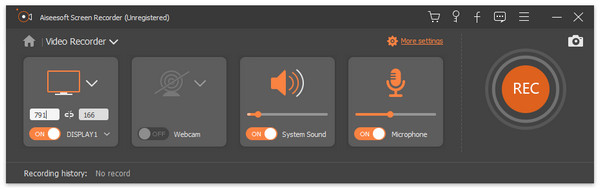

Aiseesoft Screen Recorder

PC410, Computer Services in Carroll County Maryland
Aiseesoft Screen Recorder helps to capture almost any video played on your computer, including 4K videos. You can use this screen capture software to record various kinds of videos, like online movies, video conference, video tutorials, gameplay and other videos you want to save. When you record the screen, you can choose to record the sound of the video itself or record your own voice through microphone.

Key features

1. Record any video on your computer
Aiseesoft Screen Recorder is a professional video recording application. With this recording software, you don’t have to buy another downloader because it will save more time and bandwidth to record rather than download. It is more powerful than downloader because it can save more, including game play process, video meetings and online streaming videos, etc. It even enables you to record 4K videos.

2. Highlight the mouse cursor as you wish
This is especially useful when you make video presentations. You can highlight the mouse cursor to make your action easier to be tracked on screen. Also you can define the color and shape of the highlight.

Graphcat

3. Record any audio source as you like
When you record a video, you can choose to record the voice of the video itself by using the system audio, or record your own voice by enabling microphone voice. The former one fits for recording movies while the latter one is fit for making video presentations. If you want to record a video meeting, you should turn both of them on.

4. Edit recording and snapshots
This screen recording tool also carries lots of necessary editing features to help you get a preferred output file. You can add arrow, text, line, rectangle, ellipse and more while recording, clip recorded video/audio, trim recorded video or audio file freely to only save the useful part. You can also put your personal labels like new arrow, line, text and more on snapshot.
BestCrypt Volume Encryption 4.24.2

Type: Shareware
Cost: $117
Size: 12.88 MB
Release date: Nov 25 2020
Platform: Win2000,WinXP,Win7 x32,Win7 x64,Windows 8,Windows 10,WinServer,WinOther,WinVista,WinVista x64
Publisher’s Site:  https://www.jetico.com
Publisher’s Product Page:  https://www.jetico.com/products/personal-privacy/bestcrypt-volume-encryption
Country: Finland


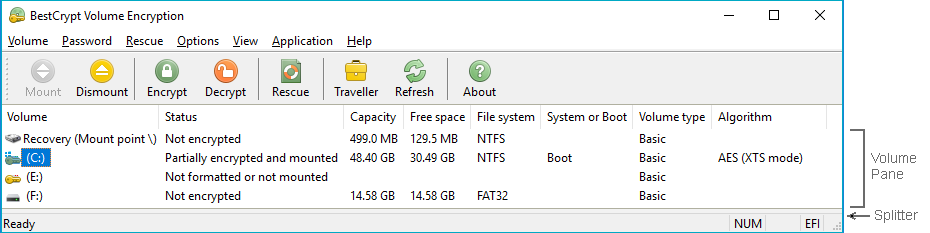
BestCrypt Volume Encryption

BestCrypt Volume for Disk Encryption protects all data on all types of volumes residing on fixed and removable disks – simple volumes, mount points, multipartition volumes (spanned, mirrored, striped, RAID-5), while also working on UEFI and GPT partitions. Jetico’s encryption software provides protection from physical threats – such as lost computers and USB sticks – to protect your privacy and comply with regulations (HIPAA, PCI). BestCrypt Volume Encryption utilizes a wide variety of algorithms (AES, Twofish, Serpent) and the largest possible key sizes with XTS, LRW encryption modes. By working with volumes, Jetico’s disk encryption is the best TrueCrypt alternative.
Disk encryption features:
– Encrypt system and boot volumes
– Support for UEFI-based computers, including secure boot
– Encrypt RAID and all types of volumes residing on fixed and removable disks
– Pre-boot authentication
– Support for Tokens for secure hardware storage of encryption keys
– Two-factor authentication with removable disk drives
– User-friendly encryption
– Option to boot encrypted volumes only from trusted network
– Support for Trusted Platform Module (TPM) for unattended reboot
– Secure hibernation
– Rescue functions to decrypt volumes in emergency case
– Central management for deployment, monitoring, encryption policy distribution and password recovery (Enterprise Edition only)

RPM Remote Print Manager Elite 32 Bit 6.2.0.526.1

Type: Shareware
Cost: $750
Size: 56.70 MB
Release date: Mar 22 2021
Platform: Win2000,WinXP,Win7 x32,Win7 x64,Windows 8,Windows 10,WinServer,WinOther,WinVista,WinVista x64
Publisher’s Site:  http://www.brooksnet.com/
Publisher’s Product Page:  https://www.brooksnet.com/lpd/comparing-rpm-elite-and-select
Country: United States of America


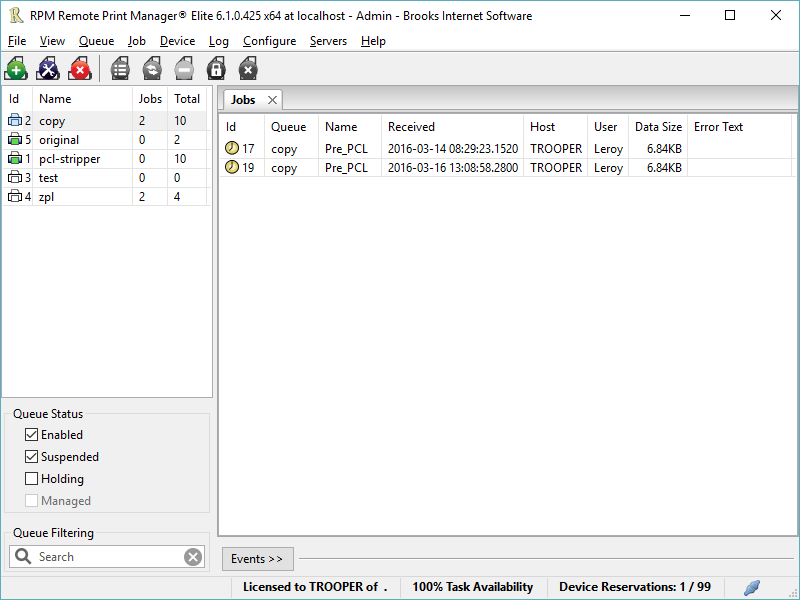
RPM Remote Print Manager Elite 32 Bit

Printing should be one click away. but there are so many problems which make printing difficult if not impossible. RPM Remote Print Manager (RPM) has grown through the years from all the print problems our customers have brought to us. We are here to help you solve your printing problems.

RPM is our virtual printer product. Our customers have been using RPM for 20 years!
RPM as virtual printer

RPM does what you expect a virtual PDF printer to do, and more:

convert incoming print jobs to other formats, such as PDF, TIFF and PCL
save multiple documents into a single document
print the same job to multiple printers
in one pass, send to a printer and save to disk
print the same job multiple times, using separate paper trays

RPM as print server

RPM is implemented as a Windows print server. Its core capabilities include:

managing your print workflow
send print jobs to any Windows printer
send print jobs to any printer on your network using core Windows print protocols, or LPR, or direct with port 9100
archive print jobs to local folders, shared folders, or anywhere via FTP
run any local application on your print job
send your print job via email as an attachment or in the message body

RPM also provides extensive data editing, manipulation and translation.

Windows version support

RPM 6.1 supports these versions of Windows: Vista, 7, Server 2008 (including R2), Windows 8 and 8.1, Server 2012 (including R2), and Windows 10. Support for Windows XP and Server 2003 has been dropped, so we no longer test new RPM versions on these older versions of Windows.
