
Aiseesoft iPhone Cleaner 1.0.6

Type: Shareware
Cost: $23.96
Size: 43.19 MB
Release date: Mar 25 2021
Platform: Win2000,WinXP,Win7 x32,Win7 x64,Windows 8,Windows 10,WinServer,WinOther,WinVista,WinVista x64
Publisher’s Site:  https://www.aiseesoft.com
Publisher’s Product Page:  https://www.aiseesoft.com/iphone-cleaner/
Country: China


Aiseesoft iPhone Cleaner

PC410, Computer Services in Carroll County Maryland
Want to erase unnecessary data in your iPhone to free up more space but tired of deleting them one by one manually? Aiseesoft iPhone Cleaner can do you a good favor. Whether you want to wipe all the data on your iPhone permanently in case of privacy disclosure, or delete some specific files or file types selectively, Aiseesoft iPhone Cleaner can meet your demands.

Key features:
1. Clean up junk files easily
Aiseesoft iPhone Cleaner enables iOS users to remove temporary files, crash logs, system junk files, caches like iTunes Cache, camera roll, photo stream, photo library, etc. easily.

2. Delete large files
You can use iPhone Cleaner to scan out all the large files on your iOS devices and clean them up according to your need.

3. Uninstall unused apps
Aiseesoft iPhone Cleaner is able to detect and present all apps on your iDevice, along with the storage they occupy. You can select and uninstall those you no long or seldom use.

Graphcat

4. Wipe all data permanently
If you need to erase all the data on your iOS device, Aiseesoft iPhone Cleaner can help you wipe data permanently and completely in one click. There is no way to recover the deleted data after deleting it, so you do not need to worry about privacy disclosure.

5. Preview data before cleaning
Aiseesoft iPhone Cleaner comes with a preview feature to let you preview the scanned results before erasing to avoid mistaken deletion.
DocuFreezer 3.2.2108

Type: Freeware
Cost: $0
Size: 149.53 MB
Release date: Aug 16 2021
Platform: Win2000,WinXP,Win7 x32,Win7 x64,Windows 8,Windows 10,WinServer,WinOther,WinVista,WinVista x64
Publisher’s Site:  https://www.fcoder.com
Publisher’s Product Page:  https://www.docufreezer.com
Country: Latvia


DocuFreezer

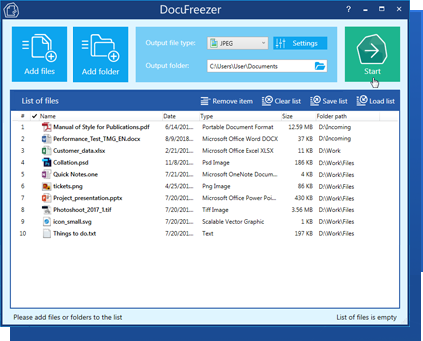
DocuFreezer is a batch file converter for Windows. DocuFreezer file conversion core processes different documents and images: Word, Excel, PowerPoint, Project documents, AutoCAD, SolidWorks, Solid Edge, Visio drawings, images, text files, and more. This simple software can batch convert multiple files at once. Popular scenarios & tasks: PDF to JPG, PDF to TIFF, DOC to PDF, XPS to PDF, XLS to PDF, JPG to PDF, Outlook emails to PDF, HTML to PDF, Text to PDF, OCR PDF to words, and more.

DocuFreezer automatically converts many files added to a list preserving the structure and color attributes of your original files. DocuFreezer output files are device independent and will be properly displayed on most PCs or other devices after conversion. The software can handle 70+ types of files and convert them to PDF, JPG, PNG, TIFF or TXT formats. It is also an OCR app – it can recognize text and save files to searchable PDF or TXT. You can find more information about DocuFreezer features at https://www.docufreezer.com

Users of Microsoft Office 2007 SP2, 2010 or 2013 (or newer versions) can benefit from the ability to convert Microsoft Office Word documents, Excel worksheets, PowerPoint presentations, Publisher, Visio files. Advanced options are also available for eDrawings, SolidWorks, AutoCAD, Solid Edge users – they can quickly save their DWG, DXF, DFT and other types of drawings to PDF or popular image formats.

What’s new in the latest version:
– New Advanced Settings tab with all available settings
– New supported formats: iCalendar ICS, Apple Mail EMLX
– Adding image or text watermark automatically
– Loading a list of files from an Excel spreadsheet
– New OCR languages: Polish and Portuguese
– New way to split multipage PDF files: X pages per file
– Ability to drag’n’drop email message files from Microsoft Outlook
– Ability to set custom page size for Outlook MSG and EML files
– Other improvements and fixes

MailsDaddy OLM to PST Converter Tool 1.0

Type: Shareware
Cost: $39
Size: 4.72 MB
Release date: Jan 04 2020
Platform: Win2000,WinXP,Win7 x32,Win7 x64,Windows 8,Windows 10,WinServer,WinOther,WinVista,WinVista x64
Publisher’s Site:  https://www.mailsdaddy.com/
Publisher’s Product Page:  https://www.mailsdaddy.com/olm-to-pst-converter/
Country: India


MailsDaddy OLM to PST Converter Tool

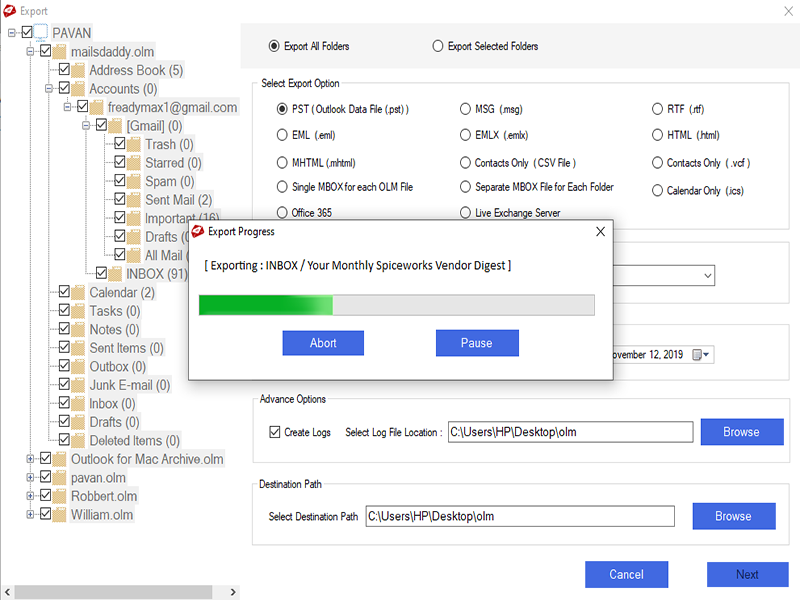
MailsDaddy OLM to PST Converter tool is the best and most prominent solution for the Mac Outlook users to transfer data in PST format. It is developed with highly advanced algorithms; still, it is easy to operate for non-professional users. It lets the user convert OLM emails, contacts, calendars, to-do lists, appointments, etc. in PST format for Outlook 2016, 2019 versions. It provides an error-free and complete result of the OLM to PST migration process. The tool retains the complete mailbox properties and key elements throughout the process and after completing the process, it maintains the same properties in PST file format. Through it is developed with advanced methodology, it facilitates the users with numerous helpful features such as described below-
# Perform a batch migration in Outlook PST file for multiple OLM files.
# Generates a free and clear preview of the selected OLM data time with all attachments and properties.
# Maintains the same folder, sub-folder structure of the OLM file in PST file format.
# Retains all attachments, inline images, and email properties of the OLM mailbox in Outlook 2013 PST file.
# Keeps all text formatting, HTML formatting, and data integrity of the mailbox without any flaw.
# Date filter, and Search Mail option reduce the size of mailbox and conversion time to perform a quick OLM to PST conversion process.
# Creates a single and separate PST file for each mailbox of OLM files.
# transfer the data of OLM file in EML, EMLX, MSG, MBOX, and many other formats.
Get the free demo version of this tool from the official website to check the features and proficiency of this OLM to PST Converter software. The demo version allows the users to export the first 20 data items from each mailbox file folder with complete content, properties, and attachments. To remove this restriction MailsDaddy Software provides three licenses to the user as Personal in $39, Business in $149, and Enterprise in $299 with lifetime validity.
