
Extreme Picture Finder 3.58

Type: Shareware
Cost: $29.95
Size: 68.31 MB
Release date: Nov 22 2021
Platform: Win2000,WinXP,Win7 x32,Win7 x64,Windows 8,Windows 10,WinServer,WinOther,WinVista,WinVista x64
Publisher’s Site:  https://www.exisoftware.com
Publisher’s Product Page:  https://www.webimagedownloader.com
Country: Ukraine


Extreme Picture Finder

PC410, Computer Services in Carroll County Maryland
Image downloader and web picture finder in one product. Automatically download all images from any website. Simply enter the website address, choose what files to download (images, music, videos or any other files) and the folder on your hard drive where to save them and let the program do the rest of the work for you! No more banners, annoying pop-ups or saving each file by hand!

Extreme Picture Finder will easily handle password-protected websites, forums or TGPs. Plus, it allows you to set file and image size limits, use URL filters to skip unwanted parts of the website, choose the way the saved files are named and use many other options to get exactly what you want as fast as possible.

If you don’t know where to start – the program offers a built-in database with thousands of website addresses sorted by category and the built-in picture finder, which allows you to search the web for pictures using keywords. Extreme Picture Finder offers several different search modes: only thumbnails, only full-size images, both thumbnails and full-size images. Plus it can download all "related" images – images located on the same page where the original full-size image was found.
Dissy 1.0

Type: Freeware
Cost: $0
Size: 84.51 MB
Release date: Jun 19 2021
Platform: Mac OS X,
Publisher’s Site:  https://www.dissyapp.com/
Publisher’s Product Page:  https://www.dissyapp.com/user-case/how-to-use-dissy/
Country: Ukraine


Dissy

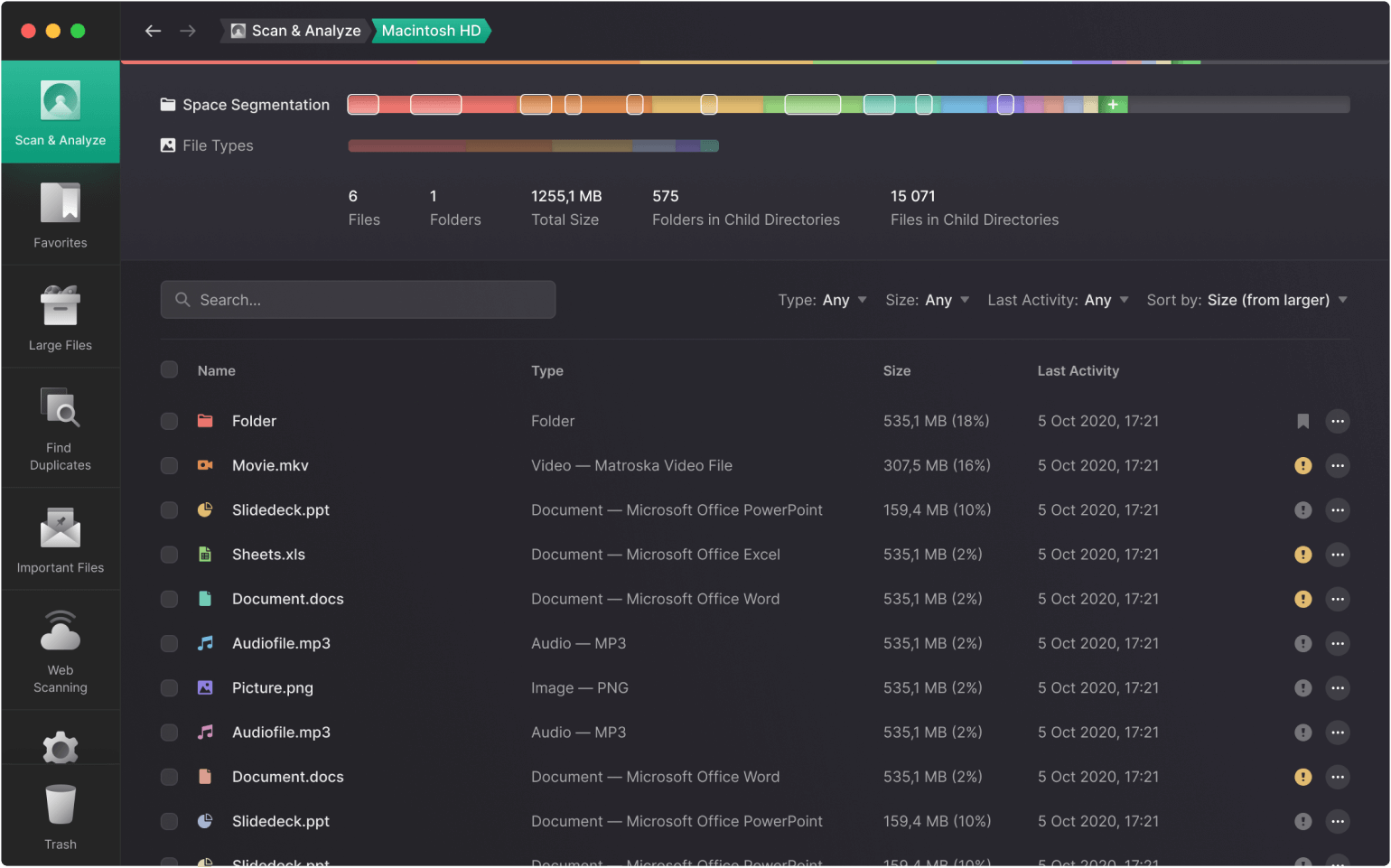
Dissy is a powerful disk space visualizer that helps you quickly find files and folders that take up the most disk space and, if necessary, delete them from your computer.
Even if your computer has a lot of free space, this does not mean that this space will be enough for you for a very long time, especially if you are an active user and store a lot of data on your machine.
Different services can offer you different solutions, such as buying an extra disk or cloud storage and more. But all of them are not free, and you will need to spend a lot of money for some storage extensions.
But we have a completely free solution for you that will analyze disk space on your computer and help get rid of unnecessary files that take up precious space.

ThumbsPlus 10.SP2-4015

Type: Shareware
Cost: $59.95
Size: 49.97 MB
Release date: Jun 14 2018
Platform: Win2000,WinXP,Win7 x32,Win7 x64,Windows 8,Windows 10,WinServer,WinOther,WinVista,WinVista x64
Publisher’s Site:  http://www.thumbsplus.com
Publisher’s Product Page:  http://www.thumbsplus.com/
Country: United States of America


ThumbsPlus

ThumbsPlus is a multi-talented application that will help you organize, view, edit, print, catalog and find all of your graphic files. It supports over a hundred digital camera, raster, vector, font and multimedia file formats. It provides superb thumbnails, a comprehensive graphic database with keywords, user-defined fields, and an easy-to-use and customizable user interface.

It includes features found in no other product, such as sorting by image similarity and location of similar images. Other features include: 48-bit color and 16-bit grayscale support, contact sheets, printed catalogues, a Web Page Wizard, batch image processing, lossless JPEG rotation, watched (‘hot’) folders, automatic renaming, cataloguing of offline volumes, TWAIN support, and image galleries.

The program includes many image editing features, most available in batch as well as interactive mode, including: color adjustment, color depth, color balance, color profile, color replacement, histogram stretching, auto-correction, image stamping (text and images), alpha channel, image combination, image compare, watermarking, built-in and custom image filters, resizing, rotation, turning, mirroring, cropping, and trimming to proportion. Python scripting is also supported.

ThumbsPlus supports viewing and slide shows of raster, vector, multimedia and font files. Plug-ins are available in the Professional and Network versions for raw files from almost all digital cameras, Postscript, PDF, EPS and AI files, and EC Software IPP files.

Graphcat

ThumbsPlus uses a Microsoft Access (JET) database by default and includes SQLite 3 support. The Professional edition can also use the following databases: MS SQL Server 2000 and higher, MySQL, MariaDB, PostgreSQL

ThumbsPlus can share a database between multiple users and multiple computers, from a small workgroup to a large enterprise.

