
QXPMarkz 1.2

Type: Demo
Cost: $199
Size: 14.75 MB
Release date: Jun 01 2021
Platform: Mac OS X,
Publisher’s Site:  http://www.markzware.com
Publisher’s Product Page:  https://markzware.com/products/qxpmarkz/
Country: United States of America

QXPMarkz

PC410, Computer Services in Carroll County Maryland
QXPMarkz is a standalone software to preview, convert, and open QuarkXPress documents in Adobe InDesign, Affinity Publisher, Adobe Acrobat, Adobe Illustrator, older QuarkXPress versions, and many other applications. You no longer need to recreate documents from scratch – QXPMarkz gives you a big head-start on QuarkXPress to InDesign data conversion.

QXPMarkz gives you the ability to open and then convert native QuarkXPress files (.qxp, .qxd files) to different formats – all without QuarkXPress being loaded on your computer. It allows you to export QuarkXPress files to IDML, PDF, TIFF, PNG, JPEG, GIF, and other non-proprietary file types. Also, you’ll be able to open .QXP files in previous versions of QuarkXPress.

Main features:

Open an IDML version of your Quark file in InDesign, or Affinity Publisher 1.8 or greater

Graphcat

Export your QuarkXPress document as IDML. PDF, TIFF, PNG, JPEG or GIF

Extract the text out of your Quark file as TXT (plain text), RTF (Rich Text Format) or HTML

Open multiple files at one time

Select an application to open your converted file, either manually or as a more permanent workflow feature.
DataNumen SQL Recovery 6.1

Type: Shareware
Cost: $499.95
Size: 7.99 MB
Release date: Nov 28 2021
Platform: Win2000,WinXP,Win7 x32,Win7 x64,Windows 8,Windows 10,WinServer,WinOther,WinVista,WinVista x64
Publisher’s Site:  https://www.datanumen.com
Publisher’s Product Page:  https://www.datanumen.com/sql-recovery/
Country: Hong Kong


DataNumen SQL Recovery

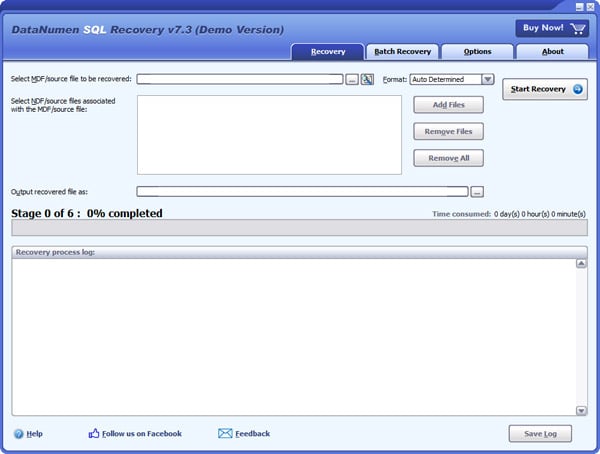
DataNumen SQL Recovery is a powerful tool to repair and recover corrupt SQL Server MDF database files. It can scan the MDF files and associated NDF files, then recover your data in them as much as possible, so to minimize the loss in file corruption.

Main Features:

Support SQL Server 2005, 2008, 2008 R2, 2012, 2014, 2016, 2017, 2019.
Support to recover the structure and data in the tables.
Support to recover all data types, except for XML type.
Support to recover sparse column.
Support to recover deleted records.
Support to recover indexes.
Support to recover views, triggers, rules and defaults.
Support to recover stored procedures, scalar functions, inline table-valued functions and multistatement table-valued functions.
Support to recover and decrypt encrypted objects.
Support to recover multiple files, including MDF file and its associated NDF files.
Support to output recovered data in MDF file.
Support to recover MDF/NDF data from undamaged or damaged VMWare VMDK(Virtual Machine Disk) files(*.vmdk), Virtual PC VHD(Virtual Hard Disk) files(*.vhd), Acronis True Image files(*.tib), Norton Ghost files(*.gho, *.v2i), Windows NTBackup files(*.bkf), ISO image files(*.iso) and Nero image files(*.nrg).
Support to recover MDF and NDF files as large as 16TB.
Support to repair MDF files on corrupted medias, such as floppy disks, Zip disks, CDROMs, etc.
Support to repair a batch of MDF files.
Integrated with Windows shell, so you can repair a MDF file with context menu in the Explorer easily.
Support drag and drop operation.
Support command line parameters.

Remote Work 1.2

Type: Demo
Cost: $25
Size: 667.00 kB
Release date: Jan 01 2021
Platform: Win2000,WinXP,Win7 x32,Win7 x64,Windows 8,Windows 10,WinServer,WinOther,WinVista,WinVista x64
Publisher’s Site:  https://www.tsplus.net/
Publisher’s Product Page:  https://tsplus-remotework.com/
Country: France


Remote Work

Out of necessity, millions of workers have been dispersed from their classic central office surroundings. The cost and logistics of duplicating software licenses alone can be enormous.
TSplus Remote Work provides users with secure remote connection to their office PC desktop for a seamless home office experience. It is an effortless and cost-saving solution for creating a complete work-from-home environment in no time!

– Cost and time saving:
Using Remote Work to access corporate desktop PCs can save organizations enough money in licensing costs to pay for itself on the first day of deployment. The Remote Work Admin Tool is fast to install and easy to configure and there are no Windows Server roles to install. A single server at the office running the software is enough to get started.

– Secure for your data:
It acts as a gateway, brokering connections between remote users and their office desktops.

– Multi-devices:
The gateway is also a web server, offering an easy to use, secure web portal to give users the ability to remotely access their office PCs via any device and any web browser!

– Familiar:
More than that, it connects them with the same session they would normally see whenthey are in the office. From License management to web portal customization, Remote Work keeps management simple for a successful and optimized transition to home office!

Download the first major version for a free 15-day trial.
