TwistedBrush Pro Studio 25.02

Type: Shareware
Cost: $99
Size: 34.57 MB
Release date: Aug 26 2021
Platform: Win2000,WinXP,Win7 x32,Win7 x64,Windows 8,Windows 10,WinServer,WinOther,WinVista,WinVista x64
Publisher’s Site:  http://www.pixarra.com
Publisher’s Product Page:  http://www.pixarra.com/pro_studio.html
Country: United States of America


TwistedBrush Pro Studio

PC410, Computer Services in Carroll County Maryland
TwistedBrush Pro Studio is a program for digital artists of any level: from novice to professional. With a strong focus on natural media painting, photo editing and illustrative styles, TwistedBrush Pro Studio has more than 9000 brushes in over 250 ArtSets, along with all the features that artists love to use: layers, realistic media, photo cloning, tracing, masks, particles, filters, script recording, scripts to AVI, drawing tablet support, brush shapes, patterns, textures, integrated scanner support, image brushes, drawing guides, reference image views, dirty brushes, scratch layer, dynamic palettes and a whole lot more.

Features:
Over 9000 brushes, covering every area of digital art
64 bit color painting system for the smoothest blends available anywhere
Powerful Brush Engine: a single system with the flexibility and performance to mimic full natural media brushes, complex blending operations, very specialize procedural object painting such as single stroke trees and everything in between
Drawing tablet support with high precision sampling and pressure sensitivity
A large array of color palettes
Full brush editing capabilities
Transparency and layers supported with all the standard plus many unique layer mixing modes
Extensive mask support for protecting and selecting parts of your images
Extensive tool set
Over 200 image processing filters
Clips: easy storage and reuse of your clipped images and photo elements for use later
Tracing paper to use as a guide
Brush control
Brush modifiers
Cloning
Drawing guides
Lua script filters
One click solutions for complex actions
Support of all the leading industry standard image formats
Adobe PhotoshopTM compatible plug-ins

Tipard 3D Converter 6.1.30

Type: Shareware
Cost: $29.75
Size: 23.84 MB
Release date: Jun 29 2021
Platform: Win2000,WinXP,Win7 x32,Win7 x64,Windows 8,Windows 10,WinServer,WinOther,WinVista,WinVista x64
Publisher’s Site:  https://www.tipard.com/
Publisher’s Product Page:  https://www.tipard.com/3d-converter/
Country: China


Tipard 3D Converter

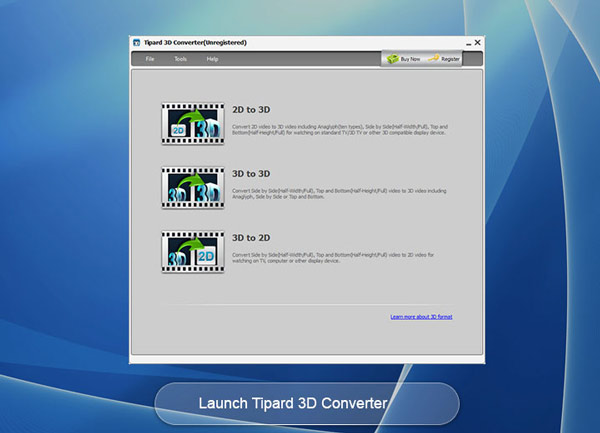
Tipard 3D Converter is composed of three converting parts: 3D video to 2D video, 2D video to 3D video, and 3D video to 3D video. It can not only convert 2D videos like MP4, MOV, M4V, MKV, AVI, WMV and more to 3D video, but also allows you to convert 3D video to 2D video and other 3D modes with amazing conversion speed. This Tipard 3D Converter also has the ability to edit video. It supports various devices like iPhone, iPad, iPod, PSP, Kindle Fire, etc.

Key functions:
1.Convert 2D video to 3D video
Tipard 3D Converter has the ability of converting 2D video to 3D video. It supports any video format like MP4, MKV, AVI, WMV, MOV, M4V, TS and more. It also highly supports HD videos, such as TS, M2TS, HD MPG, HD MPEG, HD MPEG2, HD MPEG4, HD MP4, HD WMV, and so on.

2.Convert 3D video to 3D video
Tipard 3D Converter supports many 3D formats like Anaglyph 3D, Side by Side (Half-Width) 3D, Side by Side (Full) 3D, Top and Bottom (Half-Height) 3D and Top and Bottom (Full) 3D. So you can set any 3D modes according to your needs. It is a very practical and useful function.

3.Convert 3D video to 2D video
Tipard 3D Converter enables you to convert the 3D video to a common 2D video. It becomes possible for you to watch 3D videos in 2D format on your iPhone, iPad, iPod, PSP, Kindle Fire or other portable media players.

Graphcat

4.Easy to use
The 3D Converter is simple enough when you use it. It has super-high conversion speed, high-quality video effect, comprehensive functions, simple operation and user-friendly interface, all these humanized design factors will give you the most wonderful user experience. You will enjoy it at very fast converting speed.

5.Owning powerful edit function such as clip, crop and so on
The software allows you to edit video effect, clip your video segment, crop the play region of video.

Vidmore Screen Recorder for Mac 1.0.28

Type: Shareware
Cost: $29.95
Size: 19.90 MB
Release date: Aug 30 2021
Platform: Mac OS X,
Publisher’s Site:  https://www.vidmore.com/
Publisher’s Product Page:  https://www.vidmore.com/screen-recorder/
Country: China


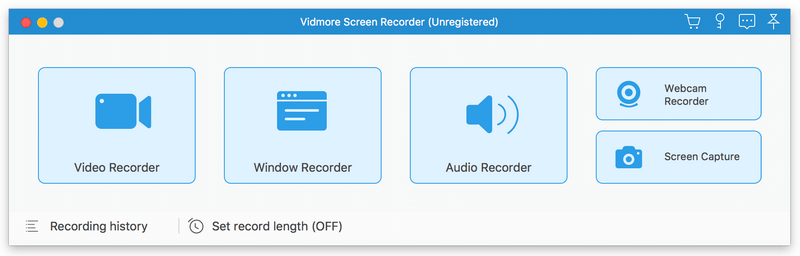
Vidmore Screen Recorder for Mac

Vidmore Screen Recorder for Mac is an easy-to-use screen recording program, with it, you could record online videos that you could not download, record the audio files you want to save.

Key functions:

1. Record video and audio files
With Vidmore Screen Recorder for Mac, you could save any precious media files you want to use in the future. It is able to record all kinds of media files without any hassle. It also allows you to record the system and microphone sound. In addition, you could record the full screen or select the area you want to record as you like.

2. Trim recordings and schedule recording task
If you just want to save a part of your recordings and you do not want to record it again, please do not worry, Vidmore Screen Recorder for Mac could help you solve this easily. You just need to choose the start and end time for your clip after recording, then you could save the part you want. If you want Vidmore Screen Recorder for Mac to record the files later automatically, you could schedule the recording task by setting the task name, the starting and ending time and the duration, then it will record at the time you want.

3. Record GIF
Do you want to save media files as GIF? With Vidmore Screen Recorder for Mac, the output video or screenshot format could be saved as GIF files. In addition, you are able to add mouse click and mouse area effects while recording.

4. Powerful editing functions
You could set the output video format, video codec and video quality according to your need. Moreover, you are able to add text, arrows and shapes to your recording files. If you want to set hotkeys for start and pause recording or screen capture, all of this could be achieved with Vidmore Screen Recorder for Mac easily.