
Outlook4Gmail 5.3.3.0

Type: Shareware
Cost: $28.98
Size: 10.40 MB
Release date: Nov 03 2020
Platform: Win2000,WinXP,Win7 x32,Win7 x64,Windows 8,Windows 10,WinServer,WinOther,WinVista,WinVista x64
Publisher’s Site:  https://scand.com/
Publisher’s Product Page:  https://outlook4gmail.scand.com/
Country: Belarus

Outlook4Gmail

PC410, Computer Services in Carroll County Maryland
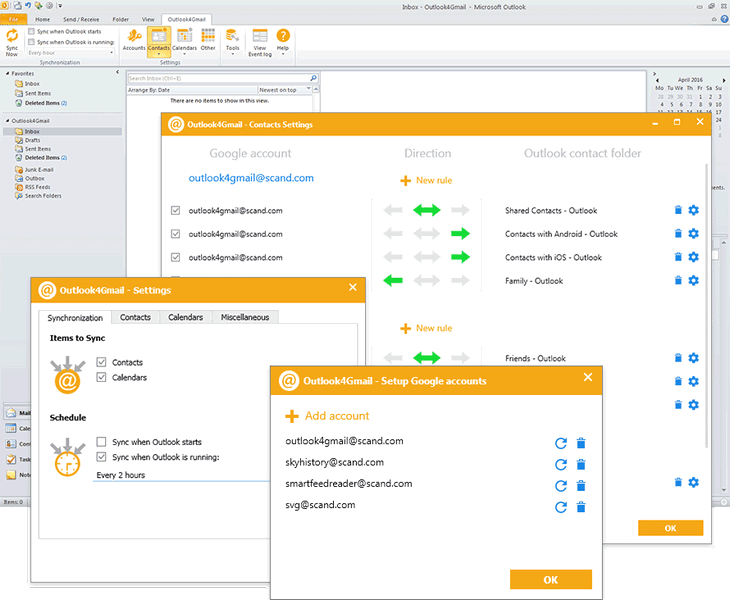
Outlook4Gmail is an Outlook add-in that helps you to perform Google calendars sync with Outlook as well as the contacts and tasks sync. It is a perfect syncing tool for Outlook users who have one or multiple Google accounts.

This plug-in supports synchronizing of Outlook and Google contacts with maximum details: Name, Company, Phones, Emails, Addresses, Dates, Persons, Notes, Contact Picture, Categories and Google Groups, etc.

Outlook4Gmail provides various ways of syncing Calendars: Import a calendar from Google into Outlook, Export an Outlook calendar to Google, Syncing existing calendars, Creating new calendars, etc.

In addition to contacts and calendars syncing, Outlook4Gmail also provides the synchronization of Google tasks with Outlook tasks folders. You could sync multiple Outlook tasks folders and subfolders with Google task lists. Synchronization of Outlook recurrent tasks is also supported.

Graphcat

Outlook4Gmail allows to automate synchronization with help of automatic check-up for contacts updates by time interval (every 30 minutes, every hour or every 2, 4, 8, 12, 24 hours). All you need is to configure the settings just once and that would be enough for the add-in to update your contacts information automatically without any efforts from user.

What’s more, Outlook4Gmail supports synchronizing of multiple Google accounts. Apart from synchronization of Google contacts and calendars, the add-in synchronizes Outlook contacts and appointments to Google as well. When you select two-way synchronization, the data will be read in two iterations and contacts will be synchronized both for Outlook and Google accounts.

If you use Outlook for more than one work and personal stations you can easily synchronize all clients by completing of two-way synchronization of Outlook clients with the required number of Google accounts.
FolderMill 4.9

Type: Freeware
Cost: $0
Size: 165.10 MB
Release date: Sep 22 2021
Platform: Win2000,WinXP,Win7 x32,Win7 x64,Windows 8,Windows 10,WinServer,WinOther,WinVista,WinVista x64
Publisher’s Site:  https://www.fcoder.com
Publisher’s Product Page:  https://www.foldermill.com
Country: Latvia


FolderMill

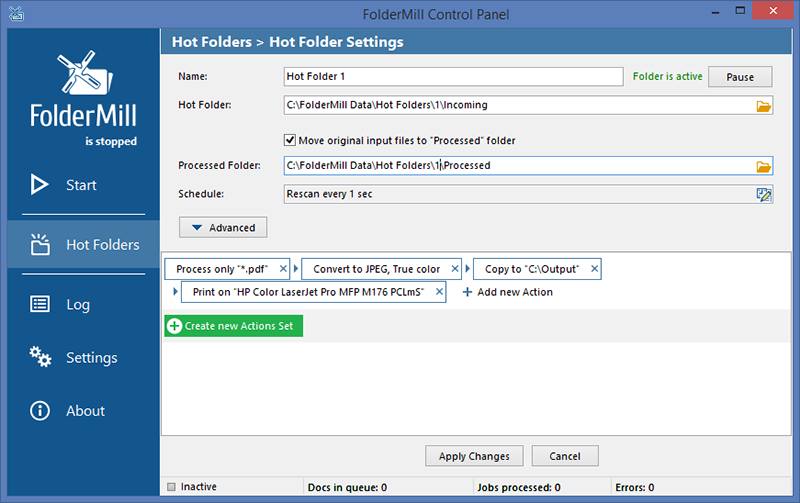
FolderMill monitors a folder and automatically prints or converts all new documents and image files to PDF, JPG, PNG, or TIFF. The system administrator defines special ‘Hot folders’ for monitoring and sets Actions to be performed. After this, all employees in the office can print documents or create PDFs as simple as copying files!

FolderMill supports all popular types of office documents including Microsoft Office Word files, RTF and plain text documents, Excel files, PowerPoint presentations, Visio drawings and charts, Microsoft Office Publisher and Adobe PDF files, XPS, JPG, PNG, PCX, DCX, Bitmap, GIF, TGA, TIFF images, and other documents.

FolderMill streamlines the conversion of all incoming files to PDF, JPG, PNG, or TIFF with very few efforts – simply place the files into one folder and take them out from another one!

To print or convert the documents all the company employees need to do is to place them into one of the ‘Hot Folders’. There is no need to open every file individually, just select the desired Action and configure its parameters.

What’s new in FolderMill 4.9:

– Processing of Word DOC, DOCX, RTF, SVG, and MHT files without Microsoft Word or OpenOffice
– New Zoom scaling mode for Print document Action
– New ways to print or convert emails with attachments
– Ability to save TIFF and JPEG images in grayscale mode
– Ability to change watermark position by Z-axis (Z-Order)
– Italian language localization
– New supported format: PRN (Microsoft Windows Print File)
– Improved Auto Crop feature for Convert to Image Action
– Improved HTML to PDF conversion
– Improved printing of Outlook MSG and EML files
– Improved component for processing AutoCAD DWG and DXF drawings
– The new version of eDrawings Viewer 2021 supported to process SolidWorks drawings
– Filter by filename Action now works faster
– Fixed ability to preserve native CMYK color space of input images
– Other fixes and improvements

AnyRec Screen Recorder for Mac 1.0.6

Type: Shareware
Cost: $14.50
Size: 29.82 MB
Release date: Sep 14 2021
Platform: Mac OS X,
Publisher’s Site:  https://www.anyrec.io/
Publisher’s Product Page:  https://www.anyrec.io/screen-recorder/
Country: Hong Kong


AnyRec Screen Recorder for Mac

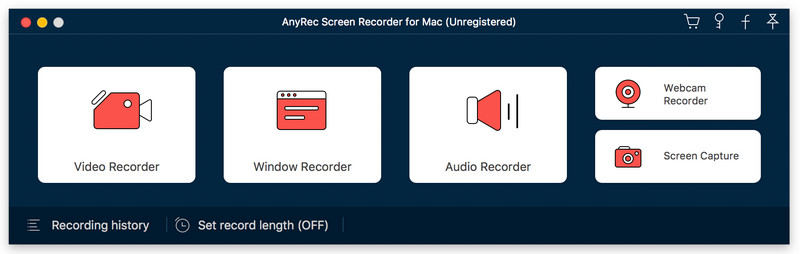
AnyRec Screen Recorder for Mac is a comprehensive screen recorder. You are able to record online videos and audio, meetings, gameplay and webcam freely. With it, you can capture any area into still Images.

Key functions:

1. Record online videos and take screenshots
AnyRec Screen Recorder for Mac is easy to use and can record high-quality videos for playback on the computer. You can also record meetings and Skype calls on your computer. It supports various formats, such as MP4, MOV, WMV, AVI, F4V, TS. In addition, you can capture any area into still Images.

2. Record audio
With AnyRec Screen Recorder for Mac, you are able to save the audio files you want to keep to other formats, such as MP3, M4A, AAC, WMA. In addition, it allows you to record system sound and microphone sound.

3. Record gameplay and webcam
AnyRec Screen Recorder for Mac is a great benefit for game lovers. It can record gameplay which you like. It can also record webcams. After recording, you can preview the recorded files and trim the recorded clips.

4. Mouse recording, save to GIFs and trim Recording Clips
With the mouse recording function, you could show mouse cursor, record mouse clicks and record mouse area in custom colors. With it, youre able to record the video and save it as an animated GIF. You can also preview and trim recorded video and audio clips with custom start and stop times freely.
