
Video Converter Ultimate for Mac 2.2.6

Type: Shareware
Cost: $55.20
Size: 113.72 MB
Release date: Oct 20 2021
Platform: Mac OS X,
Publisher’s Site:  https://www.apeaksoft.com/
Publisher’s Product Page:  https://www.apeaksoft.com/video-converter-ultimate/
Country: China
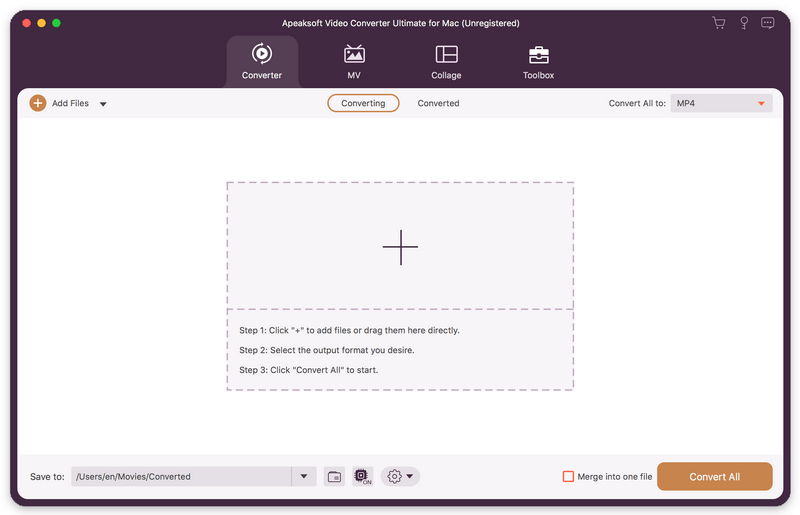

Video Converter Ultimate for Mac

PC410, Computer Services in Carroll County Maryland
Apeaksoft Video Converter Ultimate for Mac is able to convert media files to other popular formats like MP4, MOV, AVI, MP3, so that you can enjoy your videos on portable devices. Before conversion, you could edit video effects as you like.

Key functions:

1. Convert various media files and home-made DVD movies
Apeaksoft Video Converter Ultimate for Mac could convert all kinds of media files to other formats such as MP4, AVI, MKV, MOV, MXF, AAC, FLAC, M4A, WAV, etc. Moreover, it supports many portable devices, like Samsung, iPhone, etc. In addition, it could convert your home-made DVD disc/folder/ISO files to videos so that you could view them easily.

2. Make MV and Collage
The MV function in Apeaksoft Video Converter Ultimate for Mac enables you to make customized MV with various themes and edit the MV before exporting. The Collage function allows you to create collage with at most 13 videos and images.

Graphcat

3. Edit your videos before conversion
Apeaksoft Video Converter Ultimate for Mac is not only a video converter but also a video editor. With the powerful video editing function, you could rotate/crop/merge/trim your videos, adjust brightness, contrast, saturation and hue, select suitable filter, add watermark, choose audio track, add/edit subtitles, etc.

4. Edit media metadata, compress file, enhance video, make GIFs and 3D files Apeaksoft Video Converter Ultimate for Mac also provides some useful tools for users. You are able to edit the ID3 tag, compress large files to smaller size, enhance your videos. In addition, you could also make wonderful GIFs and create your own 3D files.

RationalPlan Multi Project for Linux 5.8

Type: Shareware
Cost: $149
Size: 44.01 MB
Release date: Oct 18 2021
Platform: Linux,Linux Console,Linux Gnome,Linux GPL,Linux Open Source
Publisher’s Site:  https://www.rationalplan.com/about/
Publisher’s Product Page:  https://www.rationalplan.com/on-premise/
Country: Romania


RationalPlan Multi Project for Linux

RationalPlan Multi Project by Stand By Soft is a powerful project management software designed to assist project managers in developing plans, allocating resources, tracking progress, managing budgets and analyzing workload.

If you are working in the area of construction, engineering, services&consulting, business, software development or even working on a simple student project then you can use RationalPlan. It will help you to complete your project as scheduled, on time and within budget.

If you have projects that are interrelated that is certain tasks from one project depend on other tasks from the other projects then you should opt in for a Multi Project version. Even more… you should choose a Multi Project version if you have resources that are working in multiple projects. Otherwise the Single Project version is enough.

Here are some key reasons for using RationalPlan Multi Project:
* concurrent management for multiple users by connecting to RationalPlan Project Server
* manage your company’s projects and share resources between them
* provides a clean way to break down your project, build schedules, allocate resources, and manage budgets
* get resources and finances under control (realistic cost estimates mechanisms, screening cash-flow time distribution for tasks and resources)
* gives you a step by step project guide that walks you through the project management process so you can lay down a project plan immediately
* different scenarios capability via multiple undo/redo levels will allow you to make changes and safely get back
* track project evolution regarding task’s completion, time and costs
* brings project’s critical issues to your attention

The application is covering project management area from WBS construction, project planning and scheduling to critical path management, overallocated resources detection, progress tracking, cost estimation etc.

Artworks Database 3.01

Type: Shareware
Cost: $145.25
Size: 6.00 kB
Release date: Dec 31 2020
Platform: Win2000,WinXP,Win7 x32,Win7 x64,Windows 8,Windows 10,WinServer,WinOther,WinVista,WinVista x64
Publisher’s Site:  http://www.galleryimage.com.au/
Publisher’s Product Page:  https://www.galleryimage.com.au/access-artwork-database.html
Country: Australia


Artworks Database

The Artworks database records detailed information about the artworks in your collection along with any number of images you would like to store. Easily record an artwork’s provenance, exhibition/publication history, along with past sale/ownership information.

The Artworks Database lets you link any number of documents or other electronic files such as catalogs, provenance documentation, and valuation directly with each artwork record. Never lose or misplace them again, and if you need to refer to a document, open it directly from within the artwork record.

The Artworks database also boasts a robust suite of reports to help you track and report on the collection, its value, and storage locations, sales, and many other aspects of artwork(s) and/or gallery management. Record the who, when, and where of artworks out on loan or consignment, and be alerted when they become overdue for return.

Use the Artworks database to create stunning catalogs of your works in just a few minutes. Once satisfied with your work attach the catalog to an email that can be sent out, personalize, and en-mass to your current and prospective clients using the built-in Bulk emailer. Marketing could not get any easier.

Never again pay expensive and ongoing monthly fees just to access your own information. When you purchase a license for the artworks database is yours to use for as long as you want. There is no more to pay and definitely no ongoing subscriptions.
