
Aiseesoft FoneTrans 9.1.68

Type: Shareware
Cost: $39.96
Size: 1.80 MB
Release date: Nov 04 2021
Platform: Win2000,WinXP,Win7 x32,Win7 x64,Windows 8,Windows 10,WinServer,WinOther,WinVista,WinVista x64
Publisher’s Site:  https://www.aiseesoft.com/
Publisher’s Product Page:  https://www.aiseesoft.com/ios-transfer/
Country: China
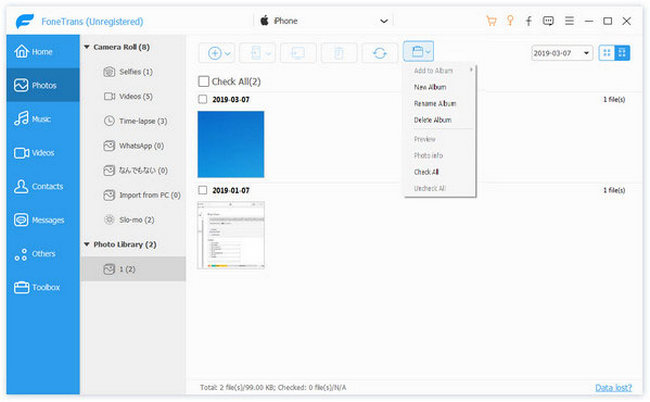

Aiseesoft FoneTrans

PC410, Computer Services in Carroll County Maryland
Aiseesoft FoneTrans is powerful iPhone transfer software, which does well in file transfer between iOS devices and computer. It can help you sync and manage photos, music, contacts, messages, videos, notes, calendars, Safari, eBooks and call log from iPhone/iPad/iPod. It’s compatible with the latest iOS 15. It also enables you to make iPhone ringtone and convert image format from HEIC to JPG/PNG and more. And now it enables you to rotate photos when previewing them.

Key Features:
1. Transfer file between iOS device and PC
FoneTrans can help you import video, music, photo and other media files from computer to iPhone/iPad/iPod for enjoyment anywhere and anytime. It also allows you to export files from iOS devices to computer/iTunes for backup.

2. Share files between iPhone/iPod/iPad
Apart from transferring files between computer and iOS devices, you are allowed to transfer files between any iOS devices for file sharing and the shareable files include music, movie, picture, TV show, Podcast, iTunes U, eBook, camera roll, ringtone, etc.

3. Back up iPhone SMS (MMS) and Contacts
With FoneTrans, you can copy SMS to PC for backup and they can be saved in excel, text or html format. Users can also back up the important contacts to PC in case of losing or damaging of their iDevice.

Graphcat

4. De-duplicate Function
To avoid repeated contacts/music, you can delete repeated ones or merge different contacts of the same person.

5. Ringtone Maker and HEIC Converter
In the toolbox, there are two other features that allow you to make ringtones for your iOS device at ease. You can also convert HEIC images to other common formats like JPG or PNG.

ToolsBaer EML to PST Conversion 1.0

Type: Shareware
Cost: $29
Size: 2.28 MB
Release date: Apr 01 2021
Platform: Win2000,WinXP,Win7 x32,Win7 x64,Windows 8,Windows 10,WinServer,WinOther,WinVista,WinVista x64
Publisher’s Site:  http://www.toolsbaer.com/
Publisher’s Product Page:  http://www.toolsbaer.com/eml-to-pst-conversion/
Country: United Kingdom


ToolsBaer EML to PST Conversion

Try this smart Toolsbaer EML to PST Converter for converting all your EML files into the Outlook PST format. The application does the conversion task smoothly without any obligation. Users try to convert their EML files into the Outlook PST format because EML formats are not supported by many clients whereas the PST format is supported by various email clients, therefore users have to convert their EML files into Outlook PST format so that they can use various email clients. this application provides a platform for the conversion of EML files for each and every user whether they are from a technical background or not. Even novice user can convert their files easily as the application provides a simple GUI interface for the users. It is an easy-to-handle application. The application is easy to set up, which means users can easily install or download the application in their local system and use it easily. In addition, it is an independent application that converts all your EML files into the Outlook PST format directly without facing any kind of problem. The users have an option to convert their entire EML files data into the PST format or can convert a single EML file by this amazing tool. Even the user can enter the unique name of the file and can save it according to their wish where they want the file to be saved. Proper scanning and previewing of data is also done by this remarkable tool so that an accurate result is provided to the user by the application .Although, users can download the free demo version of the application to check if the app really satisfies their desire or not. the demo version contains some files for conversion. If a user needs to convert unlimited files they need to buy the licensed version of the application as the licensed version gives the user an unlimited facility to convert their EML files into the Outlook PST format also a free lifetime update.

eWay-CRM 6.1.1.209

Type: Shareware
Cost: $28
Size: 243.79 MB
Release date: Apr 12 2021
Platform: Win2000,WinXP,Win7 x32,Win7 x64,Windows 8,Windows 10,WinServer,WinOther,WinVista,WinVista x64
Publisher’s Site:  http://www.eway-crm.com
Publisher’s Product Page:  https://www.eway-crm.com
Country: United States of America


eWay-CRM

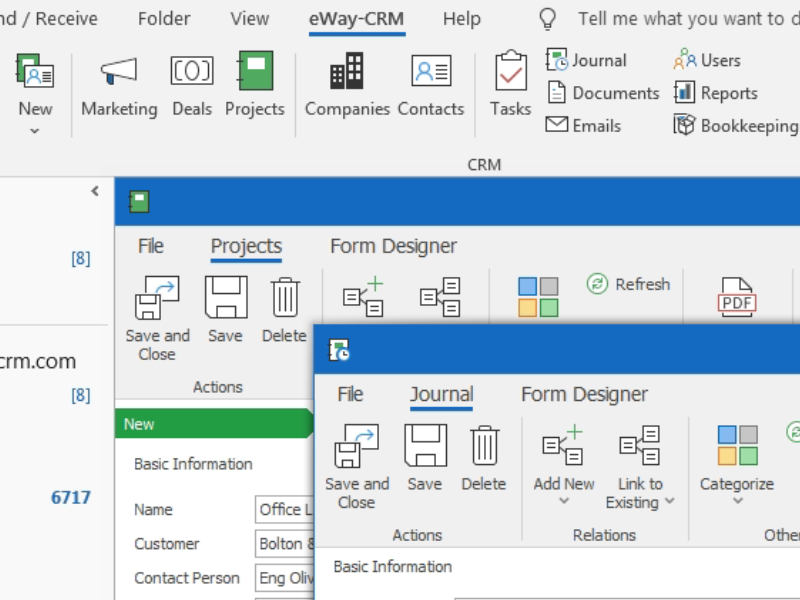
The best CRM for Outlook, available now on iOS / Android and as an online app. It helps manage Customers, Deals, Projects and Mail Merges.

AMAZING INTEGRATION WITH OUTLOOK
Turn your Outlook into professional CRM software. Work with the well-known environment, stay in one application and don’t switch between. Integrate Emails, Calendar, Tasks and Contacts.
Get your staff familiar with CRM, looks exactly like Microsoft Outlook. Give users a tool they already know and decrease your training costs.

iOS / ANDROID APPS PROVIDE DATA ON THE GO
Install the iOS / Android app on your smartphone and access data on the fly. Search your database, make notes, attach photos and set up reminders.

ALSO WORKS ONLINE
If you like Mac, use eWay-CRM Web. It’s an online app that allows you to use any device that’s by hand.

COMPANY AGENDA IN ONE PLACE
Contacts, Sales, Projects and Marketing Mail Merges available from your Outlook. Get the full communication history, attach documents, plan follow-ups, send bulk emails. Manage your pipeline, monitor life projects and let eWay-CRM send you reminders when needed.

DATA SHARING
Share your Outlook with other team members. Emails, Calendar, Contacts or Tasks. All saved data is instantly available for everyone’s access. Our CRM software also has an auto-tracking feature. When enabled, all your incoming and outgoing emails are automatically saved to eWay-CRM and organized by contacts / projects.

FULLY CUSTOMIZABLE
Customize eWay-CRM to your needs. Create grid reports, utilize advanced filter editor, save user views for later use.
Design your own forms, make as many custom fields as needed, customize workflows, set up user permissions. eWay-CRM has a built-in administration app that helps you tailor the software to your specific needs to ensure your team members will follow best practices.
