
Apeaksoft iPhone Transfer for Mac 2.0.28

Type: Shareware
Cost: $39.96
Size: 50.44 MB
Release date: Jul 14 2021
Platform: Mac OS X,
Publisher’s Site:  https://www.apeaksoft.com/
Publisher’s Product Page:  https://www.apeaksoft.com/iphone-transfer/
Country: China
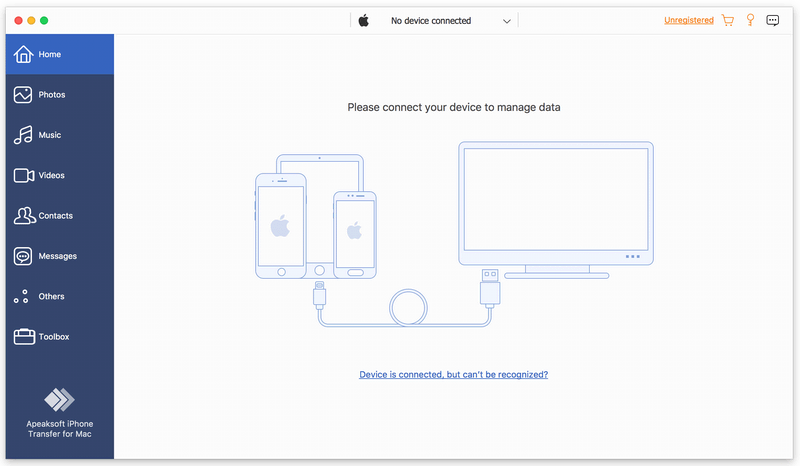

Apeaksoft iPhone Transfer for Mac

PC410, Computer Services in Carroll County Maryland
Apeaksoft iPhone Transfer for Mac is able to back up messages, contacts, pictures, music, videos, books, PDF and more between iOS device and Mac or between any two iOS devices. It supports all kinds of portable iOS devices, including iPhone/iPad/iPod touch, etc.

Key functions:

1. Transfer files flexibly
Apeaksoft iPhone Transfer for Mac is the most powerful file transfer software. It not only transfers data from iOS device to Mac, but also transfers files from iOS to iOS. What’s more, it lets you copy iOS data to iTunes easily.

2. Break iTunes limits
Apeaksoft iPhone Transfer for Mac can help you remove the restrictions caused by iTunes, for example, erase data while syncing, limited one-way transfer, copy all data without selection, various iTunes errors, no way of viewing data, etc. With Apeaksoft iPhone Transfer for Mac, you could transfer your data more quickly and conveniently without any limitation mentioned above.

Graphcat

3. Customize your iTunes library
Apeaksoft iPhone Transfer for Mac is the best iTunes replacement, which enables you to organize your iTunes library in clicks. You can manage your media files separately on Music, Movies, TV Shows, Podcasts, iTunesU, Ringtones, Audio Books and Voice Memos.

4. Make ringtone and convert HEIC pictures
With Apeaksoft iPhone Transfer for Mac, you could also make the ringtone according to your need. In addition, you could convert the photos in HEIC format to other common formats, so that you could view them on your portable devices.

WholeClear Exchange Recovery Software 1.0

Type: Shareware
Cost: $279
Size: 24.15 MB
Release date: Feb 12 2021
Platform: Win2000,WinXP,Win7 x32,Win7 x64,Windows 8,Windows 10,WinServer,WinOther,WinVista,WinVista x64
Publisher’s Site:  http://www.wholeclear.com/
Publisher’s Product Page:  http://www.wholeclear.com/exchange/
Country: United States of America


WholeClear Exchange Recovery Software

WholeClear Exchange Recovery Software gives you instant facility to recover EDB file items of Exchange Server all versions. The software smoothly recover all or desired items from corrupt EDB file. It offers several export options for recovered EDB file saving. Here are the formats in which recovered Exchange mailboxes can be saved PST, EML, MSG, RTF, vCard, HTML, etc. Also users can export Exchange EDB items to Office 365 and Live Exchange Server. The software is capable to recover deleted EDB items. Any oversized EDB file is supported to load for recovery by the tool. Entire data scanning and preview options are provided by the software. EDB Recovery process with this professional tool is easy for all users. The software offers instant results without any data losses. By recovering Exchange data items, users can save all attachments to a single folder. The resultant oversized PST file can be divided into parts based on size. There is complete protection to attachments and email formatting while recovering Exchange database. The data integrity and originality is well maintained throughout Exchange data recovery process. You can use filters and search options to make EDB file recovery process more easy and smoother. No loss of a single item throughout EDB data items recovery process. Multiple EDB files can be added for recovery with this professional tool. If you want to check the software, download the demo version of WholeClear Exchange Recovery Software and this will help you to recover 50 items per folder. Regardless of file size and number, EDB emails recovery with attachments is performed by the application. The software is installable smoothly on all versions of Windows such as Windows 10, 8.1, 8, 7, and others.

AnyMP4 DVD Creator 7.2.68

Type: Shareware
Cost: $35.00
Size: 1.79 MB
Release date: Sep 08 2021
Platform: Win2000,WinXP,Win7 x32,Win7 x64,Windows 8,Windows 10,WinServer,WinOther,WinVista,WinVista x64
Publisher’s Site:  https://www.anymp4.com
Publisher’s Product Page:  https://www.anymp4.com/dvd-creator/
Country: China


AnyMP4 DVD Creator

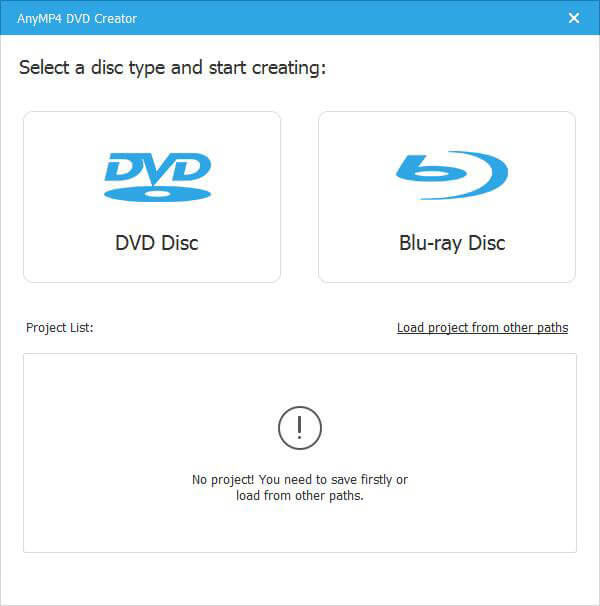
AnyMP4 DVD Creator is intended to create DVD disc, DVD folder and DVD ISO files from TS, MTS, M2TS, TRP, TP, MGP, MPEG, MPEG-2, MPA, VOB, DAT, MP4, M4V, RM, RMVB, WMV, ASF, MKV, AVI, 3GP, 3G2, FLV, SWF, F4V, MPV, MOD, TOD, QT, MOV, DV, DIF, MJPG, MJPEG, NSV, WEBM video formats. It supports DVD-5 (4.7GB), DVD-9 (8.5GB), and DVD format like DVD-R, DVD+R, DVD-RW, DVD+RW and DVD-RAM.

Key Features:

1. Create DVD from various video files.
Nearly all kinds of video can be burned into DVD disc, DVD folder or DVD ISO files, such as 3GP, AVI, DV, VOB, FLV, M2TS, MTS, SWF, MKV, MPG, MPEG, MPA, DAT, MP4, TS, NSV, MOV, QT, RMVB, etc.

2. Edit the source video.
AnyMP4 DVD Creator provides users with powerful video editing functions. With it, users can clip the video to any time length by setting the start and end time, cut off unwanted playing areas of the video to fit different portable players, personalize the video with the image or text watermarks, even adjust the video brightness, saturation, contrast, hue, and volume. Also, you can now add video filtering effect to video before burning.

3. Create stylish DVD menu.
This DVD Creator allows users to attach menus before burning. You can choose the menu template, select the menu frame, and button style, edit the menu text content, and define its font, size and color, even add the background picture and music.

4. Add and set audio track.
You can choose the audio track and add your own audio track or background music to the DVD. Users are also allowed to adjust the volume, and choose audio encoder, bitrate, and channels.
