BDGYsearches 4.8.0.5

Type: Shareware
Cost: $10
Size: 784.00 kB
Release date: Aug 01 2021
Platform: Win2000,WinXP,Win7 x32,Win7 x64,Windows 8,Windows 10,WinServer,WinOther,WinVista,WinVista x64
Publisher’s Site:  https://www.bdgysearches.com/abcguzis/ddpaulguzis.html
Publisher’s Product Page:  https://www.bdgysearches.com
Country: United States of America


BDGYsearches

PC410, Computer Services in Carroll County Maryland
BDGYsearches is a computer program that searches Bing, Duckduckgo, Google, or Yahoo for precise searches. It has the capability to search approximately forty search categories to obtain the desired result. It makes searching easy and effortless. It has the capability to search engines using the same criteria without any reentering of the search terms. It has a SUGGESTIONS feature to search if needed. BDGYsearches is the ultimate in searching the internet. It makes searching the internet so very, very easy. Some of the categories are, Site, search within a given domain, file type, IP address, site domain, definitions from pages, in the title, location, Bing near, source for the search, exact term, Google wild card, Google word in URL, BDG stocks, blogs for a given term, and many more categories. The programs has a Zoom Control, Spell Checker, and a special Address Search Bar. Pin BDGYsearches to the Windows desktop or task bar for easy searching over and over again.

Aiseesoft Mac FoneLab 10.2.50

Type: Shareware
Cost: $63.96
Size: 51.59 MB
Release date: Jul 04 2021
Platform: Mac OS X,
Publisher’s Site:  http://www.aiseesoft.com
Publisher’s Product Page:  https://www.aiseesoft.com/mac-iphone-data-recovery/
Country: China


Aiseesoft Mac FoneLab

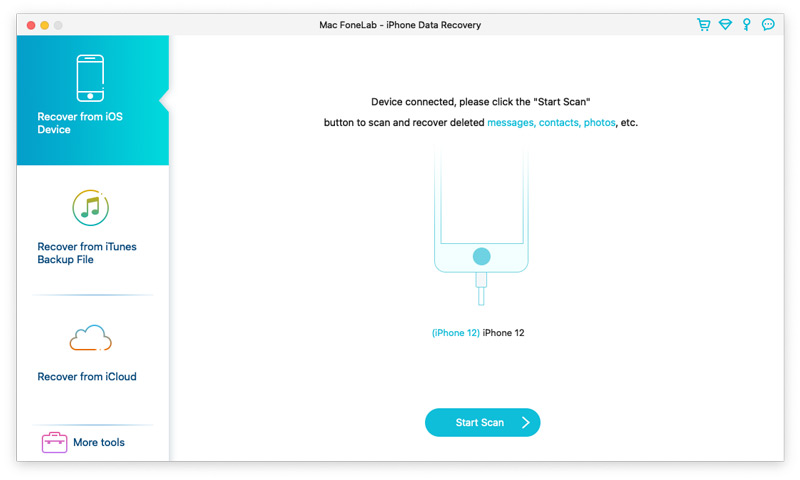
Aiseesoft Mac FoneLab is the best and easy-to-use software which can help users recover and back up various data to Mac from 12 Pro Max/12 Pro/12/12 mini, iPhone 11 Pro/11/XS/XS Max/XR/X/8/8 Plus, iPad Air, iPad mini 5, iPad 4, iPod touch 5, etc. It can also help users recover data from iTunes backup files. Besides, it supports various data such as Contacts, Messages, Call history, WhatsApp/Kik/Line/WeChat/QQ data, Calendar, Notes, Camera Roll, and Photo Stream, etc.
Key Functions:
1. Recover lost or deleted data from iOS devices directly
Recoverable data includes Contacts, Messages, Call history, Calendar, Notes, Reminder, Safari bookmark, Camera Roll, Photo Library, Photo Stream, Message attachments, Voice memos, WhatsApp data, Kik/Line/WeChat/QQ messages and photos, etc.

2. Regain data from iTunes/iCloud backup files
This Mac recovery software also enables you to recover lost data from iTunes/iCloud Backup for all Apple devices. Besides, it supports 11 types of files such as Contacts, Messages, Message attachments, Call history, Calendar and Notes, etc.

3. iOS System Recovery
This software also enables you to fix your iOS device from DFU mode, recovery mode, Apple logo, headphone mode, etc. to normal state. It also enables you to upgrade or downgrade iOS version.

4. iOS Data Backup & Restore
This software enables you to back up your iOS data to Mac and restore backup files (contacts and notes) to iOS device according to your need.

Graphcat

5. WhatsApp Transfer
The newly added WhatsApp Transfer feature can help users transfer WhatsApp data between iOS devices, back up WhatsApp messages, photos, videos, attachments, and restore WhatsApp from backup history or local iTunes backup. You can export WhatsApp backups in HTML and CSV formats.

Dancing Numbers 2020-R1.1

Type: Shareware
Cost: $199
Size: 18.24 MB
Release date: Aug 08 2021
Platform: Win2000,WinXP,Win7 x32,Win7 x64,Windows 8,Windows 10,WinServer,WinOther,WinVista,WinVista x64
Publisher’s Site:  https://www.dancingnumbers.com/
Publisher’s Product Page:  https://www.dancingnumbers.com/
Country: India


Dancing Numbers

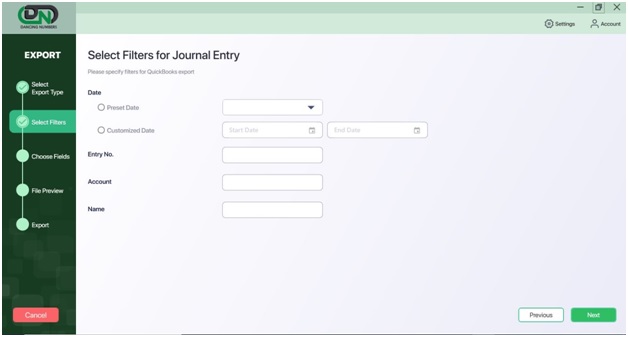
The Dancing Numbers software provides you the services of data import, export & delete your data from/to QuickBooks account. The software also provides you the 7 days free trial. It helps you do it both ways that are in bulk and in a single list or transactions. It supports .xlsx, which is the Microsoft Excel extension. All the files that you import are from Excel to QuickBooks and the files you export are from QuickBooks to Excel. The error happens when you provide the wrong information in the fields of software. You can do all these services in bulk also at 50 rows per process. The process to import, export, and deleting of the file is easy and the steps are also simpler than anyone can implement. To use all the services you have to open both the software QuickBooks and Dancing Numbers on your system. To import the data you have to update the file in the dancing numbers and then map the fields and then import the file. In the export process, you have to select the type you want to export like lists, transactions, and others. After that apply the filters, select the fields, and then do the export. In the Delete process, choose the file, lists, or transactions you want to delete then apply the filters on the file and then click on the Delete option. There are many features that help you import, export, and delete your data according to your requirements. The features that you get are also explained here so that you get the full information. It saves your time in the process of importing, exporting, or deleting the files to/from the QuickBooks account. You get all the updates of the software for free. There is a team that provides premium support to all the customers who are using the Dancing Numbers. Apply filter options for import and export processes when you run it in the software according to the file and your requirements. The benefits are also here that there are no human errors as it is an automatic process. Also, the software has the accuracy of data.