
Apeaksoft DVD Creator for Mac 1.0.30

Type: Shareware
Cost: $31.20
Size: 36.16 MB
Release date: Dec 07 2020
Platform: Mac OS X,
Publisher’s Site:  https://www.apeaksoft.com/
Publisher’s Product Page:  https://www.apeaksoft.com/dvd-creator/
Country: China
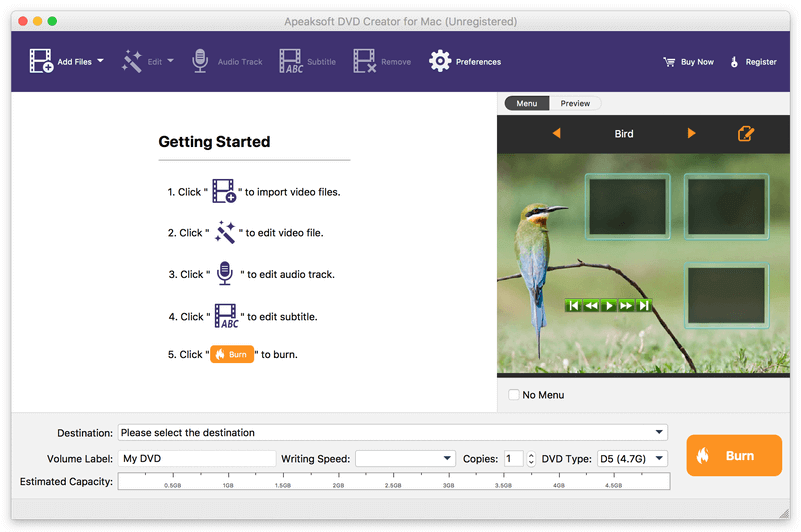

Apeaksoft  DVD Creator for Mac

PC410, Computer Services in Carroll County Maryland
Apeaksoft DVD Creator for Mac can create DVD/Blu-ray disc/folder/ISO files with all kinds of popular videos. Therefore, you can convert MP4 to DVD/Blu-ray, AVI to DVD/Blu-ray and other videos to DVD/Blu-ray. Moreover, it can help you add the audio track and subtitle. In addition, you can choose your preferred menu templates, frames and button styles and add the background music. Furthermore, you can trim the video length, crop the video frame and add watermark to the videos as you like.

Key functions:

1. Create DVD/Blu-ray with any video formats
Apeaksoft DVD Creator for Mac can help you burn DVD/Blu-ray disc/folder/ISO files with any video formats including MP4, AVI, WMV, MKV, MOV, M4V, MTS, etc.

2. Edit your DVD/Blu-ray
It is able to help you edit the video effect, such as trimming the video length, cropping the video frame, adding watermark to the video, adjusting the video effect.

Graphcat

3. Customize the DVD/Blu-ray menu
With this software, you can choose your favorite DVD/Blu-ray menu like frame/button/text style. Moreover, you can add background music, add background picture and browse opening film according to your needs.

4. Add audio track and subtitle
This software allows you to add the audio track as you like. Meanwhile, your preferred subtitles can also be added to the videos and you can choose its language, change its position, and set the delay, font size, its name and colors.

5. Fast speed and high quality
Apeaksoft DVD Creator for Mac can provide fast burning speed and high quality for you. You never need to wait for long time for the creation. Just a few minutes, you can enjoy your DVD/Blu-ray in your DVD/Blu-ray player.
Apeaksoft MobieTrans 2.0.32

Type: Shareware
Cost: $47.96
Size: 86.53 MB
Release date: Dec 10 2020
Platform: Win2000,WinXP,Win7 x32,Win7 x64,Windows 8,Windows 10,WinServer,WinOther,WinVista,WinVista x64
Publisher’s Site:  https://www.apeaksoft.com/
Publisher’s Product Page:  https://www.apeaksoft.com/mobietrans/
Country: China


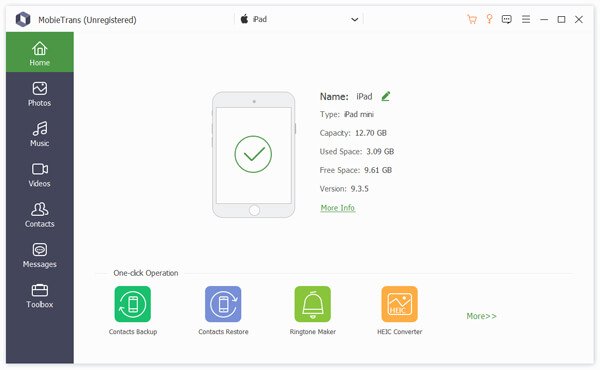
Apeaksoft MobieTrans

As the professional data transfer software, Apeaksoft MobieTrans can safely and easily copy data like photos, music, contacts, etc. between your two iOS devices or two Android devices. And you could also transfer files between Android and iOS. In addition, it is possible to transfer data between iOS/Android and computer. It supports many popular mobile phones like iPhone, iPad, iPod, Samsung, HTC, Huawei, etc.

Key functions:

1. Transfer files between iOS and Android devices
Apeaksoft MobieTrans is the best data transfer software which can help you transfer photos, contacts, videos, music and any other files between iOS and Android devices without any trouble.

2. Back up data between two Android devices or two iOS devices
With this software, you do not need to worry about copying data from your old device to new device, it can transfer the data like contacts, pictures, video/audio files between two Android devices or two iOS devices.

3. Transfer files between Android/iOS devices and computer
Apeaksoft MobieTrans enables you to import data from computer to your iOS/ Android devices according to your need. It also allows you to export your data from iOS/Android devices to computer.

4. Other features
This software also provides some small but useful features. For example, you can use it to make your own iPhone ringtone. And if the format of your photos is HEIC, our software could convert this format to JPG/JPEG/PNG so that you can view them on any portable devices.

MacX HD Video Converter Pro for Windows 5.16.2

Type: Shareware
Cost: $29.95
Size: 44.98 MB
Release date: Dec 01 2020
Platform: Win2000,WinXP,Win7 x32,Win7 x64,Windows 8,Windows 10,WinServer,WinOther,WinVista,WinVista x64
Publisher’s Site:  http://www.macxdvd.com/
Publisher’s Product Page:  http://www.macxdvd.com/macx-hd-video-converter-pro-for-windows/
Country: China


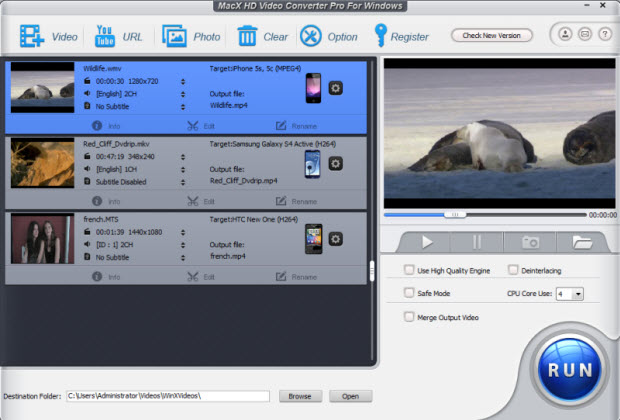
MacX HD Video Converter Pro for Windows

MacX HD Video Converter Pro for Windows (10) is the best HD video converter that enables you to convert videos among almost all video formats, including MKV,HEVC/H.265,, M2TS, AVCHD, MOD, TOD, MP4, AVI, WMV, FLV, etc for iPhone X/8/8 Plus/7, iPad Air/Air 2, iPad Mini 4/Mini with Retina, iPad Pro, iPod, HTC, Samsung, WP8, Surface, PS4, Xbox, etc with ultrafast speed (QSV Tech adopted) and perfect video quality. As an all-in-one video software, it also provides unparalleled ability to download YouTube video, upscale 1080P HD to 4K video, make photo slideshow and edit video with a few clicks.

Main Features:
1. Supports a heap of input videos, including MOD, TOD, TS/MTS/M2TS/AVCHD, VOB, AVI, WMV, MP4, FLV, MOV, 3GP, Xvid, DivX, etc.
2. Convert any video for playing on iPhone X/8/8 Plus/7, iPad Air/Air 2, iPad Mini 3/Mini with retina, iPad Pro, iPad Mini 4, iPod, HTC One, Galaxy Note 8, Galaxy S8, HTC One M9, Surface Pro 4, Xbox One, Huawei Mate 10, etc.
3. Convert any kinds of video to HEVC MP4 for better playback on iOS devices.
4. Download video (including 4K ultra HD video) from YouTube and convert YouTube to MP3, AVI, MP4, MOV, etc.
5. Create funny photo slideshow in formats like MP4, AVI, FLV, etc for editing, uploading or sharing.
6. Act as a functional Multi-track HD video converter, letting users freely select multi-track audio and video files.
7. Take advantage of QSV and CUDA/NVENC, Auto Copy mode, multi-core CPU use and High Quality Engine, delivering up to 16x faster video converting speed than before and flawless output video quality.
8. Fantastic video editing features, including trim, cut, crop, merge video files, add external SRT subtitles to video, etc.
9. Extract music from video files to make phone ring tones or take snapshot as computer wallpaper.
