Coolcut 1.4.0

Type: Freeware
Cost: $0
Size: 633.00 kB
Release date: Dec 04 2020
Platform: Win2000,WinXP,Win7 x32,Win7 x64,Windows 8,Windows 10,WinServer,WinOther,WinVista,WinVista x64
Publisher’s Site:  https://coolcut.tv/
Publisher’s Product Page:  https://coolcut.tv/
Country: China


Coolcut

PC410, Computer Services in Carroll County Maryland
1.4K ultra high-definition computer screencap to capture wonderful moments
2.Custom framerate and code rate of picture quality, perfectly record all popular games
3.Fast cutting and combination of video clips
4.Use picture-in-picture track to overlap multiple video clips
5.Convert text into a voice segment by one touch
6.Ultra high-definition recording online learning coursework preparation and online films
7.Accurate recording of microphone audios to add fine background music to the works
FaxTalk FaxCenter Pro 10.0.0.1625

Type: Demo
Cost: $59.95
Size: 23.85 MB
Release date: Dec 01 2020
Platform: Win2000,WinXP,Win7 x32,Win7 x64,Windows 8,Windows 10,WinServer,WinOther,WinVista,WinVista x64
Publisher’s Site:  https://www.faxtalk.com
Publisher’s Product Page:  https://www.faxtalk.com/faxtalk-faxcenter-pro-fax-software/
Country: United States of America


FaxTalk FaxCenter Pro

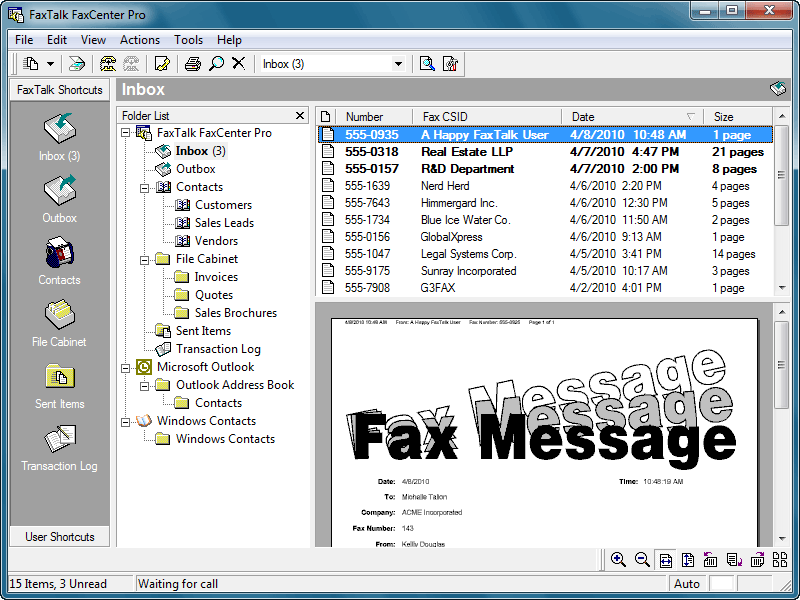
Easy to use send and receive fax software for Windows. FaxTalk FaxCenter Pro manages your incoming and outgoing fax communications quickly, efficiently, and reliably. Whether you’re a small business or an individual, FaxTalk FaxCenter Pro’s advanced send and receive fax features turn your computer into sophisticated fax machine and eliminates the need for a stand-alone fax machine. From a single application you can send, receive, view and print faxes, organize fax documents, create and manage contacts and phonebooks and control all fax operations.

Whether you are sending a fax to a single recipient or broadcasting faxes to multiple recipients the FaxTalk FaxCenter Pro fax software provides the features you need. Produce professional looking faxes, even combine multiple documents into a single fax, and broadcast faxes to multiple recipients with just a few mouse clicks. With the FaxTalk FaxCenter Pro fax software you can fax directly from Windows applications and utilize powerful features such as broadcast faxing, delayed scheduling, fax to email, access to contacts stored in Microsoft Outlook, Windows Address Book and Windows Contacts, fax markup and annotation tools, custom designed cover pages, scanner support, resend previously sent faxes and complete Distinctive ring and Caller ID support.

Receive faxes on your computer with features that save you time and money. Avoid printing unwanted faxes and view received faxes on screen, print a copy, or save the fax for future review. Automatically forward received faxes to an email address or another fax number. You can even have received faxes automatically forwarded to your Microsoft Outlook Inbox to create a unified messaging solution. You can also block the reception of unwanted, unsolicited "junk faxes".

Aiseesoft Mac FoneLab 10.2.26

Type: Shareware
Cost: $63.96
Size: 51.42 MB
Release date: Dec 08 2020
Platform: Mac OS X,
Publisher’s Site:  https://www.aiseesoft.com/
Publisher’s Product Page:  https://www.aiseesoft.com/mac-iphone-data-recovery/
Country: China


Aiseesoft Mac FoneLab

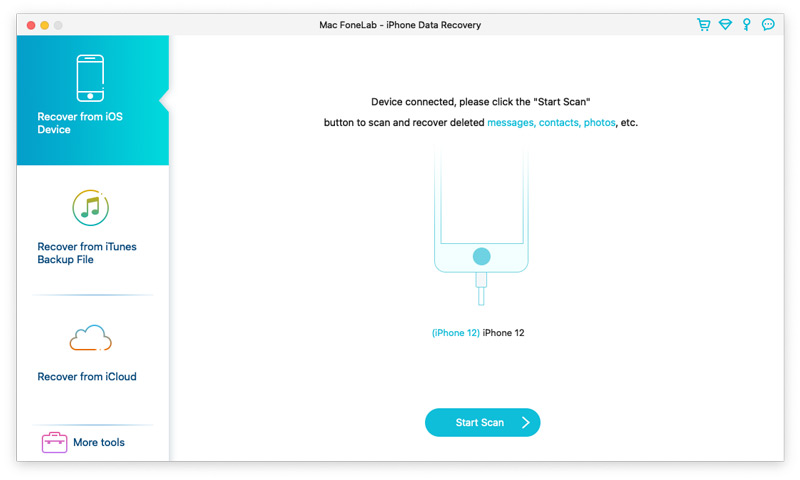
Aiseesoft Mac FoneLab is the best and easy-to-use software which can help users recover and back up various data to Mac from 12 Pro Max/12 Pro/12/12 mini, iPhone 11 Pro/11/XS/XS Max/XR/X/8/8 Plus, iPad Air, ipad mini 2, iPad 4, iPod touch 5, etc. It can also help users recover data from iTunes backup files. Besides, it supports various data such as Contacts, Messages, Call history, Whatsapp/Kik/Line/WeChat/QQ data, Calendar, Notes, Camera Roll, and Photo Stream, etc.
Key Functions:
1. Recover lost or deleted data from iOS devices directly
Recoverable data includes Contacts, Messages, Call history, Calendar, Notes, Reminder, Safari bookmark, Camera Roll, Photo Library, Photo Stream, Message attachments, Voice memos, Whatsapp data, Kik/Line/WeChat/QQ messages and photos, etc.

2. Regain data from iTunes/iCloud backup files
This Mac recovery software also enables you to recover lost data from iTunes/iCloud Backup for all Apple devices. Besides, it supports 11 types of files such as Contacts, Messages, Message attachments, Call history, Calendar and Notes, etc.

3. iOS System Recovery
This software also enables you to fix your iOS device from DFU mode, recovery mode, Apple logo, headphone mode, etc. to normal state. It also enables you to upgrade or downgrade iOS version.

4. iOS Data Backup & Restore
This software enables you to back up your iOS data to Mac and restore backup files (contacts and notes) to iOS device according to your need.

Graphcat

5. WhatsApp Transfer
The newly added WhatsApp Transfer feature can help users transfer WhatsApp data between iOS devices, back up WhatsApp messages, photos, videos, attachments, and restore WhatsApp from backup history or local iTunes backup. You can export WhatsApp backups in HTML and CSV formats.