
Apeaksoft iPhone Transfer 2.0.28

Type: Shareware
Cost: $39.96
Size: 66.75 MB
Release date: Oct 20 2020
Platform: Win2000,WinXP,Win7 x32,Win7 x64,Windows 8,Windows 10,WinServer,WinOther,WinVista,WinVista x64
Publisher’s Site:  https://www.apeaksoft.com/
Publisher’s Product Page:  https://www.apeaksoft.com/iphone-transfer/
Country: China

Apeaksoft iPhone Transfer

PC410, Computer Services in Carroll County Maryland
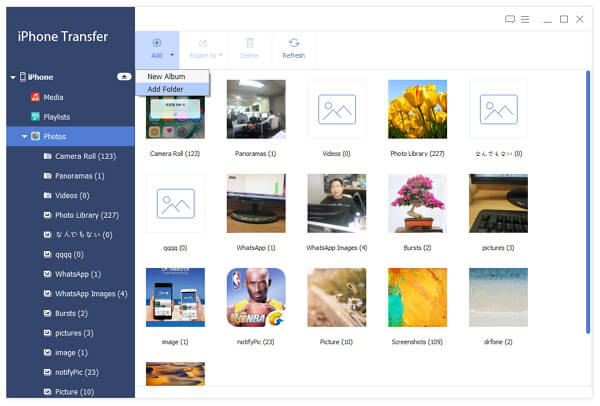
Apeaksoft iPhone Transfer is the first-granted data transfer software which does well in file transfer between iOS devices and computer. It can transfer videos, music, photos and any other multimedia files from computer to iOS device, including iPhone 11/11 Pro/11 Pro Max/XS/XS Max/XR/X/8/8 Plus/7/6 Plus, iPad mini 3/2 and iPod, etc. Even if the video/audio files are incompatible with your devices, it can convert these video/audio files automatically before transferring. In addition, it enables you to back up contacts and SMS to your computer and transfer files between any two iOS devices.

Key functions:

1. Transfer files
It is flexible file transfer software which not only transfers files from iOS to computer, but also transfers data between two iOS devices. Moreover, it lets you manage data between iTunes and iOS devices.

2. Best iTunes alternative
Apeaksoft iPhone Transfer is the best iTunes replacement, which enables you to organize your iTunes library in clicks. You can manage your media files separately on Music, Movies, TV Shows, Podcasts, iTunesU, Ringtones, Audio Books and Voice Memos.

Graphcat

3. Manage iOS files
This powerful iOS data transfer software is superior to iTunes, because it does more than iTunes do for you. You can manage your iOS music, videos, ringtones, single contact or group contacts, etc. You can also edit media files like deleting, renaming, creating playlists, etc.

4. Make ringtone and convert HEIC pictures
Apeaksoft iPhone Transfer could not only transfer various data but also make ringtones easily. You could make your own ringtones and add the created ringtone to device directly. In addition, it is able to convert the HEIC pictures to other common formats.
Apeaksoft iPhone Data Recovery for Mac 1.1.80

Type: Shareware
Cost: $31.96
Size: 52.93 MB
Release date: Dec 10 2020
Platform: Mac OS X,
Publisher’s Site:  https://www.apeaksoft.com/
Publisher’s Product Page:  https://www.apeaksoft.com/iphone-data-recovery/
Country: China


Apeaksoft iPhone Data Recovery for Mac

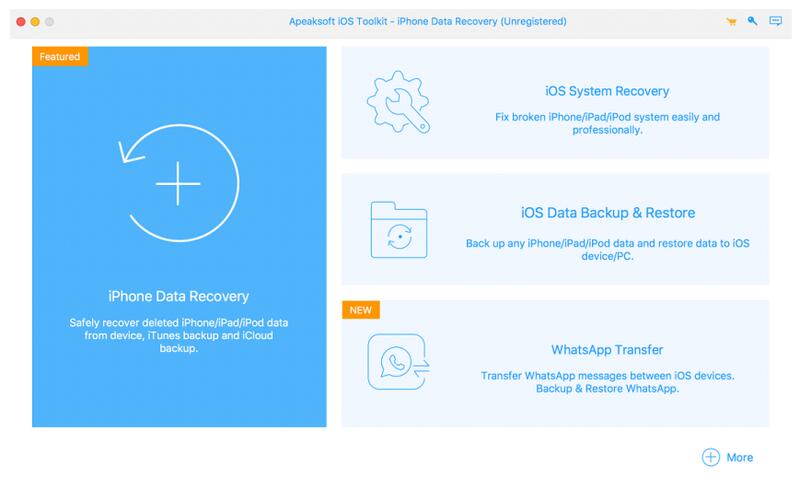
Apeaksoft iPhone Data Recovery for Mac can recover lost Messages, Contacts, Call History, Notes, QQ/Wechat data, Photos, etc. from iOS devices or from iTunes/iCloud backup files. It supports many portable iOS devices, including iPhone/iPad/iPod, etc.

Key functions:

1. Recover lost data from iOS devices
If you want to recover lost data such as Contacts, Messages, Call history, Notes, Photos, Voice memos, QQ/Wechat data, media content of Line/Kik/Viber, etc. from your iOS devices, Apeaksoft iPhone Data Recovery for Mac could do you a favor. It could recover lost data from iPhone/iPad/iPod, etc.

2. Recover data from iTunes backup files/iCloud
Apeaksoft iPhone Data Recovery for Mac can recover lost data as long as your device has been backed up with iTunes/iCloud. So even you lose your data, with it, you are able to get your lost data back conveniently.

3. Back up iOS data and restore the data
The iOS Data Backup and Restore function can help you back up your iOS data to computer in one click and you could also restore your data to iOS device or computer without any hassle.

4. iOS System Recovery function
iOS System Recovery function can help you fix your iOS system back to normal state in various situations including stuck in recovery/DFU mode, white Apple logo, black screen, looping on start, etc. What is more, this part also enables you to upgrade or downgrade the iOS device system.

5. Transfer WhatsApp data
With the WhatsApp Transfer function, you could transfer your WhatsApp data between two iOS devices. In addition, you are able to back up WhataApp data to computer and restore the backed up data to device.

Mirror Backup 1.0

Type: Shareware
Cost: $5
Size: 14.02 MB
Release date: Dec 29 2020
Platform: Win2000,WinXP,Win7 x32,Win7 x64,Windows 8,Windows 10,WinServer,WinOther,WinVista,WinVista x64
Publisher’s Site:  http://www.Gammadyne.com
Publisher’s Product Page:  https://www.mirrorbackup.net/mirror_backup.htm
Country: United States of America


Mirror Backup

Mirror Backup protects from data loss by continuously monitoring files and folders, and backing them up to the cloud, local drive, or network share when they change. It does this in a background service that does not require a user to be logged in – perfect for company servers. It can also keep incremental backups, when you want a history of each file’s changes. In some situations, this design is more desirable than whole-disk backups. And if the worst should happen, you can restore a backup with just a few clicks.
