
Tipard DVD Cloner 6.2.56

Type: Shareware
Cost: $29.75
Size: 20.08 MB
Release date: Dec 01 2020
Platform: Win2000,WinXP,Win7 x32,Win7 x64,Windows 8,Windows 10,WinServer,WinOther,WinVista,WinVista x64
Publisher’s Site:  https://www.tipard.com/
Publisher’s Product Page:  https://www.tipard.com/dvd-cloner-6.html
Country: China

Tipard DVD Cloner

PC410, Computer Services in Carroll County Maryland
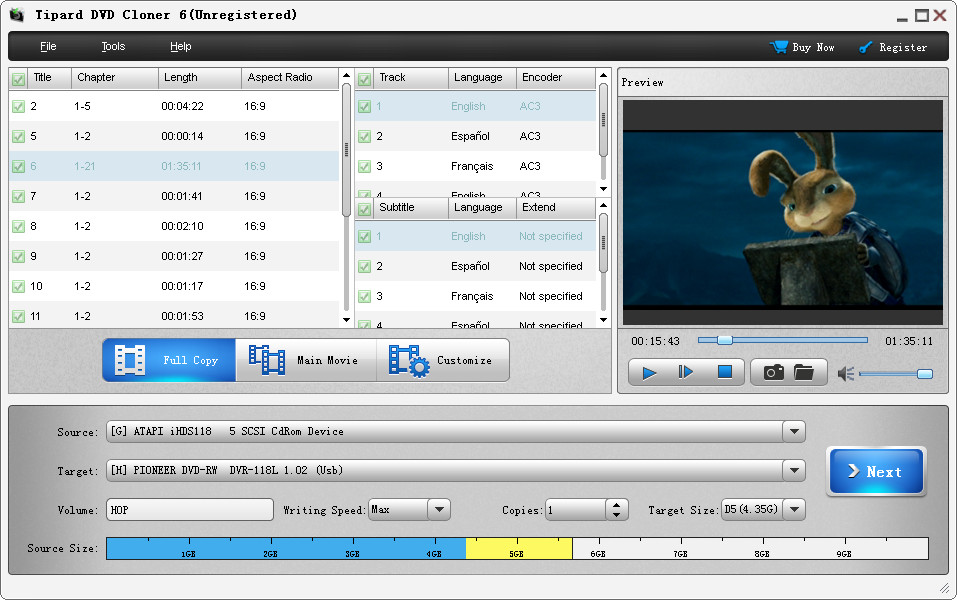
Tipard DVD Cloner allows to your copy DVD disc to DVD disc, such as DVD-9 to DVD-9, DVD-5 to DVD-5, DVD-9 to DVD-5. Besides, it also enables you to back up DVD disc to local computer as DVD folder or ISO files. Meanwhile, it can also copy local DVD folder or ISO files to your DVD disc. What’s more, you can select Full Copy, Main Movie or Customize as your copy mode. Moreover, you are able to choose your preferred audio track and add downloaded subtitle to the video file. It is compatible with Windows 10.

Key functions:
1. Clone and Back up DVD disc
Tipard DVD Copy can clone DVD disc to DVD Disc exactly in 1:1 ratio with all their contents. For instance, you are able to copy DVD-9 to DVD-5, DVD-9 to DVD-9, DVD-5 to DVD-5 with the best quality.

2. Copy DVD Disc to DVD folder/ISO files
This DVD Cloner allows you to back up and copy DVD disc to DVD folder or ISO file on your PC. Meanwhile, you can copy local DVD folder or ISO file to DVD disc losslessly.

3. More Copy Modes for you
Tipard DVD Cloner has three copy modes for you to select, they are Customize, Full Mode and Main Movie. You can choose whatever you like and you can copy any parts in the DVD according to your own requirements.

Graphcat

4. Choose volume and size
You can select a perfect volume and a fitful size like DVD 5 or DVD 9 for the target DVD disc. So you can make the best choice according to the condition of your DVD. With Tipard DVD Cloner, you can get the best copy results.
DataNumen Word Repair 3.5

Type: Shareware
Cost: $89.95
Size: 7.08 MB
Release date: Nov 02 2020
Platform: Win2000,WinXP,Win7 x32,Win7 x64,Windows 8,Windows 10,WinServer,WinOther,WinVista,WinVista x64
Publisher’s Site:  https://www.datanumen.com
Publisher’s Product Page:  https://www.datanumen.com/word-repair/
Country: Hong Kong


DataNumen Word Repair

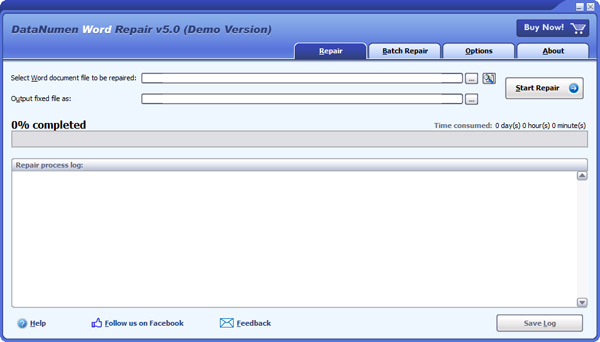
DataNumen Word Repair is a powerful Word document recovery tool. It uses advanced technologies to scan the corrupt or damaged Word documents (doc and docx files) and recover your data in them as much as possible, so to minimize the loss in file corruption.

Main features:
1.Support to repair Microsoft Word 6.0, 95, 97, 2000, XP, 2003, 2007, 2010, 2013, 2016, 2019 and Word for Office 365 documents.
2.Support to recover text, images and formatting in Word documents.
3.Support to recover tables.
4.Support to recover bulleted or numbered lists.
5.Support to recover formatting and hyperlinks.
6.Support to fix Word doc files on corrupted medias, such as floppy disks, Zip disks, CDROMs, etc.
7.Support to repair a batch of Word doc and docx files.
8.Support to find and select the Word documents to be repaired on the local computer.
9.Support integration with Windows Explorer, so you can fix a doc and docx file with the context menu of Windows Explorer easily.
10.Support drag & drop operation.
11.Support command line parameters.

MOOS Project Viewer for Mac 4.0.1

Type: Shareware
Cost: $25
Size: 54.14 MB
Release date: Jun 15 2020
Platform: Mac OS X,
Publisher’s Site:  https://www.moosprojectviewer.com/
Publisher’s Product Page:  http://www.moosprojectviewer.com/
Country: Romania


MOOS Project Viewer for Mac

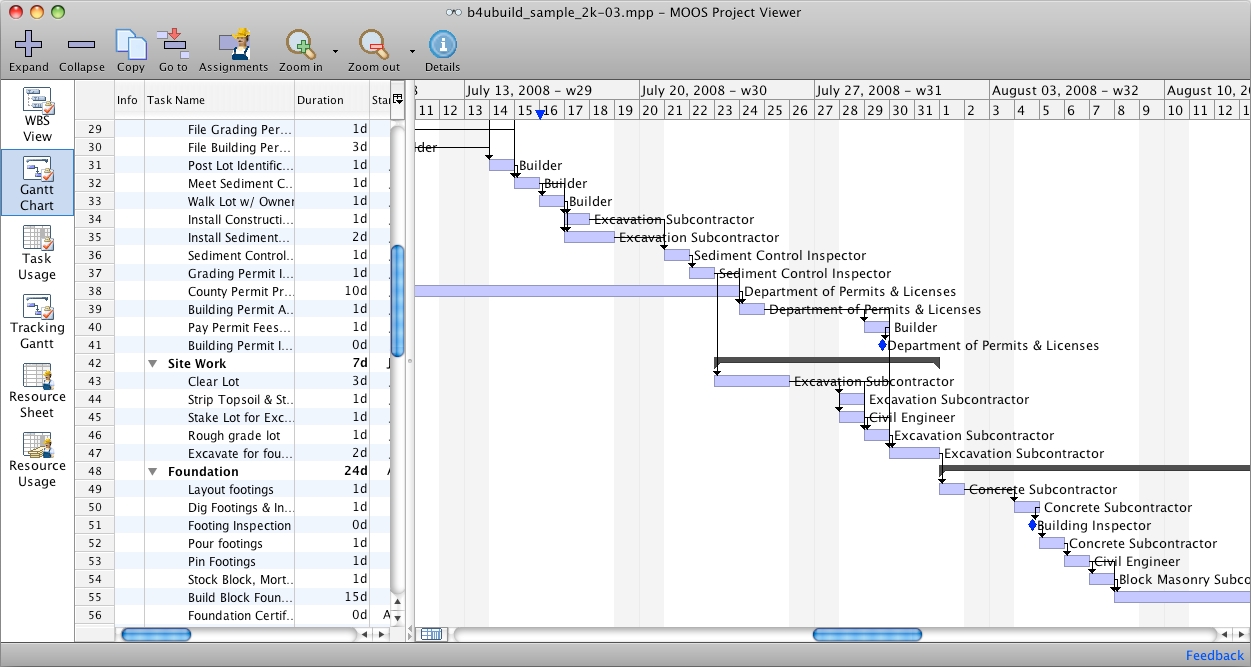
MOOS Project Viewer is a Microsoft Project viewer that can open any MS Project file type (.mpp, .mpt, .mpx, .xml) for any Microsoft Project version (2000, 2003 2007, and 2010). Available views: WBS, Gantt chart, task sheet, resource sheet, resource usage.

It is running on any Java enabled platform including Windows, Mac OS X and Linux and it is the perfect solution for project stakeholders to view the project details in a dynamic way. No need to work with printed materials or static reports in different formats (html, pdf, excel, etc.). Using MOOS Project Viewer you get the possibility to see project details that no other report can give you. You can zoom in/out, collapse/expand, show/hide, resize, etc. Hence you get a powerful tool with a strong configuration to view any Microsoft Project file.

Why do you need a Microsoft Project viewer?

If you receive a file generated with MS Project and you don’t have Microsoft Project and you only need to view it then you need a Microsoft Project viewer. This will help you save money. There are many viewers on the market: some freeware and some commercial but only some of them are really good. MOOS Project Viewer has the best Microsoft Project viewer value/price ratio.

What do you get by using MOOS Project Viewer?

* Open any and all Microsoft Project files (mpp, mpt, xml) and Microsoft Project versions (2000, 2003, 2007)
* No need to have MS Project installed on your computer
* Easy to use interface (easier that with Microsoft Project)
* Available views: Gantt Chart, Task Sheet, Resource Sheet, Resource Usage, Tracking Gantt
* Print any view
* Wide Gantt chart timescale range (from minutes to years)
* Show critical path, deadlines and baselines in Gantt chart
* Show/hide, arrange and resize columns per view and keep settings
* Running on multiple platforms (Windows, Mac OS X, Linux)
* 24 hours support
* free updates
