BestCrypt Volume Encryption 4.24.01

Type: Shareware
Cost: $117
Size: 12.85 MB
Release date: Apr 02 2020
Platform: Win2000,WinXP,Win7 x32,Win7 x64,Windows 8,Windows 10,WinServer,WinOther,WinVista,WinVista x64
Publisher’s Site:  https://www.jetico.com
Publisher’s Product Page:  https://www.jetico.com/products/personal-privacy/bestcrypt-volume-encryption
Country: Finland


BestCrypt Volume Encryption

PC410, Computer Services in Carroll County Maryland
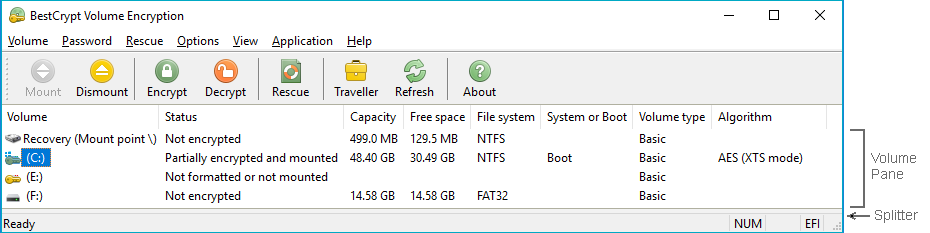
BestCrypt Volume for Disk Encryption protects all data on all types of volumes residing on fixed and removable disks – simple volumes, mount points, multipartition volumes (spanned, mirrored, striped, RAID-5), while also working on UEFI and GPT partitions. Jetico’s encryption software provides protection from physical threats – such as lost computers and USB sticks – to protect your privacy and comply with regulations (HIPAA, PCI). BestCrypt Volume Encryption utilizes a wide variety of algorithms (AES, Twofish, Serpent) and the largest possible key sizes with XTS, LRW encryption modes. By working with volumes, Jetico’s disk encryption is the best TrueCrypt alternative.
Disk encryption features:
– Encrypt system and boot volumes
– Support for UEFI-based computers, including secure boot
– Encrypt RAID and all types of volumes residing on fixed and removable disks
– Pre-boot authentication
– Support for Tokens for secure hardware storage of encryption keys
– Two-factor authentication with removable disk drives
– User-friendly encryption
– Option to boot encrypted volumes only from trusted network
– Support for Trusted Platform Module (TPM) for unattended reboot
– Secure hibernation
– Rescue functions to decrypt volumes in emergency case
– Central management for deployment, monitoring, encryption policy distribution and password recovery (Enterprise Edition only)
UFS Explorer Standard Recovery 8.6

Type: Shareware
Cost: $64.95
Size: 16.14 MB
Release date: Sep 25 2020
Platform: Win2000,WinXP,Win7 x32,Win7 x64,Windows 8,Windows 10,WinServer,WinOther,WinVista,WinVista x64
Publisher’s Site:  https://www.sysdevlabs.com
Publisher’s Product Page:  https://www.ufsexplorer.com/ufs-explorer-standard-recovery.php
Country: Ukraine


UFS Explorer Standard Recovery

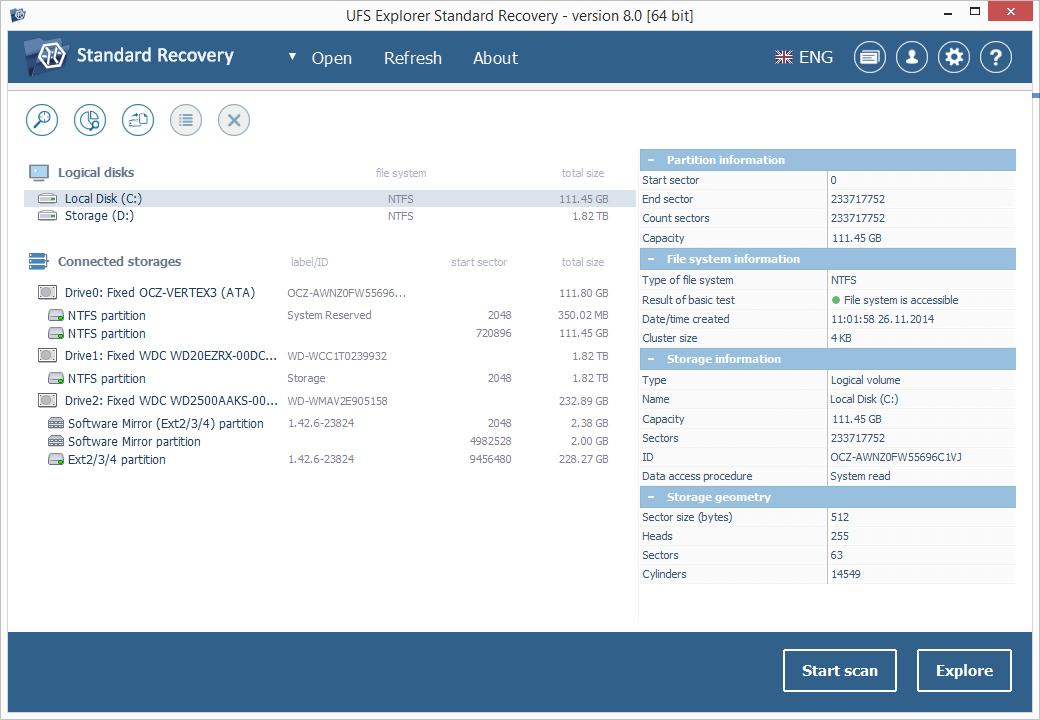
UFS Explorer Standard Recovery embraces sophisticated techniques that make it easy to recover accidentally deleted files and data lost due to logical damage after disk formatting, hardware or software crashes, malware attacks, etc. The program supports a wide range of file systems used in different environments, including Windows (FAT/FAT32/exFAT and NTFS), macOS (APFS, HFS+), Linux (XFS, Ext2, Ext3, Ext4, Linux JFS, ReiserFS, UFS/UFS2, big-endian UFS, Btrfs) and BSD/Solaris (UFS, simple ZFS volumes). Spanned volumes created with mdadm, LVM, Apple Disk Utility, LDM and others are automatically recognized and assembled by the software, without any additional user actions required. The application is capable of restoring files from different devices, like your PC, USB flash drive, memory card of a photo/video camera, external hard drive, etc. In addition to that, it effectively works with disk images and virtual disks created by major virtualization software, like VMware, Hyper-V, VirtualBox, performing equally successful data recovery from both physical and virtual storages. Moreover, the application is enhanced with various supplementary possibilities. It offers an advanced file search and filters, allows previewing files of common types and sorting them by different criteria. Furthermore, the utility enables the user to select the method of disk access and define a timeout for cases when reading fails due to an I/O device error. The embedded disk imager allows adjusting the imaged area and such parameters as reading timeout, block size, direction, protocol, etc. A set of rules can also be specified for skipping damaged blocks. UFS Explorer Standard Recovery applies the most advanced algorithms to scan the device for lost data and recovers lost and deleted files while working in a safe read-only mode which prevents any modifications to the initial storage content.

Print Conductor 7.1

Type: Freeware
Cost: $0
Size: 104.34 MB
Release date: Oct 19 2020
Platform: Win2000,WinXP,Win7 x32,Win7 x64,Windows 8,Windows 10,WinServer,WinOther,WinVista,WinVista x64
Publisher’s Site:  https://www.fcoder.com
Publisher’s Product Page:  https://www.print-conductor.com/
Country: Latvia


Print Conductor

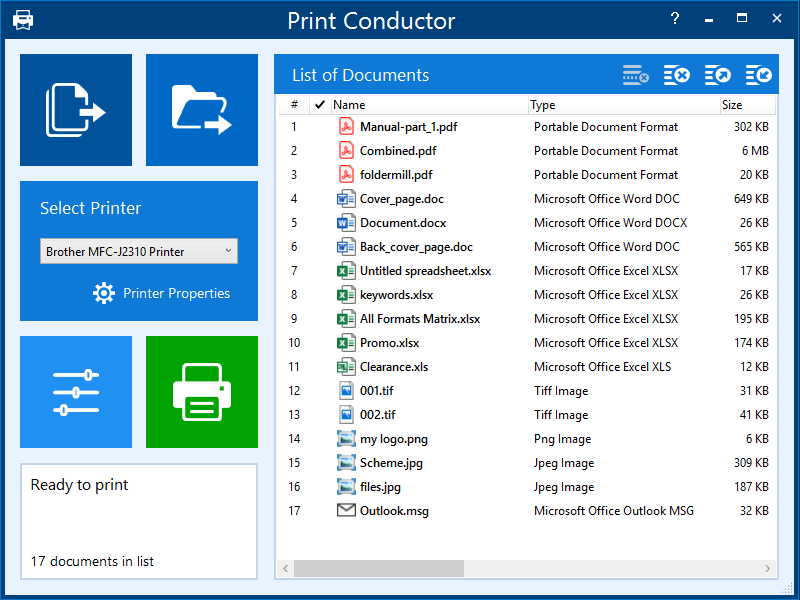
Print Conductor is a batch printing software. If you regularly have to open and print multiple files, this smart tool can be a real time-saver.

Manually printing several files is tedious work – it generally requires opening and printing each file separately in the applications used to create them. Once you tell it which files to print, Print Conductor automates the rest of the process.

Print Conductor is easy to use. Just add files to be printed to the list and click the ‘Start Printing’ button.

All popular file formats are supported: PDF files, plain texts, Microsoft Office and OpenOffice documents and presentations, RTF, HTML, MHT, XML files, AutoCAD, Solidworks and Inventor drawings, Visio charts, Photoshop PSD, JPG, TIFF, PNG, PCX, DCX, BMP and JBIG images, WMF and EMF metafiles.

Graphcat

Print Conductor can batch print large quantities of documents on any type of printer: desktop printers, network printers or virtual printers. If you select Universal Document Converter as a virtual printer to use with Print Conductor, you can batch convert a list of documents, presentations, worksheets or drawings to a variety of other formats: PDF, TIFF, JPEG, PNG, GIF, PCX, DCX, or BMP.

What’s new in version 7.1:
– New post processing actions: move, copy or delete files after printing
– New custom page zoom feature
– Print headings of Excel spreadsheets
– New supported file types: iCalendar (ICS), Adobe InDesign INDD, KOMPAS-3D, obsolete DOC and XLS
– Keeping source files available for editing when printing
– Opening Detailed Report when the session is paused
– Loading files from selected folders at start-up
– Printing cover pages only
– Printing TXT files in "direct" mode
– Color background for text watermark
– New text watermark macro that adds item number
– Ability to change print job name when printing in Single print job mode
– Using different input printer trays in Single print job mode
– Other improvements