Category Archives: System Utilities

Automation Tools, Backup & Restore, Benchmarking, Clipboard Tools, File & Disk Management, File Compression, Launchers & Task Managers, Other, Printer, Registry Tools, Shell Tools, System Maintenance, Text/Document Editors

WindowManager 4.5.0

Type: Shareware
Cost: $10.00
Size: 737.00 kB
Release date: Feb 03 2017
Platform: Win2000,WinXP,Win7 x32,Win7 x64,Windows 8,Windows 10,WinServer,WinOther,WinVista,WinVista x64
Publisher’s Site:  http://www.desksoft.com
Publisher’s Product Page:  http://www.desksoft.com/WindowManager.htm
Country: Austria

WindowManager

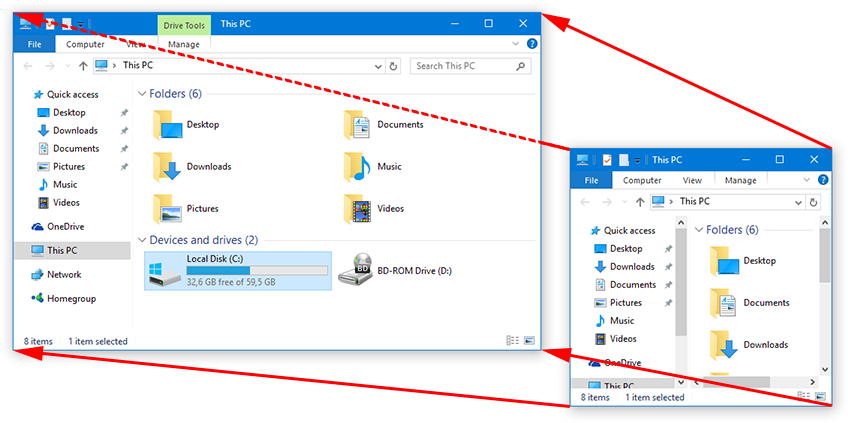
WindowManager helps you to improve your work flow by remembering and restoring the position and size of your programs and windows. Many programs don’t remember their position and size between sessions and even Windows Explorer does not restore windows to their last position under Windows 7 or higher. This is where WindowManager steps in and makes sure your windows are placed exactly where you want them every time you open them. WindowManager even allows you to lock the position and size of any window, so that it will always open at the same spot no matter where you move it. The window handling is fully customizable and you can set up special rules for your favorite or most frequently used windows. You can also make WindowManager send keystrokes or mouse-clicks to a program when its window is opened, run additional programs and other advanced actions. With WindowManager, you can also minimize most windows to the system tray.

Graphcat<

ScrollNavigator 5.4.0

Type: Shareware
Cost: $10.00
Size: 738.00 kB
Release date: Jan 31 2017
Platform: Win2000,WinXP,Win7 x32,Win7 x64,Windows 8,Windows 10,WinServer,WinOther,WinVista,WinVista x64
Publisher’s Site:  http://www.desksoft.com
Publisher’s Product Page:  http://www.desksoft.com/ScrollNavigator.htm
Country: Austria


ScrollNavigator

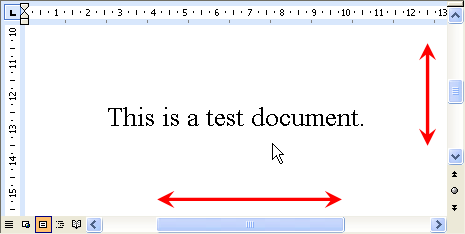
ScrollNavigator helps you to scroll your documents horizontally and vertically. Simply click and hold down the right (or the middle) mouse button anywhere in a window and move the mouse to scroll the window contents. This saves you the trouble of positioning the mouse cursor over a scroll bar and it allows scrolling both directions at the same time. ScrollNavigator works with all windows that have standard scroll bars (e.g. all office programs, explorer windows and most other applications). ScrollNavigator also adds dynamic acceleration to your mouse wheel. This indispensable feature makes mouse wheel scrolling more accurate when you turn the wheel slowly, and it scrolls your documents much faster when you turn the wheel quickly. Try it out and see how wheel acceleration will make your work much more efficient and enjoyable. Turning the mouse wheel will scroll the window under the mouse cursor instead of the one with the focus, so there is no need for clicking inside the window first, anymore. The back, forward and middle buttons of the mouse can also be customized and sent directly to the window under the mouse cursor.

WinSleep by MollieSoft 1.4.2.0

Type: Shareware
Cost: $14.95
Size: 1.22 MB
Release date: Jan 08 2017
Platform: Win2000,WinXP,Win7 x32,Win7 x64,Windows 8,Windows 10,WinServer,WinOther,WinVista,WinVista x64
Publisher’s Site:  http://www.molliesoft.com
Publisher’s Product Page:  http://www.molliesoft.com/winsleep
Country: United States of America


WinSleep by MollieSoft

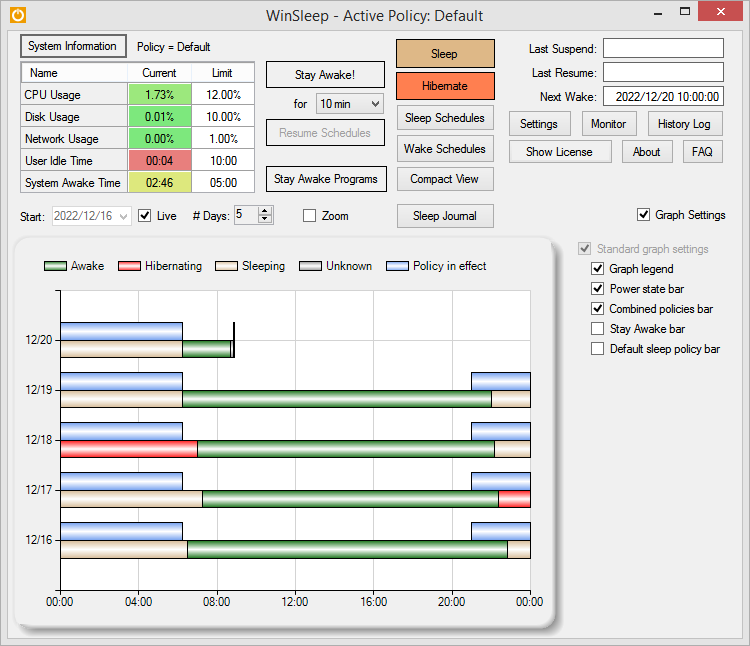
WINSLEEP by MollieSoft keeps your computer asleep (while not too busy) as much as possible during periods you specify.
** Runs on Windows 7, Windows 8.1 or Windows 10.
** Provides a detailed time-line graph showing when your computer was awake, asleep, or hibernating.
** Sleep Journal shows when/why your computer woke up or went to sleep.
** Provides convenient Sleep and Hibernate buttons for manual use when desired.
** Use remote viewer WinSleep Monitor to connect from anywhere!
** Shows the current CPU/Disk/Network usage percentages for your computer.
** Define multiple sleep schedules (daily, weekly, or monthly time slot), each with a designated sleep policy with its own CPU/Disk/Network usage limits.
** Set wake schedules and an optional task (program) to be run at each wake.
** Helps prolong the life of your desktop computer. Your disk drive is not spinning, motherboard is not powered, fan is not running (and accumulating dust inside the computer casing), and your monitors are in standby mode.
** Saves money! A typical desktop uses 250 watts of electricity when awake, but only a few watts while asleep. Power companies (in the US) may bill at say 10 cents per kWH. This is .25 kWH @ 10 cents = 2.5 cents/hr you are saving while asleep. Say WinSleep sleeps your computer for half the day; this is $.30/day = $109.50 per year. The more you sleep, the more you save. (We didn’t even count the power consumption of the computer monitor here.)