Category Archives: System Utilities

Automation Tools, Backup & Restore, Benchmarking, Clipboard Tools, File & Disk Management, File Compression, Launchers & Task Managers, Other, Printer, Registry Tools, Shell Tools, System Maintenance, Text/Document Editors

EXE Joiner 1.21.4.3

Type: Shareware
Cost: $34.99
Size: 626.00 kB
Release date: Jan 14 2017
Platform: Win2000,WinXP,Win7 x32,Win7 x64,Windows 8,Windows 10,WinServer,WinOther,WinVista,WinVista x64
Publisher’s Site:  http://www.exejoiner.com
Publisher’s Product Page:  http://www.exejoiner.com
Country: United States of America

EXE Joiner

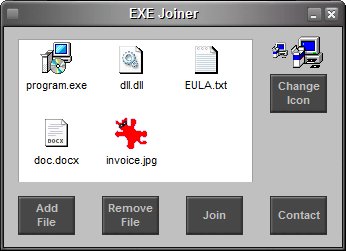
EXE Joiner is a small program that allows you to easily join (bind) two or more files (no matter their type) into one single executable. That executable (the one into which the files are included) is a simple compiled program that, when opened, will automatically launch the included files one by one.


See more at www.exejoiner.com

EXE Joiner is portable – no installation needed, no need for .NET or any other runtime library. Just unzip on your hard drive and run the program (and to uninstall simply delete it from your hard drive).

EXE Joiner is able to run any type of file from the joined file without affecting the file functionality. For instance, let’s assume you join an executable and a mp3 file. When the joined file is run, the included executable will run like before being joined while the mp3 file will be opened with the associated mp3 player (Winamp, MediaPlayer etc.).

Graphcat<

Cacheman 10.03

Type: Shareware
Cost: $28.95
Size: 4.58 MB
Release date: Dec 21 2016
Platform: Win2000,WinXP,Win7 x32,Win7 x64,Windows 8,Windows 10,WinServer,WinOther,WinVista,WinVista x64
Publisher’s Site:  https://www.outertech.com
Publisher’s Product Page:  https://www.outertech.com/en/how-to-speed-up-your-computer
Country: Germany


Cacheman

Memory is one of the most important pieces of computer hardware as it is in constant use no matter what a PC is used for. There is a tremendous number of variables that can influence the speed and performance of memory, and this in turn will affect the overall performance of a computer. Cacheman (short for Cache manager) can help by making it possible to optimize system cache and take control of RAM. A computer cache is a software or hardware component that stores user data so that future requests for that data can be served faster.

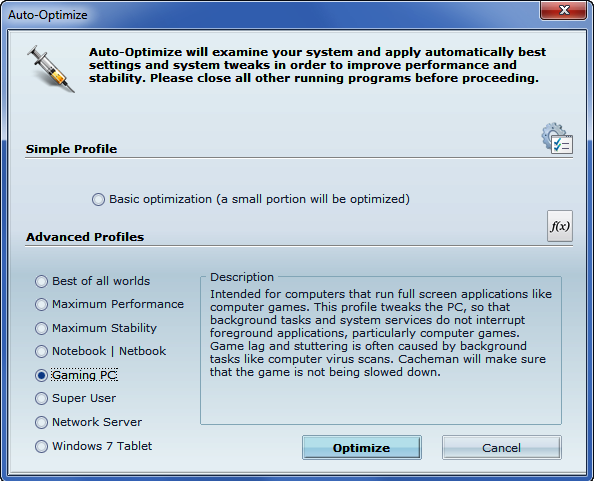
Cacheman is suitable for use by experts and novices alike, and there are a number of manual and automatic optimization settings available to suit all levels of ability. Cacheman automatically optimizes how Windows handles memory. Depending on what the PC is used for, a range of computer performance profiles is available including gaming, graphics workstation, digital audio recording, notebook, and server.

Cacheman dynamically changes the priority at which certain programs and processes are run, and can limit the amount of memory any given application is able to use. The active front-running application will get the maximum possible processing power and available system memory. Computer games, office software, web browsing, and video players will not be interrupted by background tasks like computer virus scans.

By default, Windows 10 can track and share website visits, app usage, purchases, typed words, and more. Cacheman’s auto-optimization feature modifies Windows privacy setting so that significantly less tracking data is recorded and sent back to Microsoft.

TeraByte Drive Image Backup and Restore 3.05

Type: Shareware
Cost: $38.94
Size: 107.13 MB
Release date: Dec 17 2016
Platform: Win2000,WinXP,Win7 x32,Win7 x64,Windows 8,Windows 10,WinServer,WinOther,WinVista,WinVista x64
Publisher’s Site:  http://www.terabyteunlimited.com
Publisher’s Product Page:  http://www.terabyteunlimited.com/image-for-windows.htm
Country: United States of America


TeraByte Drive Image Backup and Restore

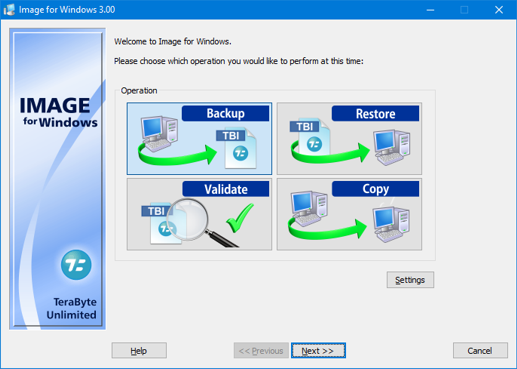
TeraByte Drive Image Backup and Restore Suite is an affordable and reliable drive image backup and restore software package that is used for backing up all of your hard drive data to other media or external drives (such as eSATA, USB or 1394) and allows you to easily perform a bare-metal restore for efficient disaster recovery. It can also be used for disk to disk cloning and includes scheduling, encryption, and much more.

The key components of the suite are Image for Windows, Image for DOS, Image for Linux and the TeraByte OS Deployment Tool Suite. In particular the OS Deployment Tool can be used to script your image deployment to support different hardware (hardware independent restore).